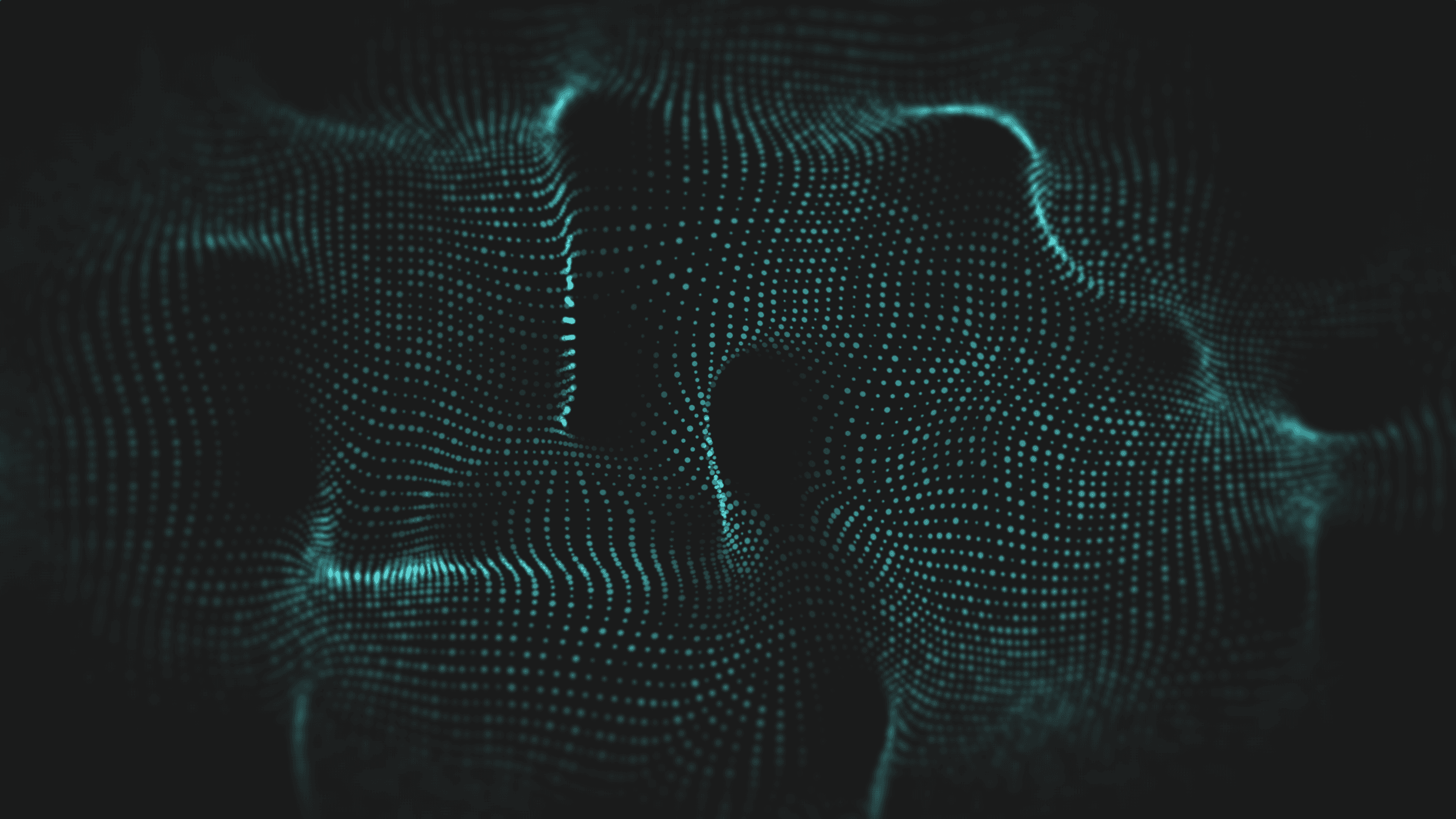
In this article, I show how I built a "burning" object effect from scratch.
No VFX Graph here. The whole particle system runs on compute shaders and a vertex/fragment shader.
___
1. Introduction
1.1 Requirements and roadmap
This implementation uses compute shaders and several GPU buffer types. If you're not familiar with HLSL buffer types, read this article first:
https://www.proceduralpixels.com/blog/gpu-buffers-in-unity-101
I created the effect in Unity 6000.3.11f1, URP.
The implementation follows these steps:
Build the GPU particle system shell in C#.
Spawn particles on the GPU.
Render particles with indirect instancing.
Simulate particles with consume/append ping-pong buffers.
Spawn particles directly on a mesh surface.
Use a shared burning mask to synchronize surface dissolve and particle emission.
Profile the result and identify the main bottlenecks.
___
2. How the effect works
2.1 Frame flow
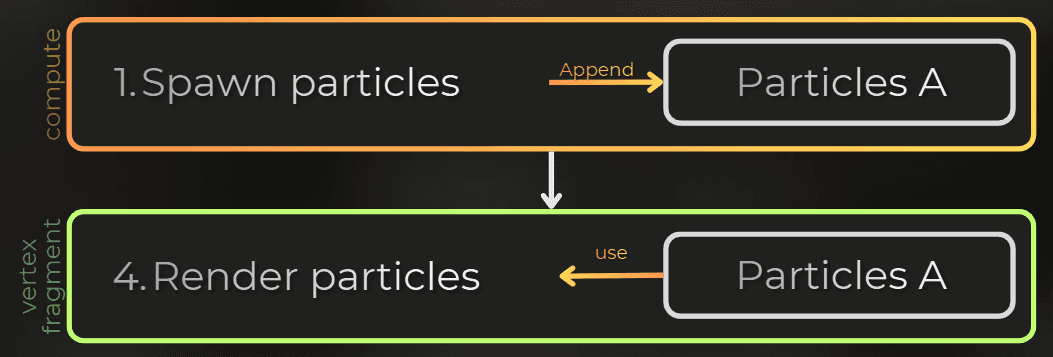
Implementation overview:
Each frame:
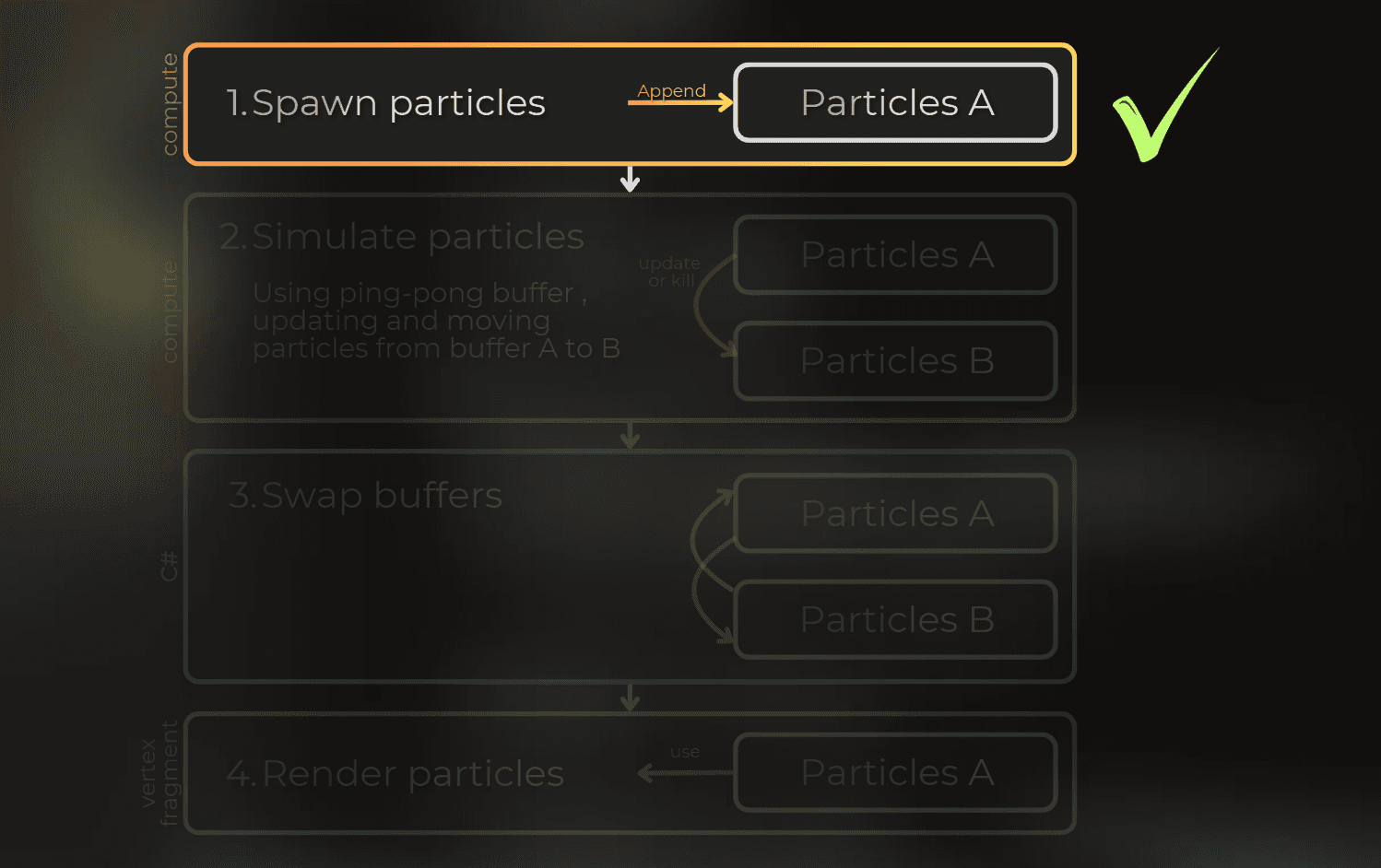
Spawn new particles on the GPU using a compute shader.
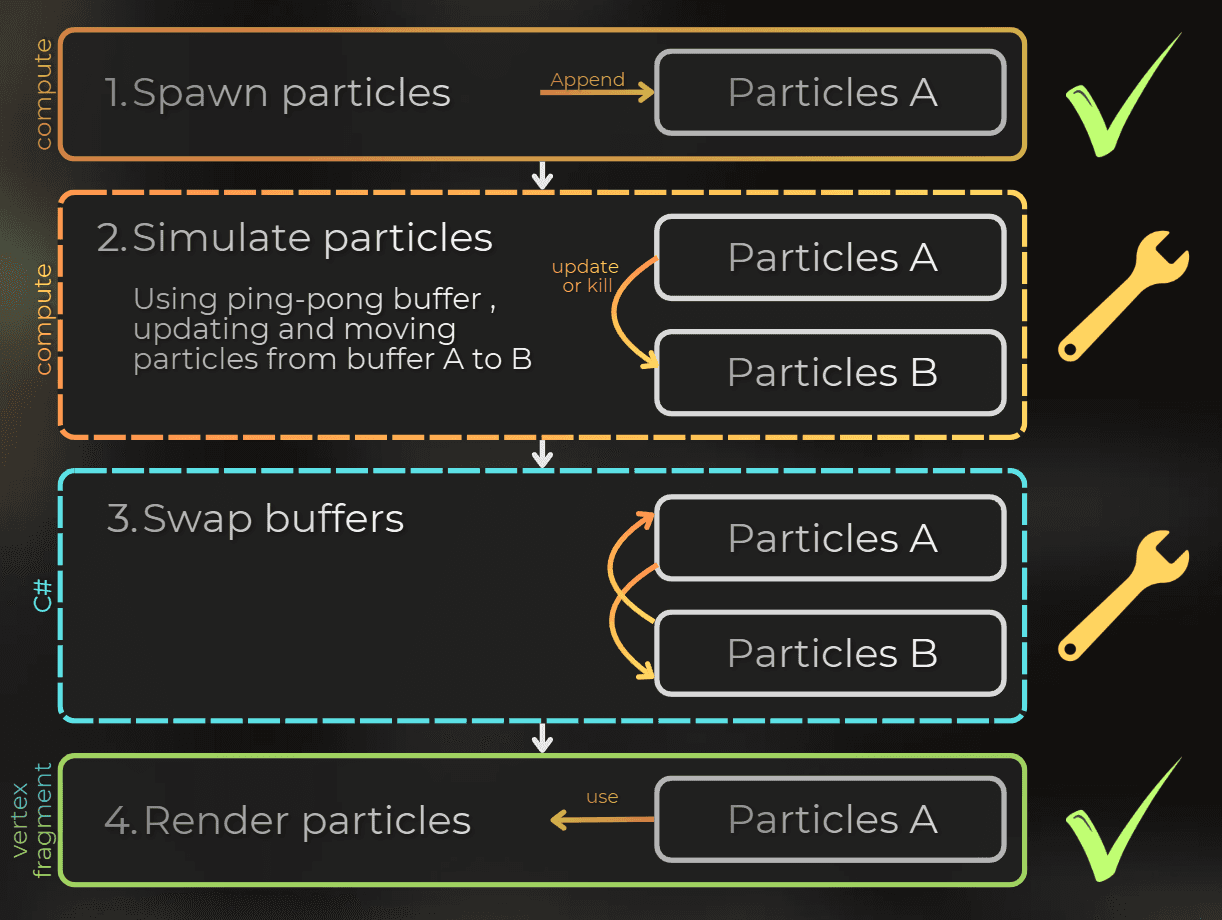
Update existing particles and kill old ones with a consume-append pattern in a compute shader. Particles are stored in ping-pong buffers.
Swap ping-pong buffer references in C#.
Render particles using indirect instancing with a vertex/fragment shader.

I start with spawning and rendering, so I can verify that every spawned particle renders correctly. Then I add simulation and mesh-based spawning.
___
3. Implementing C# rendering shell
3.1 Particle data
Start with the CPU-side component that drives the simulation.
I keep the particle data as small as possible. Each particle stores this C# data:
[StructLayout(LayoutKind.Sequential)]
public struct ParticleData
{
public float4 positionWS;
public float4 velocityWS;
public float4 color;
public float size;
public float lifetime;
public float time;
public uint seed
[StructLayout(LayoutKind.Sequential)]
public struct ParticleData
{
public float4 positionWS;
public float4 velocityWS;
public float4 color;
public float size;
public float lifetime;
public float time;
public uint seed
[StructLayout(LayoutKind.Sequential)]
public struct ParticleData
{
public float4 positionWS;
public float4 velocityWS;
public float4 color;
public float size;
public float lifetime;
public float time;
public uint seed
I also created a matching HLSL definition. It must stay aligned with the C# struct:
#ifndef PARTICLE_DATA_INCLUDED
#define PARTICLE_DATA_INCLUDED

struct ParticleData
{
    float4 positionWS;
    float4 velocityWS;
    float4 color;
    float size;
    float lifetime;
    float time;
	uint seed;
};

#endif
#ifndef PARTICLE_DATA_INCLUDED
#define PARTICLE_DATA_INCLUDED
struct ParticleData
{
float4 positionWS;
float4 velocityWS;
float4 color;
float size;
float lifetime;
float time;
uint seed;
};
#endif#ifndef PARTICLE_DATA_INCLUDED
#define PARTICLE_DATA_INCLUDED
struct ParticleData
{
float4 positionWS;
float4 velocityWS;
float4 color;
float size;
float lifetime;
float time;
uint seed;
};
#endif3.2 GPU particle system
Next, I add the simulation shell. To keep the first pass simple, I spawn particles into an empty buffer and render them immediately, skipping simulation until rendering works.
This is the GPUParticleSystem component. It initializes resources with the OnEnable/OnDisable pattern and uses the RenderPipelineManager callback to prepare particles at the start of camera rendering. Explanation in the comments:
public class GPUParticleSystem : MonoBehaviour
{
public int maxParticleCount = 1_000_000;
private GraphicsBuffer particleBufferA = null;
private GraphicsBuffer particleBufferB = null;
private void OnEnable()
{
RenderPipelineManager.beginCameraRendering += RenderPipelineManager_beginCameraRendering;
particleBufferA = new GraphicsBuffer(Target.Structured | Target.CopySource | Target.Append | Target.Counter, maxParticleCount, UnsafeUtility.SizeOf<ParticleData>());
particleBufferA.SetCounterValue(0);
particleBufferB = new GraphicsBuffer(Target.Structured | Target.CopySource | Target.Append | Target.Counter, maxParticleCount, UnsafeUtility.SizeOf<ParticleData>());
particleBufferB.SetCounterValue(0);
}
private void OnDisable()
{
RenderPipelineManager.beginCameraRendering -= RenderPipelineManager_beginCameraRendering;
ReleaseBuffer(ref particleBufferA);
ReleaseBuffer(ref particleBufferB);
void ReleaseBuffer(ref GraphicsBuffer buffer)
{
if (buffer != null)
{
buffer.Release();
buffer = null;
}
}
}
private void RenderPipelineManager_beginCameraRendering(ScriptableRenderContext context, Camera camera)
{
if (camera.cameraType != CameraType.Game && camera.cameraType != CameraType.SceneView)
return;
CommandBuffer cmd = CommandBufferPool.Get(nameof(GPUParticleSystem) + "_" + gameObject.name);
cmd.SetBufferCounterValue(particleBufferA, 0);
SpawnParticles(cmd, particleBufferA);
RenderParticles(cmd, particleBufferA, camera);
context.ExecuteCommandBuffer(cmd);
CommandBufferPool.Release(cmd);
}
private void SpawnParticles(CommandBuffer cmd, GraphicsBuffer particleBufferA)
{
}
private void RenderParticles(CommandBuffer cmd, GraphicsBuffer particleBufferA, Camera camera)
{
public class GPUParticleSystem : MonoBehaviour
{
public int maxParticleCount = 1_000_000;
private GraphicsBuffer particleBufferA = null;
private GraphicsBuffer particleBufferB = null;
private void OnEnable()
{
RenderPipelineManager.beginCameraRendering += RenderPipelineManager_beginCameraRendering;
particleBufferA = new GraphicsBuffer(Target.Structured | Target.CopySource | Target.Append | Target.Counter, maxParticleCount, UnsafeUtility.SizeOf<ParticleData>());
particleBufferA.SetCounterValue(0);
particleBufferB = new GraphicsBuffer(Target.Structured | Target.CopySource | Target.Append | Target.Counter, maxParticleCount, UnsafeUtility.SizeOf<ParticleData>());
particleBufferB.SetCounterValue(0);
}
private void OnDisable()
{
RenderPipelineManager.beginCameraRendering -= RenderPipelineManager_beginCameraRendering;
ReleaseBuffer(ref particleBufferA);
ReleaseBuffer(ref particleBufferB);
void ReleaseBuffer(ref GraphicsBuffer buffer)
{
if (buffer != null)
{
buffer.Release();
buffer = null;
}
}
}
private void RenderPipelineManager_beginCameraRendering(ScriptableRenderContext context, Camera camera)
{
if (camera.cameraType != CameraType.Game && camera.cameraType != CameraType.SceneView)
return;
CommandBuffer cmd = CommandBufferPool.Get(nameof(GPUParticleSystem) + "_" + gameObject.name);
cmd.SetBufferCounterValue(particleBufferA, 0);
SpawnParticles(cmd, particleBufferA);
RenderParticles(cmd, particleBufferA, camera);
context.ExecuteCommandBuffer(cmd);
CommandBufferPool.Release(cmd);
}
private void SpawnParticles(CommandBuffer cmd, GraphicsBuffer particleBufferA)
{
}
private void RenderParticles(CommandBuffer cmd, GraphicsBuffer particleBufferA, Camera camera)
{
public class GPUParticleSystem : MonoBehaviour
{
public int maxParticleCount = 1_000_000;
private GraphicsBuffer particleBufferA = null;
private GraphicsBuffer particleBufferB = null;
private void OnEnable()
{
RenderPipelineManager.beginCameraRendering += RenderPipelineManager_beginCameraRendering;
particleBufferA = new GraphicsBuffer(Target.Structured | Target.CopySource | Target.Append | Target.Counter, maxParticleCount, UnsafeUtility.SizeOf<ParticleData>());
particleBufferA.SetCounterValue(0);
particleBufferB = new GraphicsBuffer(Target.Structured | Target.CopySource | Target.Append | Target.Counter, maxParticleCount, UnsafeUtility.SizeOf<ParticleData>());
particleBufferB.SetCounterValue(0);
}
private void OnDisable()
{
RenderPipelineManager.beginCameraRendering -= RenderPipelineManager_beginCameraRendering;
ReleaseBuffer(ref particleBufferA);
ReleaseBuffer(ref particleBufferB);
void ReleaseBuffer(ref GraphicsBuffer buffer)
{
if (buffer != null)
{
buffer.Release();
buffer = null;
}
}
}
private void RenderPipelineManager_beginCameraRendering(ScriptableRenderContext context, Camera camera)
{
if (camera.cameraType != CameraType.Game && camera.cameraType != CameraType.SceneView)
return;
CommandBuffer cmd = CommandBufferPool.Get(nameof(GPUParticleSystem) + "_" + gameObject.name);
cmd.SetBufferCounterValue(particleBufferA, 0);
SpawnParticles(cmd, particleBufferA);
RenderParticles(cmd, particleBufferA, camera);
context.ExecuteCommandBuffer(cmd);
CommandBufferPool.Release(cmd);
}
private void SpawnParticles(CommandBuffer cmd, GraphicsBuffer particleBufferA)
{
}
private void RenderParticles(CommandBuffer cmd, GraphicsBuffer particleBufferA, Camera camera)
{
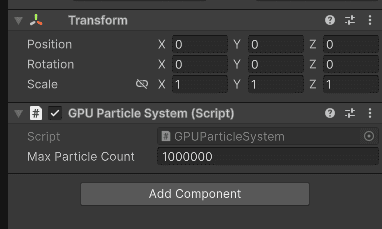
Now I can attach this component to any object in the hierarchy.
___
4. Spawning the particles
4.1 Spawner interface
Next, I add particle spawning. The system should support different spawners, so I use an interface:
public interface ISpawnGPUParticles
{
	void SpawnParticles(CommandBuffer cmd, GraphicsBuffer appendParticleBuffer
public interface ISpawnGPUParticles
{
	void SpawnParticles(CommandBuffer cmd, GraphicsBuffer appendParticleBuffer
public interface ISpawnGPUParticles
{
	void SpawnParticles(CommandBuffer cmd, GraphicsBuffer appendParticleBuffer
Particle spawning works like this:
Find all components in the child hierarchy that implement spawning.
Execute particle spawning on each child component.
public class GPUParticleSystem : MonoBehaviour
{
...
private void SpawnParticles(CommandBuffer cmd, GraphicsBuffer particleBufferA)
{
List<ISpawnGPUParticles> spawners = ListPool<ISpawnGPUParticles>.Get();
GetComponentsInChildren(false, spawners);
for (int i = 0; i < spawners.Count; i++)
{
ISpawnGPUParticles spawner = spawners[i];
spawner.SpawnParticles(cmd, particleBufferA);
}
ListPool<ISpawnGPUParticles>.Release(spawners
public class GPUParticleSystem : MonoBehaviour
{
...
private void SpawnParticles(CommandBuffer cmd, GraphicsBuffer particleBufferA)
{
List<ISpawnGPUParticles> spawners = ListPool<ISpawnGPUParticles>.Get();
GetComponentsInChildren(false, spawners);
for (int i = 0; i < spawners.Count; i++)
{
ISpawnGPUParticles spawner = spawners[i];
spawner.SpawnParticles(cmd, particleBufferA);
}
ListPool<ISpawnGPUParticles>.Release(spawners
public class GPUParticleSystem : MonoBehaviour
{
...
private void SpawnParticles(CommandBuffer cmd, GraphicsBuffer particleBufferA)
{
List<ISpawnGPUParticles> spawners = ListPool<ISpawnGPUParticles>.Get();
GetComponentsInChildren(false, spawners);
for (int i = 0; i < spawners.Count; i++)
{
ISpawnGPUParticles spawner = spawners[i];
spawner.SpawnParticles(cmd, particleBufferA);
}
ListPool<ISpawnGPUParticles>.Release(spawners
___
4.2 Sphere spawner
First, I create a simple spawner that emits particles inside a unit sphere. Particles spawn in the spawner's object space and then convert to world space, so the transform controls the sphere's position, rotation, and size.
The comments explain the details.
public class SphereParticleSpawner : MonoBehaviour, ISpawnGPUParticles
{
[SerializeField] int spawnCount = 100;
[SerializeField] private ComputeShader spawnCompute;
private Unity.Mathematics.Random random;
private void OnEnable()
{
random = new Unity.Mathematics.Random(768976192u);
}
public void SpawnParticles(CommandBuffer cmd, GraphicsBuffer appendParticleBuffer)
{
if (spawnCompute == null)
return;
cmd.SetComputeMatrixParam(spawnCompute, Uniforms._LocalToWorld, transform.localToWorldMatrix);
cmd.SetComputeIntParam(spawnCompute, Uniforms._SpawnParticleCount, spawnCount);
cmd.SetComputeIntParam(spawnCompute, Uniforms._SpawnSeed, random.NextInt());
cmd.SetComputeBufferParam(spawnCompute, 0, Uniforms._Particles, appendParticleBuffer);
uint3 groupSize;
spawnCompute.GetKernelThreadGroupSizes(0, out groupSize.x, out groupSize.y, out groupSize.z);
int3 groupCount = (new int3(spawnCount, 1, 1) + (int3)groupSize - 1) / (int3)groupSize;
cmd.DispatchCompute(spawnCompute, 0, groupCount.x, groupCount.y, groupCount.z);
}
void OnDrawGizmosSelected()
{
Gizmos.matrix = transform.localToWorldMatrix;
Gizmos.color = Color.red;
Gizmos.DrawWireSphere(Vector3.zero, 1.0f
public class SphereParticleSpawner : MonoBehaviour, ISpawnGPUParticles
{
[SerializeField] int spawnCount = 100;
[SerializeField] private ComputeShader spawnCompute;
private Unity.Mathematics.Random random;
private void OnEnable()
{
random = new Unity.Mathematics.Random(768976192u);
}
public void SpawnParticles(CommandBuffer cmd, GraphicsBuffer appendParticleBuffer)
{
if (spawnCompute == null)
return;
cmd.SetComputeMatrixParam(spawnCompute, Uniforms._LocalToWorld, transform.localToWorldMatrix);
cmd.SetComputeIntParam(spawnCompute, Uniforms._SpawnParticleCount, spawnCount);
cmd.SetComputeIntParam(spawnCompute, Uniforms._SpawnSeed, random.NextInt());
cmd.SetComputeBufferParam(spawnCompute, 0, Uniforms._Particles, appendParticleBuffer);
uint3 groupSize;
spawnCompute.GetKernelThreadGroupSizes(0, out groupSize.x, out groupSize.y, out groupSize.z);
int3 groupCount = (new int3(spawnCount, 1, 1) + (int3)groupSize - 1) / (int3)groupSize;
cmd.DispatchCompute(spawnCompute, 0, groupCount.x, groupCount.y, groupCount.z);
}
void OnDrawGizmosSelected()
{
Gizmos.matrix = transform.localToWorldMatrix;
Gizmos.color = Color.red;
Gizmos.DrawWireSphere(Vector3.zero, 1.0f
public class SphereParticleSpawner : MonoBehaviour, ISpawnGPUParticles
{
[SerializeField] int spawnCount = 100;
[SerializeField] private ComputeShader spawnCompute;
private Unity.Mathematics.Random random;
private void OnEnable()
{
random = new Unity.Mathematics.Random(768976192u);
}
public void SpawnParticles(CommandBuffer cmd, GraphicsBuffer appendParticleBuffer)
{
if (spawnCompute == null)
return;
cmd.SetComputeMatrixParam(spawnCompute, Uniforms._LocalToWorld, transform.localToWorldMatrix);
cmd.SetComputeIntParam(spawnCompute, Uniforms._SpawnParticleCount, spawnCount);
cmd.SetComputeIntParam(spawnCompute, Uniforms._SpawnSeed, random.NextInt());
cmd.SetComputeBufferParam(spawnCompute, 0, Uniforms._Particles, appendParticleBuffer);
uint3 groupSize;
spawnCompute.GetKernelThreadGroupSizes(0, out groupSize.x, out groupSize.y, out groupSize.z);
int3 groupCount = (new int3(spawnCount, 1, 1) + (int3)groupSize - 1) / (int3)groupSize;
cmd.DispatchCompute(spawnCompute, 0, groupCount.x, groupCount.y, groupCount.z);
}
void OnDrawGizmosSelected()
{
Gizmos.matrix = transform.localToWorldMatrix;
Gizmos.color = Color.red;
Gizmos.DrawWireSphere(Vector3.zero, 1.0f
Now I can use this component.
4.3 Sphere spawn compute shader
Here is the compute shader that spawns these particles. How it works is basically, for each thread:
Pick random position in unit sphere.
Transform this position from object space to world space.
Append particle with this position into the append buffer.
#pragma kernel SpawnSphereParticles
#pragma enable_d3d11_debug_symbols
#include "ParticleData.hlsl"
AppendStructuredBuffer<ParticleData> _Particles;
float4x4 _LocalToWorld;
int _SpawnParticleCount;
int _SpawnSeed;
float HashUintToFloat01(uint n) {...}
float2 HashUintToFloat2(uint n) {...}
float3 RandomUnitDirection(uint seed)
{
float2 u = HashUintToFloat2(seed);
float z = 1.0 - 2.0 * u.x;
float phi = 6.28318530718 * u.y;
float r = sqrt(saturate(1.0 - z * z));
return float3(r * cos(phi), r * sin(phi), z);
}
float3 RandomPointInUnitSphere(uint seed)
{
float radius = pow(HashUintToFloat01(seed + 0xA2C2A892u), 1.0 / 3.0);
return RandomUnitDirection(seed + 0x7F4A7C15u) * radius;
}
float3 RandomColor(uint seed)
{
return float3(HashUintToFloat01(seed + 0xBA55C0D3u),
HashUintToFloat01(seed + 0x27D4EB2Du),
HashUintToFloat01(seed + 0x165667B1u));
}
[numthreads(16, 1, 1)]
void SpawnSphereParticles(uint3 id : SV_DispatchThreadID)
{
if (id.x >= (uint)_SpawnParticleCount)
return;
uint particleSeed = asuint(_SpawnSeed) + id.x * 0x9E3779B9u;
float3 positionOS = RandomPointInUnitSphere(particleSeed);
float3 positionWS = mul(_LocalToWorld, float4(positionOS, 1.0)).xyz;
ParticleData particle;
particle.positionWS = float4(positionWS, 1.0);
particle.velocityWS = float4(0.0, 0.0, 0.0, 0.0);
particle.color = float4(RandomColor(particleSeed + 0x517CC1B7u), 1.0);
particle.size = 0.01;
particle.lifetime = lerp(2.0, 8.0, HashUintToFloat01(particleSeed + 0xC2B2AE35u));
particle.time = 0.0;
particle.seed = particleSeed;
_Particles.Append(particle
#pragma kernel SpawnSphereParticles
#pragma enable_d3d11_debug_symbols
#include "ParticleData.hlsl"
AppendStructuredBuffer<ParticleData> _Particles;
float4x4 _LocalToWorld;
int _SpawnParticleCount;
int _SpawnSeed;
float HashUintToFloat01(uint n) {...}
float2 HashUintToFloat2(uint n) {...}
float3 RandomUnitDirection(uint seed)
{
float2 u = HashUintToFloat2(seed);
float z = 1.0 - 2.0 * u.x;
float phi = 6.28318530718 * u.y;
float r = sqrt(saturate(1.0 - z * z));
return float3(r * cos(phi), r * sin(phi), z);
}
float3 RandomPointInUnitSphere(uint seed)
{
float radius = pow(HashUintToFloat01(seed + 0xA2C2A892u), 1.0 / 3.0);
return RandomUnitDirection(seed + 0x7F4A7C15u) * radius;
}
float3 RandomColor(uint seed)
{
return float3(HashUintToFloat01(seed + 0xBA55C0D3u),
HashUintToFloat01(seed + 0x27D4EB2Du),
HashUintToFloat01(seed + 0x165667B1u));
}
[numthreads(16, 1, 1)]
void SpawnSphereParticles(uint3 id : SV_DispatchThreadID)
{
if (id.x >= (uint)_SpawnParticleCount)
return;
uint particleSeed = asuint(_SpawnSeed) + id.x * 0x9E3779B9u;
float3 positionOS = RandomPointInUnitSphere(particleSeed);
float3 positionWS = mul(_LocalToWorld, float4(positionOS, 1.0)).xyz;
ParticleData particle;
particle.positionWS = float4(positionWS, 1.0);
particle.velocityWS = float4(0.0, 0.0, 0.0, 0.0);
particle.color = float4(RandomColor(particleSeed + 0x517CC1B7u), 1.0);
particle.size = 0.01;
particle.lifetime = lerp(2.0, 8.0, HashUintToFloat01(particleSeed + 0xC2B2AE35u));
particle.time = 0.0;
particle.seed = particleSeed;
_Particles.Append(particle
#pragma kernel SpawnSphereParticles
#pragma enable_d3d11_debug_symbols
#include "ParticleData.hlsl"
AppendStructuredBuffer<ParticleData> _Particles;
float4x4 _LocalToWorld;
int _SpawnParticleCount;
int _SpawnSeed;
float HashUintToFloat01(uint n) {...}
float2 HashUintToFloat2(uint n) {...}
float3 RandomUnitDirection(uint seed)
{
float2 u = HashUintToFloat2(seed);
float z = 1.0 - 2.0 * u.x;
float phi = 6.28318530718 * u.y;
float r = sqrt(saturate(1.0 - z * z));
return float3(r * cos(phi), r * sin(phi), z);
}
float3 RandomPointInUnitSphere(uint seed)
{
float radius = pow(HashUintToFloat01(seed + 0xA2C2A892u), 1.0 / 3.0);
return RandomUnitDirection(seed + 0x7F4A7C15u) * radius;
}
float3 RandomColor(uint seed)
{
return float3(HashUintToFloat01(seed + 0xBA55C0D3u),
HashUintToFloat01(seed + 0x27D4EB2Du),
HashUintToFloat01(seed + 0x165667B1u));
}
[numthreads(16, 1, 1)]
void SpawnSphereParticles(uint3 id : SV_DispatchThreadID)
{
if (id.x >= (uint)_SpawnParticleCount)
return;
uint particleSeed = asuint(_SpawnSeed) + id.x * 0x9E3779B9u;
float3 positionOS = RandomPointInUnitSphere(particleSeed);
float3 positionWS = mul(_LocalToWorld, float4(positionOS, 1.0)).xyz;
ParticleData particle;
particle.positionWS = float4(positionWS, 1.0);
particle.velocityWS = float4(0.0, 0.0, 0.0, 0.0);
particle.color = float4(RandomColor(particleSeed + 0x517CC1B7u), 1.0);
particle.size = 0.01;
particle.lifetime = lerp(2.0, 8.0, HashUintToFloat01(particleSeed + 0xC2B2AE35u));
particle.time = 0.0;
particle.seed = particleSeed;
_Particles.Append(particle
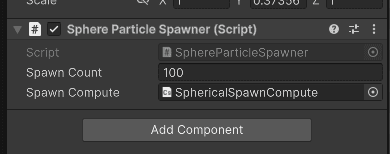
I assigned the compute shader to the spawner:
Then I checked in Nvidia Nsight Frame Debugger that the spawn compute shader runs:
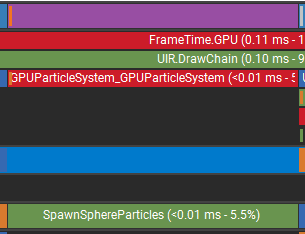
The output also looks correct: exactly 100 particles spawned, and the buffer data is valid.

This part is now implemented:
___
5. Rendering the particles
5.1 Render function
I skip particle simulation for now and implement rendering first. Before simulating anything, I need to see the particles.
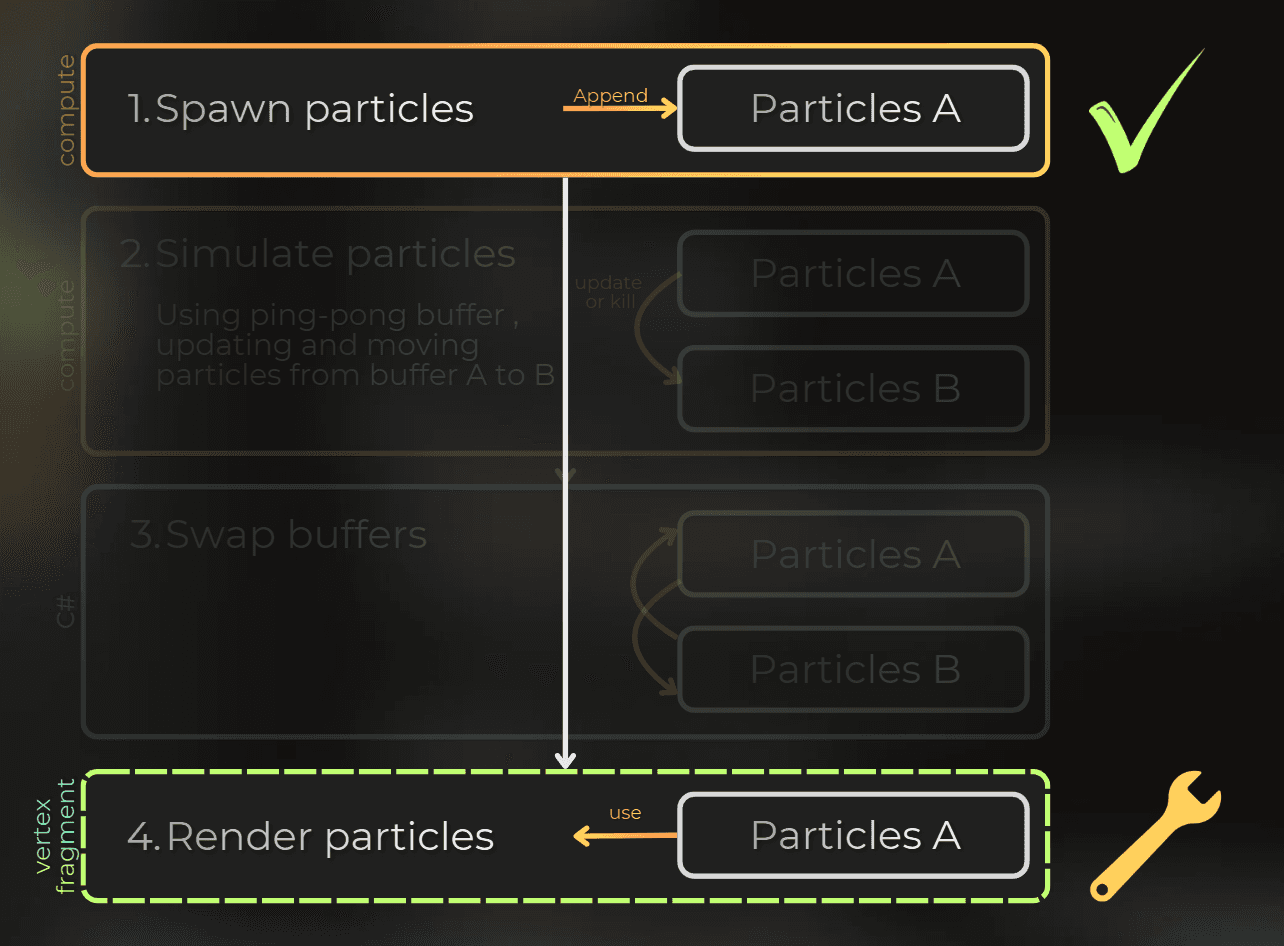
Back in GPUParticleSystem, the render function draws particles from the given buffer into the camera.
The render path needs these pieces:
Mesh and material that will control the rendering.
Indirect argument buffer that will control the instance count.
Using the mesh, material, argument buffer, and particle buffer to render particles with instanced rendering.
Then I will create a shader that renders the particles.
public class GPUParticleSystem : MonoBehaviour
{
...
public Mesh mesh;
public Material material;
private GraphicsBuffer drawArgsBuffer = null;
private MaterialPropertyBlock propertyBlock;
private void OnEnable()
{
...
drawArgsBuffer = new GraphicsBuffer(Target.IndirectArguments | Target.CopyDestination, 1, IndirectDrawIndexedArgs.size);
propertyBlock = new MaterialPropertyBlock();
}
private void OnDisable()
{
...
ReleaseBuffer(ref drawArgsBuffer);
if (propertyBlock != null)
{
propertyBlock.Clear();
propertyBlock = null;
}
...
}
private void RenderParticles(CommandBuffer cmd, GraphicsBuffer particleBufferA, Camera camera)
{
if (material == null || mesh == null)
return;
var indirectDrawIndexedArgsData = ArrayPool<IndirectDrawIndexedArgs>.Shared.Rent(1);
indirectDrawIndexedArgsData[0] = new IndirectDrawIndexedArgs()
{
indexCountPerInstance = mesh.GetIndexCount(0),
};
cmd.SetBufferData(drawArgsBuffer, indirectDrawIndexedArgsData, 0, 0, 1);
ArrayPool<IndirectDrawIndexedArgs>.Shared.Return(indirectDrawIndexedArgsData);
cmd.CopyCounterValue(particleBufferA, drawArgsBuffer, sizeof(uint));
propertyBlock.SetBuffer(Uniforms._Particles, particleBufferA);
RenderParams renderParams = new RenderParams(material);
renderParams.matProps = propertyBlock;
renderParams.camera = camera;
renderParams.worldBounds = new Bounds(Vector3.zero, Vector3.one * 100000.0f);
Graphics.RenderMeshIndirect(renderParams, mesh, drawArgsBuffer, 1, 0
public class GPUParticleSystem : MonoBehaviour
{
...
public Mesh mesh;
public Material material;
private GraphicsBuffer drawArgsBuffer = null;
private MaterialPropertyBlock propertyBlock;
private void OnEnable()
{
...
drawArgsBuffer = new GraphicsBuffer(Target.IndirectArguments | Target.CopyDestination, 1, IndirectDrawIndexedArgs.size);
propertyBlock = new MaterialPropertyBlock();
}
private void OnDisable()
{
...
ReleaseBuffer(ref drawArgsBuffer);
if (propertyBlock != null)
{
propertyBlock.Clear();
propertyBlock = null;
}
...
}
private void RenderParticles(CommandBuffer cmd, GraphicsBuffer particleBufferA, Camera camera)
{
if (material == null || mesh == null)
return;
var indirectDrawIndexedArgsData = ArrayPool<IndirectDrawIndexedArgs>.Shared.Rent(1);
indirectDrawIndexedArgsData[0] = new IndirectDrawIndexedArgs()
{
indexCountPerInstance = mesh.GetIndexCount(0),
};
cmd.SetBufferData(drawArgsBuffer, indirectDrawIndexedArgsData, 0, 0, 1);
ArrayPool<IndirectDrawIndexedArgs>.Shared.Return(indirectDrawIndexedArgsData);
cmd.CopyCounterValue(particleBufferA, drawArgsBuffer, sizeof(uint));
propertyBlock.SetBuffer(Uniforms._Particles, particleBufferA);
RenderParams renderParams = new RenderParams(material);
renderParams.matProps = propertyBlock;
renderParams.camera = camera;
renderParams.worldBounds = new Bounds(Vector3.zero, Vector3.one * 100000.0f);
Graphics.RenderMeshIndirect(renderParams, mesh, drawArgsBuffer, 1, 0
public class GPUParticleSystem : MonoBehaviour
{
...
public Mesh mesh;
public Material material;
private GraphicsBuffer drawArgsBuffer = null;
private MaterialPropertyBlock propertyBlock;
private void OnEnable()
{
...
drawArgsBuffer = new GraphicsBuffer(Target.IndirectArguments | Target.CopyDestination, 1, IndirectDrawIndexedArgs.size);
propertyBlock = new MaterialPropertyBlock();
}
private void OnDisable()
{
...
ReleaseBuffer(ref drawArgsBuffer);
if (propertyBlock != null)
{
propertyBlock.Clear();
propertyBlock = null;
}
...
}
private void RenderParticles(CommandBuffer cmd, GraphicsBuffer particleBufferA, Camera camera)
{
if (material == null || mesh == null)
return;
var indirectDrawIndexedArgsData = ArrayPool<IndirectDrawIndexedArgs>.Shared.Rent(1);
indirectDrawIndexedArgsData[0] = new IndirectDrawIndexedArgs()
{
indexCountPerInstance = mesh.GetIndexCount(0),
};
cmd.SetBufferData(drawArgsBuffer, indirectDrawIndexedArgsData, 0, 0, 1);
ArrayPool<IndirectDrawIndexedArgs>.Shared.Return(indirectDrawIndexedArgsData);
cmd.CopyCounterValue(particleBufferA, drawArgsBuffer, sizeof(uint));
propertyBlock.SetBuffer(Uniforms._Particles, particleBufferA);
RenderParams renderParams = new RenderParams(material);
renderParams.matProps = propertyBlock;
renderParams.camera = camera;
renderParams.worldBounds = new Bounds(Vector3.zero, Vector3.one * 100000.0f);
Graphics.RenderMeshIndirect(renderParams, mesh, drawArgsBuffer, 1, 0
___
5.2 Shader Graph particle data node
The CPU side of rendering is ready. Next, I need shaders that render the particles.
I created this library for Shader Graph so I can access particle data and control rendering there.
This HLSL fetches particle data through a Shader Graph node:
#ifndef PARTICLE_RENDERER_NODES_INCLUDED
#define PARTICLE_RENDERER_NODES_INCLUDED
#include "ParticleData.hlsl"
StructuredBuffer<ParticleData> _Particles;
void GetParticleData_float(
in uint IN_InstanceID,
out float3 OUT_PositionWS,
out float OUT_Size,
out float4 OUT_Color,
out float OUT_NormalizedTime)
{
ParticleData particle = _Particles[IN_InstanceID];
OUT_PositionWS = particle.positionWS.xyz;
OUT_Size = particle.size;
OUT_NormalizedTime = particle.lifetime > 0.0
? saturate(particle.time / particle.lifetime)
: 0.0;
OUT_Color = particle.color;
OUT_Color.a *= 1.0 - OUT_NormalizedTime;
}
#endif#ifndef PARTICLE_RENDERER_NODES_INCLUDED
#define PARTICLE_RENDERER_NODES_INCLUDED
#include "ParticleData.hlsl"
StructuredBuffer<ParticleData> _Particles;
void GetParticleData_float(
in uint IN_InstanceID,
out float3 OUT_PositionWS,
out float OUT_Size,
out float4 OUT_Color,
out float OUT_NormalizedTime)
{
ParticleData particle = _Particles[IN_InstanceID];
OUT_PositionWS = particle.positionWS.xyz;
OUT_Size = particle.size;
OUT_NormalizedTime = particle.lifetime > 0.0
? saturate(particle.time / particle.lifetime)
: 0.0;
OUT_Color = particle.color;
OUT_Color.a *= 1.0 - OUT_NormalizedTime;
}
#endif#ifndef PARTICLE_RENDERER_NODES_INCLUDED
#define PARTICLE_RENDERER_NODES_INCLUDED
#include "ParticleData.hlsl"
StructuredBuffer<ParticleData> _Particles;
void GetParticleData_float(
in uint IN_InstanceID,
out float3 OUT_PositionWS,
out float OUT_Size,
out float4 OUT_Color,
out float OUT_NormalizedTime)
{
ParticleData particle = _Particles[IN_InstanceID];
OUT_PositionWS = particle.positionWS.xyz;
OUT_Size = particle.size;
OUT_NormalizedTime = particle.lifetime > 0.0
? saturate(particle.time / particle.lifetime)
: 0.0;
OUT_Color = particle.color;
OUT_Color.a *= 1.0 - OUT_NormalizedTime;
}
#endif
I used it as a Shader Graph node to render each particle:
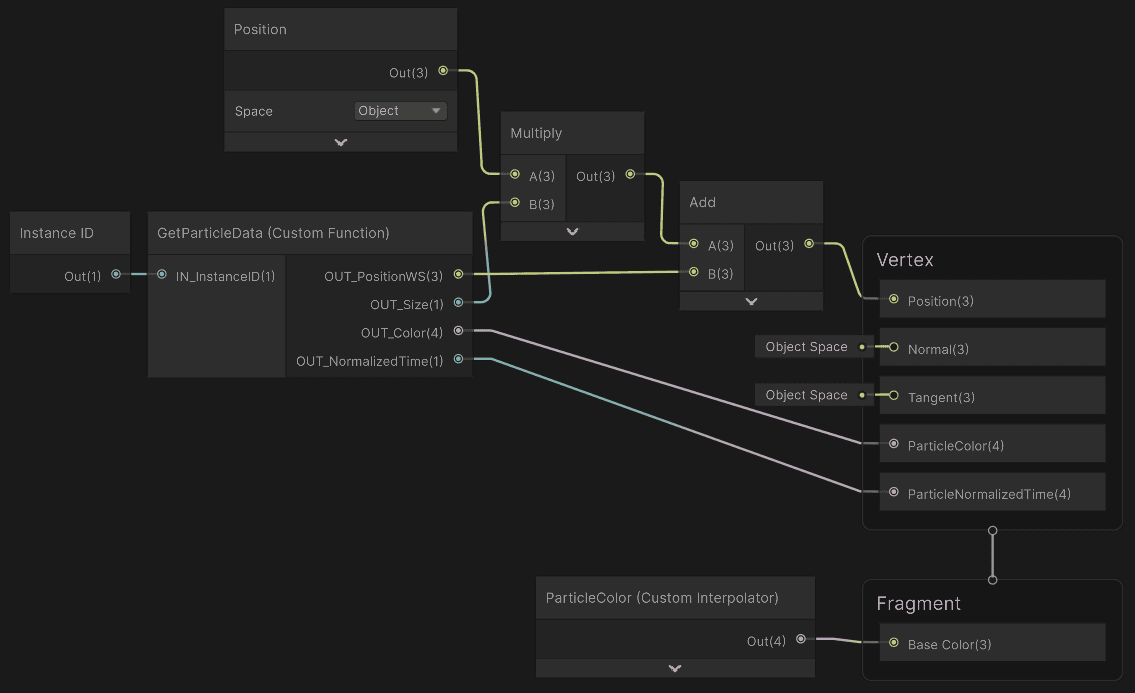
After assigning the material with this shader, particles appeared on screen. The image is noisy because spawn positions reset to new random values each frame, but the full pipeline works.
Rendering is now complete:
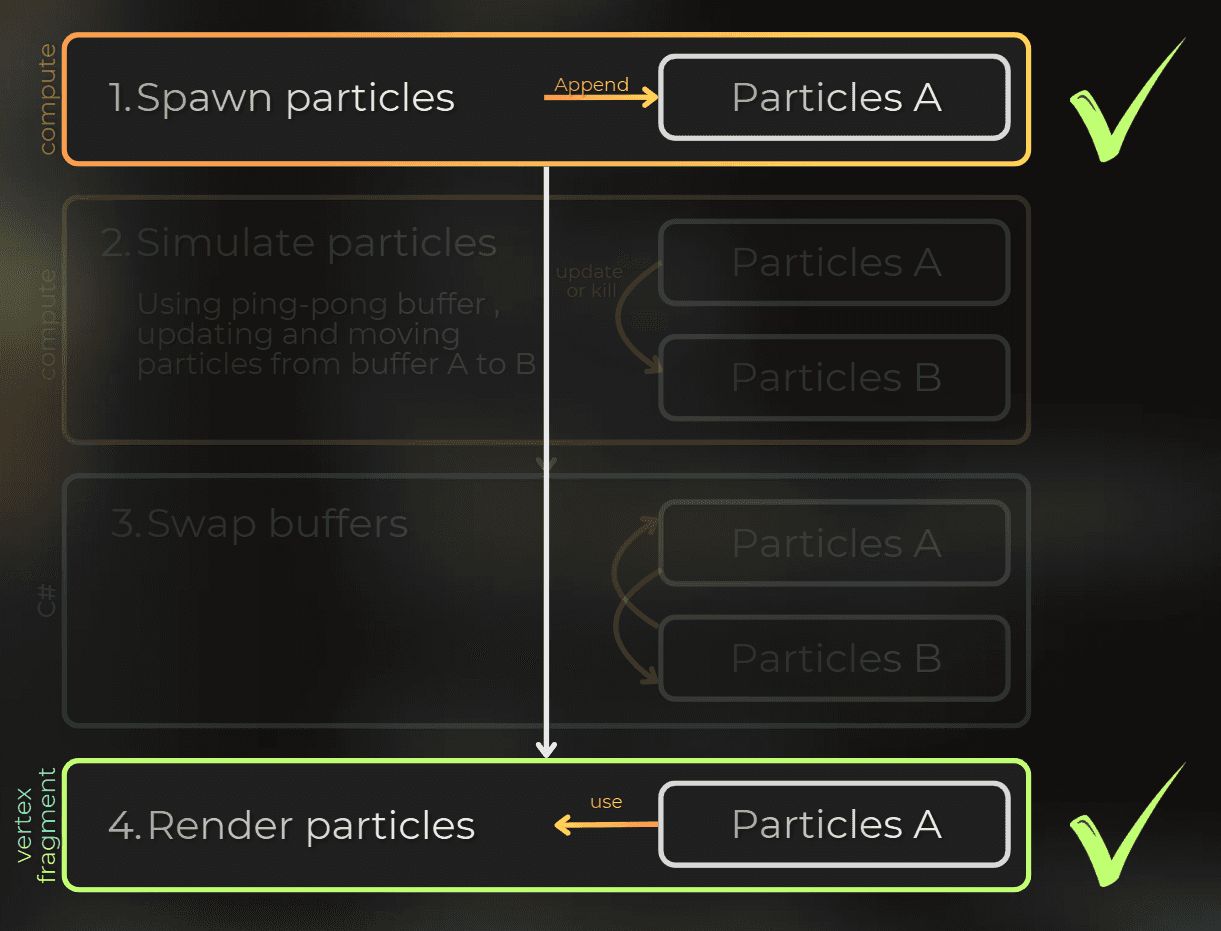
___
6. Simulating the particles
Time to simulate the particles.
6.1 C# - simulating the particles
I use the same pattern as spawning: define an interface for simulation steps.
public interface ISimulateGPUParticles
{
void SimulateParticles(CommandBuffer cmd, GraphicsBuffer consumeBuffer, GraphicsBuffer appendBuffer
public interface ISimulateGPUParticles
{
void SimulateParticles(CommandBuffer cmd, GraphicsBuffer consumeBuffer, GraphicsBuffer appendBuffer
public interface ISimulateGPUParticles
{
void SimulateParticles(CommandBuffer cmd, GraphicsBuffer consumeBuffer, GraphicsBuffer appendBuffer
Simulation moves particles from a consume buffer into an append buffer.
I use consume/append buffers here because each simulation shader can read one particle, modify it, and either append it to the output buffer or skip the append to kill it. Since I already read the full particle data for simulation, writing surviving particles into a fresh append buffer is a simple way to compact the alive particles. The alternative would be an indexed alive list or a prefix-sum compaction pass, but that adds more buffers and extra dispatches for this version. I wanted to keep things simple.
I added one step between spawning and rendering, and removed the temporary particle-buffer counter reset.
private void RenderPipelineManager_beginCameraRendering(ScriptableRenderContext context, Camera camera)
{
...
SpawnParticles(cmd, particleBufferA);
SimulateParticles(cmd, ref particleBufferA, ref particleBufferB);
RenderParticles(cmd, particleBufferA, camera
private void RenderPipelineManager_beginCameraRendering(ScriptableRenderContext context, Camera camera)
{
...
SpawnParticles(cmd, particleBufferA);
SimulateParticles(cmd, ref particleBufferA, ref particleBufferB);
RenderParticles(cmd, particleBufferA, camera
private void RenderPipelineManager_beginCameraRendering(ScriptableRenderContext context, Camera camera)
{
...
SpawnParticles(cmd, particleBufferA);
SimulateParticles(cmd, ref particleBufferA, ref particleBufferB);
RenderParticles(cmd, particleBufferA, camera
Particle simulation follows the same structure as spawning:
Get all components that can simulate particles.
Use them to simulate particles, then swap the buffers.
private void SimulateParticles(CommandBuffer cmd, ref GraphicsBuffer consumeBuffer, ref GraphicsBuffer appendBuffer)
{
List<ISimulateGPUParticles> simulationSteps = ListPool<ISimulateGPUParticles>.Get();
GetComponentsInChildren(false, simulationSteps);
for (int i = 0; i < simulationSteps.Count; i++)
{
cmd.SetBufferCounterValue(particleBufferB, 0);
ISimulateGPUParticles simulation = simulationSteps[i];
simulation.SimulateParticles(cmd, particleBufferA, particleBufferB);
(consumeBuffer, appendBuffer) = (appendBuffer, consumeBuffer);
}
ListPool<ISimulateGPUParticles>.Release(simulationSteps
private void SimulateParticles(CommandBuffer cmd, ref GraphicsBuffer consumeBuffer, ref GraphicsBuffer appendBuffer)
{
List<ISimulateGPUParticles> simulationSteps = ListPool<ISimulateGPUParticles>.Get();
GetComponentsInChildren(false, simulationSteps);
for (int i = 0; i < simulationSteps.Count; i++)
{
cmd.SetBufferCounterValue(particleBufferB, 0);
ISimulateGPUParticles simulation = simulationSteps[i];
simulation.SimulateParticles(cmd, particleBufferA, particleBufferB);
(consumeBuffer, appendBuffer) = (appendBuffer, consumeBuffer);
}
ListPool<ISimulateGPUParticles>.Release(simulationSteps
private void SimulateParticles(CommandBuffer cmd, ref GraphicsBuffer consumeBuffer, ref GraphicsBuffer appendBuffer)
{
List<ISimulateGPUParticles> simulationSteps = ListPool<ISimulateGPUParticles>.Get();
GetComponentsInChildren(false, simulationSteps);
for (int i = 0; i < simulationSteps.Count; i++)
{
cmd.SetBufferCounterValue(particleBufferB, 0);
ISimulateGPUParticles simulation = simulationSteps[i];
simulation.SimulateParticles(cmd, particleBufferA, particleBufferB);
(consumeBuffer, appendBuffer) = (appendBuffer, consumeBuffer);
}
ListPool<ISimulateGPUParticles>.Release(simulationSteps
Now I need the component that runs the simulation. This code uses the particle count in buffer A to dispatch the compute shader with indirect arguments.
public class GPUParticleSimulation : MonoBehaviour, ISimulateGPUParticles
{
public ComputeShader particleSimulationCompute;
private IndirectComputeArgsPreparation indirectComputeArgsPreparation;
private GraphicsBuffer particleCountBuffer = null;
private void OnEnable()
{
indirectComputeArgsPreparation = new IndirectComputeArgsPreparation();
particleCountBuffer = new GraphicsBuffer(Target.Structured | Target.CopyDestination, 4, sizeof(uint));
}
private void OnDisable()
{
...
}
public void SimulateParticles(CommandBuffer cmd, GraphicsBuffer consumeBuffer, GraphicsBuffer appendBuffer)
{
if (particleSimulationCompute == null)
throw new InvalidOperationException("Trying to simulate particles when no compute shader is set");
var indirectArgs = indirectComputeArgsPreparation.ComputeIndirectArgs(cmd, particleSimulationCompute, 0,
(prepCmd, threadCountBuffer) =>
{
uint4[] threadCountData = ArrayPool<uint4>.Shared.Rent(1);
threadCountData[0] = new uint4(1u, 1u, 1u, 1u);
prepCmd.SetBufferData(threadCountBuffer, threadCountData, 0, 0, 1);
prepCmd.CopyCounterValue(consumeBuffer, threadCountBuffer, 0);
ArrayPool<uint4>.Shared.Return(threadCountData);
});
cmd.CopyCounterValue(consumeBuffer, particleCountBuffer, 0);
cmd.SetComputeFloatParam(particleSimulationCompute, Uniforms._DeltaTime, Time.deltaTime);
cmd.SetComputeFloatParam(particleSimulationCompute, Uniforms._Time, Time.timeSinceLevelLoad);
cmd.SetComputeBufferParam(particleSimulationCompute, 0, Uniforms._InputParticles, consumeBuffer);
cmd.SetComputeBufferParam(particleSimulationCompute, 0, Uniforms._OutputParticles, appendBuffer);
cmd.SetComputeBufferParam(particleSimulationCompute, 0, Uniforms._InputParticleCount, particleCountBuffer);
cmd.DispatchCompute(particleSimulationCompute, 0, indirectArgs, 0
public class GPUParticleSimulation : MonoBehaviour, ISimulateGPUParticles
{
public ComputeShader particleSimulationCompute;
private IndirectComputeArgsPreparation indirectComputeArgsPreparation;
private GraphicsBuffer particleCountBuffer = null;
private void OnEnable()
{
indirectComputeArgsPreparation = new IndirectComputeArgsPreparation();
particleCountBuffer = new GraphicsBuffer(Target.Structured | Target.CopyDestination, 4, sizeof(uint));
}
private void OnDisable()
{
...
}
public void SimulateParticles(CommandBuffer cmd, GraphicsBuffer consumeBuffer, GraphicsBuffer appendBuffer)
{
if (particleSimulationCompute == null)
throw new InvalidOperationException("Trying to simulate particles when no compute shader is set");
var indirectArgs = indirectComputeArgsPreparation.ComputeIndirectArgs(cmd, particleSimulationCompute, 0,
(prepCmd, threadCountBuffer) =>
{
uint4[] threadCountData = ArrayPool<uint4>.Shared.Rent(1);
threadCountData[0] = new uint4(1u, 1u, 1u, 1u);
prepCmd.SetBufferData(threadCountBuffer, threadCountData, 0, 0, 1);
prepCmd.CopyCounterValue(consumeBuffer, threadCountBuffer, 0);
ArrayPool<uint4>.Shared.Return(threadCountData);
});
cmd.CopyCounterValue(consumeBuffer, particleCountBuffer, 0);
cmd.SetComputeFloatParam(particleSimulationCompute, Uniforms._DeltaTime, Time.deltaTime);
cmd.SetComputeFloatParam(particleSimulationCompute, Uniforms._Time, Time.timeSinceLevelLoad);
cmd.SetComputeBufferParam(particleSimulationCompute, 0, Uniforms._InputParticles, consumeBuffer);
cmd.SetComputeBufferParam(particleSimulationCompute, 0, Uniforms._OutputParticles, appendBuffer);
cmd.SetComputeBufferParam(particleSimulationCompute, 0, Uniforms._InputParticleCount, particleCountBuffer);
cmd.DispatchCompute(particleSimulationCompute, 0, indirectArgs, 0
public class GPUParticleSimulation : MonoBehaviour, ISimulateGPUParticles
{
public ComputeShader particleSimulationCompute;
private IndirectComputeArgsPreparation indirectComputeArgsPreparation;
private GraphicsBuffer particleCountBuffer = null;
private void OnEnable()
{
indirectComputeArgsPreparation = new IndirectComputeArgsPreparation();
particleCountBuffer = new GraphicsBuffer(Target.Structured | Target.CopyDestination, 4, sizeof(uint));
}
private void OnDisable()
{
...
}
public void SimulateParticles(CommandBuffer cmd, GraphicsBuffer consumeBuffer, GraphicsBuffer appendBuffer)
{
if (particleSimulationCompute == null)
throw new InvalidOperationException("Trying to simulate particles when no compute shader is set");
var indirectArgs = indirectComputeArgsPreparation.ComputeIndirectArgs(cmd, particleSimulationCompute, 0,
(prepCmd, threadCountBuffer) =>
{
uint4[] threadCountData = ArrayPool<uint4>.Shared.Rent(1);
threadCountData[0] = new uint4(1u, 1u, 1u, 1u);
prepCmd.SetBufferData(threadCountBuffer, threadCountData, 0, 0, 1);
prepCmd.CopyCounterValue(consumeBuffer, threadCountBuffer, 0);
ArrayPool<uint4>.Shared.Return(threadCountData);
});
cmd.CopyCounterValue(consumeBuffer, particleCountBuffer, 0);
cmd.SetComputeFloatParam(particleSimulationCompute, Uniforms._DeltaTime, Time.deltaTime);
cmd.SetComputeFloatParam(particleSimulationCompute, Uniforms._Time, Time.timeSinceLevelLoad);
cmd.SetComputeBufferParam(particleSimulationCompute, 0, Uniforms._InputParticles, consumeBuffer);
cmd.SetComputeBufferParam(particleSimulationCompute, 0, Uniforms._OutputParticles, appendBuffer);
cmd.SetComputeBufferParam(particleSimulationCompute, 0, Uniforms._InputParticleCount, particleCountBuffer);
cmd.DispatchCompute(particleSimulationCompute, 0, indirectArgs, 0
Note: IndirectComputeArgsPreparation is my utility class for preparing indirect compute dispatch arguments on the GPU, skipping the CPU readback. You can find the full snippet here: IndirectComputeArgsPreparation on GitLab. It is MIT-licensed (Copyright © 2026 Jan Mróz - Procedural Pixels); see License.txt in the snippet.
Note: For particleCountBuffer, I only read one uint in the shader, but the buffer must be created as Target.Structured | Target.CopyDestination with a count of 4. Using Target.CopyDestination alone, or a count of 1, worked in some cases in the editor, but it crashed the Vulkan backend for me.
6.2 HLSL - simulating the particles
Next, I prepare the particle simulation compute shader. This first version only moves particles upward.

Here is the compute shader. The comments explain the details.
#pragma kernel ParticleSimulation
#pragma enable_d3d11_debug_symbols
#include "ParticleData.hlsl"
ConsumeStructuredBuffer<ParticleData> _InputParticles;
AppendStructuredBuffer<ParticleData> _OutputParticles;
Buffer<uint> _InputParticleCount;
float _DeltaTime;
float _Time;
[numthreads(16, 1, 1)]
void ParticleSimulation(uint3 id : SV_DispatchThreadID)
{
uint inputParticleCount = _InputParticleCount.Load(0);
if (id.x >= inputParticleCount)
return;
ParticleData particle = _InputParticles.Consume();
particle.time += _DeltaTime;
float normalizedTime = particle.lifetime > 0.0 ? particle.time / particle.lifetime : 1.01;
if (normalizedTime > 1.0)
return;
particle.positionWS.y += _DeltaTime;
_OutputParticles.Append(particle
#pragma kernel ParticleSimulation
#pragma enable_d3d11_debug_symbols
#include "ParticleData.hlsl"
ConsumeStructuredBuffer<ParticleData> _InputParticles;
AppendStructuredBuffer<ParticleData> _OutputParticles;
Buffer<uint> _InputParticleCount;
float _DeltaTime;
float _Time;
[numthreads(16, 1, 1)]
void ParticleSimulation(uint3 id : SV_DispatchThreadID)
{
uint inputParticleCount = _InputParticleCount.Load(0);
if (id.x >= inputParticleCount)
return;
ParticleData particle = _InputParticles.Consume();
particle.time += _DeltaTime;
float normalizedTime = particle.lifetime > 0.0 ? particle.time / particle.lifetime : 1.01;
if (normalizedTime > 1.0)
return;
particle.positionWS.y += _DeltaTime;
_OutputParticles.Append(particle
#pragma kernel ParticleSimulation
#pragma enable_d3d11_debug_symbols
#include "ParticleData.hlsl"
ConsumeStructuredBuffer<ParticleData> _InputParticles;
AppendStructuredBuffer<ParticleData> _OutputParticles;
Buffer<uint> _InputParticleCount;
float _DeltaTime;
float _Time;
[numthreads(16, 1, 1)]
void ParticleSimulation(uint3 id : SV_DispatchThreadID)
{
uint inputParticleCount = _InputParticleCount.Load(0);
if (id.x >= inputParticleCount)
return;
ParticleData particle = _InputParticles.Consume();
particle.time += _DeltaTime;
float normalizedTime = particle.lifetime > 0.0 ? particle.time / particle.lifetime : 1.01;
if (normalizedTime > 1.0)
return;
particle.positionWS.y += _DeltaTime;
_OutputParticles.Append(particle
Next, I added the GPUParticleSimulation component under GPUParticleSystem:
And this is the simulation in action:
___
7. Spawning particles on a mesh
7.1 Goal
The goal is a mesh burning effect:
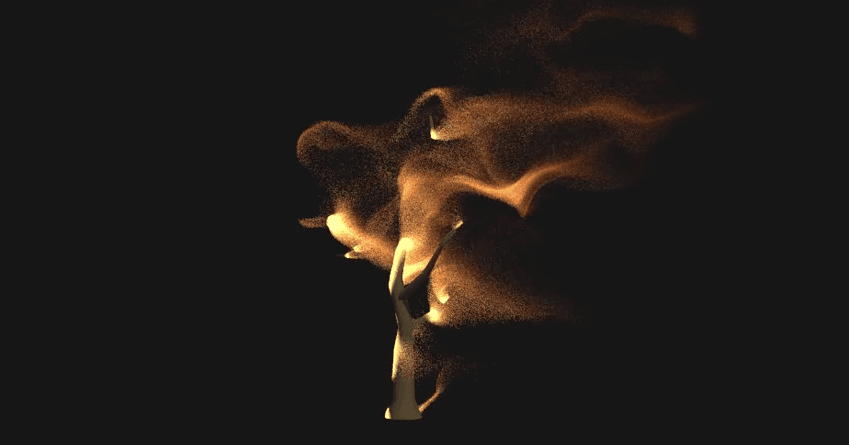
The particles need to spawn on a mesh.

On the GPU, the mesh is stored using:
Vertex buffer: contains all the vertices with all their attributes.
Index buffer: contains vertex-buffer indices, where each 3 consecutive indices form a triangle.
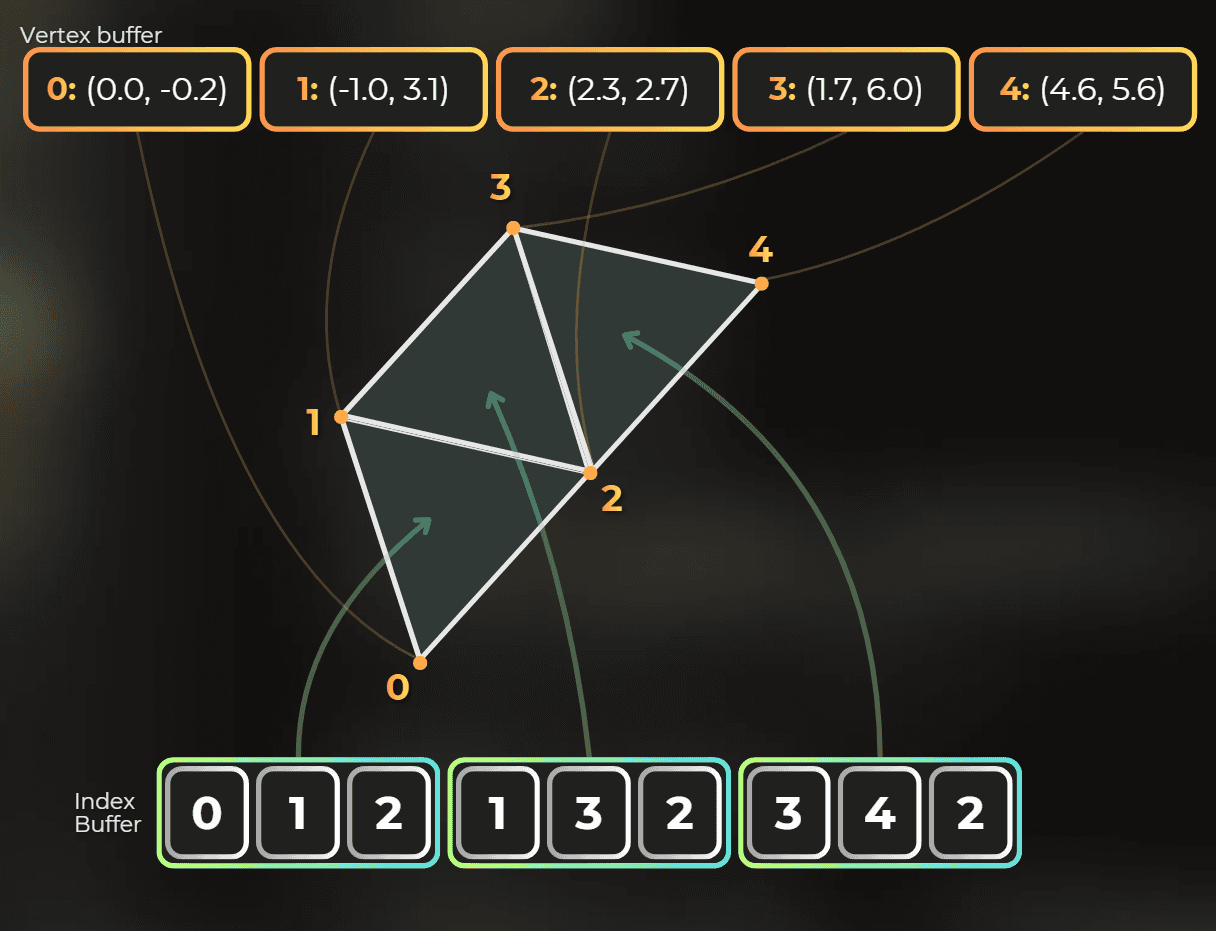
I can bind both buffers to the compute shader and spawn particles on the triangles.
7.2 Accessing the vertex buffer and index buffer of a mesh
I make another particle spawner, similar to SphereParticleSpawner.
I add a MeshFilter reference so the spawner can access the mesh.
public class MeshParticleSpawner : MonoBehaviour, ISpawnGPUParticles
{
...
[SerializeField] private MeshFilter meshFilter
public class MeshParticleSpawner : MonoBehaviour, ISpawnGPUParticles
{
...
[SerializeField] private MeshFilter meshFilter
public class MeshParticleSpawner : MonoBehaviour, ISpawnGPUParticles
{
...
[SerializeField] private MeshFilter meshFilter
Then I cache the mesh vertex and index buffers. Their elements can have different sizes, so I access them with ByteAddressBuffer in HLSL. To bind them this way, both mesh buffers need the Target.Raw usage flag set.
private GraphicsBuffer vertexBuffer;
private GraphicsBuffer indexBuffer;
private void OnEnable()
{
...
if (meshFilter == null || meshFilter.sharedMesh == null)
return;
meshFilter.sharedMesh.vertexBufferTarget |= GraphicsBuffer.Target.Raw;
meshFilter.sharedMesh.indexBufferTarget |= GraphicsBuffer.Target.Raw;
vertexBuffer = meshFilter.sharedMesh.GetVertexBuffer(0);
indexBuffer = meshFilter.sharedMesh.GetIndexBuffer();
}
private void OnDisable()
{
ReleaseBuffer(ref vertexBuffer);
ReleaseBuffer(ref indexBuffer);
void ReleaseBuffer(ref GraphicsBuffer buffer)
{
if (buffer != null)
{
buffer.Release();
buffer = null
private GraphicsBuffer vertexBuffer;
private GraphicsBuffer indexBuffer;
private void OnEnable()
{
...
if (meshFilter == null || meshFilter.sharedMesh == null)
return;
meshFilter.sharedMesh.vertexBufferTarget |= GraphicsBuffer.Target.Raw;
meshFilter.sharedMesh.indexBufferTarget |= GraphicsBuffer.Target.Raw;
vertexBuffer = meshFilter.sharedMesh.GetVertexBuffer(0);
indexBuffer = meshFilter.sharedMesh.GetIndexBuffer();
}
private void OnDisable()
{
ReleaseBuffer(ref vertexBuffer);
ReleaseBuffer(ref indexBuffer);
void ReleaseBuffer(ref GraphicsBuffer buffer)
{
if (buffer != null)
{
buffer.Release();
buffer = null
private GraphicsBuffer vertexBuffer;
private GraphicsBuffer indexBuffer;
private void OnEnable()
{
...
if (meshFilter == null || meshFilter.sharedMesh == null)
return;
meshFilter.sharedMesh.vertexBufferTarget |= GraphicsBuffer.Target.Raw;
meshFilter.sharedMesh.indexBufferTarget |= GraphicsBuffer.Target.Raw;
vertexBuffer = meshFilter.sharedMesh.GetVertexBuffer(0);
indexBuffer = meshFilter.sharedMesh.GetIndexBuffer();
}
private void OnDisable()
{
ReleaseBuffer(ref vertexBuffer);
ReleaseBuffer(ref indexBuffer);
void ReleaseBuffer(ref GraphicsBuffer buffer)
{
if (buffer != null)
{
buffer.Release();
buffer = null
Note: For now, this supports only meshes with one submesh. I read GetSubMesh(0), then use its indexStart and indexCount when decoding triangles. To support multiple submeshes, I would either dispatch once per submesh or pass a selected submesh index into the spawner.
Then I bind the buffers before dispatching the compute shader. I also modified the spawn count to spawn one particle per vertex.
public void SpawnParticles(CommandBuffer cmd, GraphicsBuffer appendParticleBuffer)
{
if (spawnCompute == null || meshFilter == null || meshFilter.sharedMesh == null)
return;
int spawnCount = meshFilter.sharedMesh.GetSubMesh(0).vertexCount;
cmd.SetComputeMatrixParam(spawnCompute, Uniforms._LocalToWorld, meshFilter.transform.localToWorldMatrix);
...
cmd.SetComputeBufferParam(spawnCompute, 0, Uniforms._VertexBuffer, vertexBuffer);
cmd.SetComputeBufferParam(spawnCompute, 0, Uniforms._IndexBuffer, indexBuffer);
public void SpawnParticles(CommandBuffer cmd, GraphicsBuffer appendParticleBuffer)
{
if (spawnCompute == null || meshFilter == null || meshFilter.sharedMesh == null)
return;
int spawnCount = meshFilter.sharedMesh.GetSubMesh(0).vertexCount;
cmd.SetComputeMatrixParam(spawnCompute, Uniforms._LocalToWorld, meshFilter.transform.localToWorldMatrix);
...
cmd.SetComputeBufferParam(spawnCompute, 0, Uniforms._VertexBuffer, vertexBuffer);
cmd.SetComputeBufferParam(spawnCompute, 0, Uniforms._IndexBuffer, indexBuffer);
public void SpawnParticles(CommandBuffer cmd, GraphicsBuffer appendParticleBuffer)
{
if (spawnCompute == null || meshFilter == null || meshFilter.sharedMesh == null)
return;
int spawnCount = meshFilter.sharedMesh.GetSubMesh(0).vertexCount;
cmd.SetComputeMatrixParam(spawnCompute, Uniforms._LocalToWorld, meshFilter.transform.localToWorldMatrix);
...
cmd.SetComputeBufferParam(spawnCompute, 0, Uniforms._VertexBuffer, vertexBuffer);
cmd.SetComputeBufferParam(spawnCompute, 0, Uniforms._IndexBuffer, indexBuffer);
7.3 Decoding vertex and index data
Vertices and indices can use different formats. I fetch them with ByteAddressBuffer, which gives low-level byte-addressed memory access. Each load reads 32 bits as a uint.
I need to know each vertex stride and where the position lives inside that stride, positionOffset.
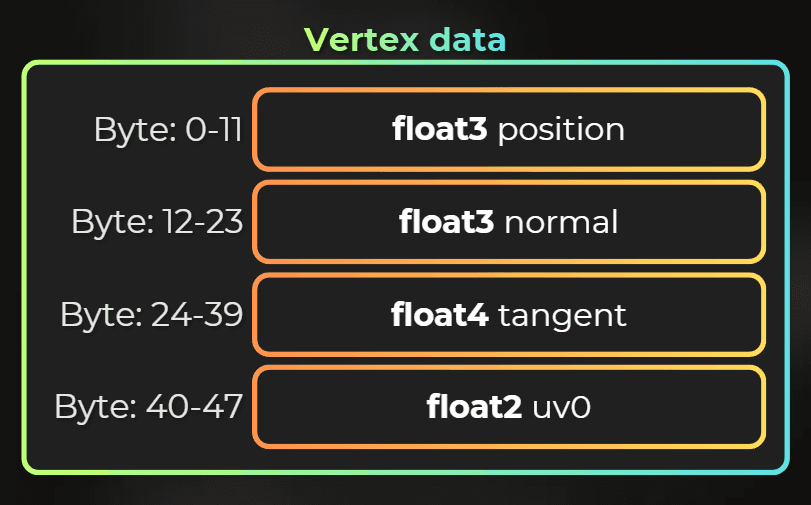
In the example above, the vertex stride is 48 bytes and the position offset is 0 bytes.
I get the vertex-buffer stride with mesh.GetVertexBufferStride(0) and the attribute offset with mesh.GetVertexAttributeOffset(VertexAttribute.Position).
The index buffer can use two formats: 16 bits per index or 32 bits per index. I get that from mesh.indexFormat.
The shader needs all of this data.
7.4 Base index and index count
Meshes can start rendering from an index other than zero, and they do not need to render every index. Unity stores baseIndex and indexCount in the submesh, so the compute shader needs those too.
7.5 Providing detailed mesh data to the shader
I collect the mesh metadata needed for decoding and send it to the shader with a ConstantBuffer. This is the struct:
[System.Serializable, StructLayout(LayoutKind.Sequential)]
public struct MeshParams
{
public uint _VertexBufferStride;
public uint _PositionAttributeOffset;
public uint _NormalAttributeOffset;
public uint _VertexCount;
public uint _BaseIndex;
public uint _IndexCount;
public uint _IndexBufferStride;
public uint _Padding2;
[System.Serializable, StructLayout(LayoutKind.Sequential)]
public struct MeshParams
{
public uint _VertexBufferStride;
public uint _PositionAttributeOffset;
public uint _NormalAttributeOffset;
public uint _VertexCount;
public uint _BaseIndex;
public uint _IndexCount;
public uint _IndexBufferStride;
public uint _Padding2;
[System.Serializable, StructLayout(LayoutKind.Sequential)]
public struct MeshParams
{
public uint _VertexBufferStride;
public uint _PositionAttributeOffset;
public uint _NormalAttributeOffset;
public uint _VertexCount;
public uint _BaseIndex;
public uint _IndexCount;
public uint _IndexBufferStride;
public uint _Padding2;
Note: I add _Padding2 because constant buffer data is laid out in 16-byte registers. The first four uint values fill one 16-byte register, and the next four fill another one, so the C# struct and HLSL constant buffer both end up as 32 bytes. Without explicit padding, it is easy to accidentally create a C# layout that does not match what the shader reads.
The mesh spawner also needs a constant buffer:
public class MeshParticleSpawner : MonoBehaviour, ISpawnGPUParticles
{
...
private ConstantBuffer<MeshParams> meshParamsConstantBuffer;
private void OnEnable()
{
...
meshParamsConstantBuffer = new();
}
private void OnDisable()
{
...
if (meshParamsConstantBuffer != null)
{
meshParamsConstantBuffer.Release();
meshParamsConstantBuffer = null
public class MeshParticleSpawner : MonoBehaviour, ISpawnGPUParticles
{
...
private ConstantBuffer<MeshParams> meshParamsConstantBuffer;
private void OnEnable()
{
...
meshParamsConstantBuffer = new();
}
private void OnDisable()
{
...
if (meshParamsConstantBuffer != null)
{
meshParamsConstantBuffer.Release();
meshParamsConstantBuffer = null
public class MeshParticleSpawner : MonoBehaviour, ISpawnGPUParticles
{
...
private ConstantBuffer<MeshParams> meshParamsConstantBuffer;
private void OnEnable()
{
...
meshParamsConstantBuffer = new();
}
private void OnDisable()
{
...
if (meshParamsConstantBuffer != null)
{
meshParamsConstantBuffer.Release();
meshParamsConstantBuffer = null
Then I send this data to the compute shader:
public void SpawnParticles(CommandBuffer cmd, GraphicsBuffer appendParticleBuffer)
{
Mesh mesh = meshFilter.sharedMesh;
MeshParams meshParams = new MeshParams()
{
_VertexBufferStride = (uint)mesh.GetVertexBufferStride(0),
_NormalAttributeOffset = (uint)mesh.GetVertexAttributeOffset(VertexAttribute.Normal),
_PositionAttributeOffset = (uint)mesh.GetVertexAttributeOffset(VertexAttribute.Position),
_VertexCount = (uint)mesh.vertexCount,
_IndexCount = (uint)mesh.GetSubMesh(0).indexCount,
_BaseIndex = (uint)mesh.GetSubMesh(0).indexStart,
_IndexBufferStride = (mesh.indexFormat == IndexFormat.UInt16) ? 2u : 4u
};
meshParamsConstantBuffer.UpdateData(cmd, meshParams);
meshParamsConstantBuffer.Set(cmd, spawnCompute, Uniforms.C_MeshParticleSpawnerParams
public void SpawnParticles(CommandBuffer cmd, GraphicsBuffer appendParticleBuffer)
{
Mesh mesh = meshFilter.sharedMesh;
MeshParams meshParams = new MeshParams()
{
_VertexBufferStride = (uint)mesh.GetVertexBufferStride(0),
_NormalAttributeOffset = (uint)mesh.GetVertexAttributeOffset(VertexAttribute.Normal),
_PositionAttributeOffset = (uint)mesh.GetVertexAttributeOffset(VertexAttribute.Position),
_VertexCount = (uint)mesh.vertexCount,
_IndexCount = (uint)mesh.GetSubMesh(0).indexCount,
_BaseIndex = (uint)mesh.GetSubMesh(0).indexStart,
_IndexBufferStride = (mesh.indexFormat == IndexFormat.UInt16) ? 2u : 4u
};
meshParamsConstantBuffer.UpdateData(cmd, meshParams);
meshParamsConstantBuffer.Set(cmd, spawnCompute, Uniforms.C_MeshParticleSpawnerParams
public void SpawnParticles(CommandBuffer cmd, GraphicsBuffer appendParticleBuffer)
{
Mesh mesh = meshFilter.sharedMesh;
MeshParams meshParams = new MeshParams()
{
_VertexBufferStride = (uint)mesh.GetVertexBufferStride(0),
_NormalAttributeOffset = (uint)mesh.GetVertexAttributeOffset(VertexAttribute.Normal),
_PositionAttributeOffset = (uint)mesh.GetVertexAttributeOffset(VertexAttribute.Position),
_VertexCount = (uint)mesh.vertexCount,
_IndexCount = (uint)mesh.GetSubMesh(0).indexCount,
_BaseIndex = (uint)mesh.GetSubMesh(0).indexStart,
_IndexBufferStride = (mesh.indexFormat == IndexFormat.UInt16) ? 2u : 4u
};
meshParamsConstantBuffer.UpdateData(cmd, meshParams);
meshParamsConstantBuffer.Set(cmd, spawnCompute, Uniforms.C_MeshParticleSpawnerParams
7.6 Compute shader - spawning one particle for each vertex
I reuse the sphere spawning compute shader. The code here is a modified version of that shader.
First, I declare the vertex buffer, index buffer, and constant buffer at the top of the compute shader:
...
ByteAddressBuffer _VertexBuffer;
ByteAddressBuffer _IndexBuffer;

cbuffer C_MeshParticleSpawnerParams
{
    uint _VertexBufferStride;
    uint _PositionAttributeOffset;
    uint _NormalAttributeOffset;
    uint _VertexCount;

    uint _BaseIndex;
    uint _IndexCount;
    uint _IndexBufferStride;
    uint _Padding2
...
ByteAddressBuffer _VertexBuffer;
ByteAddressBuffer _IndexBuffer;

cbuffer C_MeshParticleSpawnerParams
{
    uint _VertexBufferStride;
    uint _PositionAttributeOffset;
    uint _NormalAttributeOffset;
    uint _VertexCount;

    uint _BaseIndex;
    uint _IndexCount;
    uint _IndexBufferStride;
    uint _Padding2
...
ByteAddressBuffer _VertexBuffer;
ByteAddressBuffer _IndexBuffer;

cbuffer C_MeshParticleSpawnerParams
{
    uint _VertexBufferStride;
    uint _PositionAttributeOffset;
    uint _NormalAttributeOffset;
    uint _VertexCount;

    uint _BaseIndex;
    uint _IndexCount;
    uint _IndexBufferStride;
    uint _Padding2
I add a function that returns the position for a given vertex:
float3 GetVertexPosition(uint vertexIndex)
{
float3 positionOS;
uint vertexBaseAddress = vertexIndex * _VertexBufferStride;
positionOS.x = asfloat(_VertexBuffer.Load(vertexBaseAddress + _PositionAttributeOffset));
positionOS.y = asfloat(_VertexBuffer.Load(vertexBaseAddress + _PositionAttributeOffset + 4));
positionOS.z = asfloat(_VertexBuffer.Load(vertexBaseAddress + _PositionAttributeOffset + 8));
return positionOS;
}
...
float3 GetVertexNormal(uint vertexIndex)
{
float3 GetVertexPosition(uint vertexIndex)
{
float3 positionOS;
uint vertexBaseAddress = vertexIndex * _VertexBufferStride;
positionOS.x = asfloat(_VertexBuffer.Load(vertexBaseAddress + _PositionAttributeOffset));
positionOS.y = asfloat(_VertexBuffer.Load(vertexBaseAddress + _PositionAttributeOffset + 4));
positionOS.z = asfloat(_VertexBuffer.Load(vertexBaseAddress + _PositionAttributeOffset + 8));
return positionOS;
}
...
float3 GetVertexNormal(uint vertexIndex)
{
float3 GetVertexPosition(uint vertexIndex)
{
float3 positionOS;
uint vertexBaseAddress = vertexIndex * _VertexBufferStride;
positionOS.x = asfloat(_VertexBuffer.Load(vertexBaseAddress + _PositionAttributeOffset));
positionOS.y = asfloat(_VertexBuffer.Load(vertexBaseAddress + _PositionAttributeOffset + 4));
positionOS.z = asfloat(_VertexBuffer.Load(vertexBaseAddress + _PositionAttributeOffset + 8));
return positionOS;
}
...
float3 GetVertexNormal(uint vertexIndex)
{
Note: this code assumes vertices store positions as 32-bit floats. That is not always true: attributes can use 32-bit, 16-bit, or 8-bit precision. To keep the code simple, I assume all meshes used for spawning use full 32-bit vertex precision.
Now the compute shader can spawn each particle from a vertex position:
[numthreads(16, 1, 1)]
void SpawnMeshParticles(uint3 id : SV_DispatchThreadID)
{
...
float3 positionOS = GetVertexPosition(id.x);
float3 positionWS = mul(_LocalToWorld, float4(positionOS, 1.0)).xyz
[numthreads(16, 1, 1)]
void SpawnMeshParticles(uint3 id : SV_DispatchThreadID)
{
...
float3 positionOS = GetVertexPosition(id.x);
float3 positionWS = mul(_LocalToWorld, float4(positionOS, 1.0)).xyz
[numthreads(16, 1, 1)]
void SpawnMeshParticles(uint3 id : SV_DispatchThreadID)
{
...
float3 positionOS = GetVertexPosition(id.x);
float3 positionWS = mul(_LocalToWorld, float4(positionOS, 1.0)).xyz
This is the result. Every particle spawns at the vertex position, so I implemented that correctly:
7.7 Compute shader - spawning one particle for each triangle
Next, I want particles distributed across triangles, so I modify the code to spawn one particle per triangle.
The C# code now dispatches one compute thread per triangle:
int spawnCount = (int)meshParams._IndexCount / 3
int spawnCount = (int)meshParams._IndexCount / 3
int spawnCount = (int)meshParams._IndexCount / 3
Now the shader needs to read indices through ByteAddressBuffer. Indices can be 32-bit (uint) or 16-bit (ushort).
For 32-bit indices, the solution is simple:
vertexIndex = _IndexBuffer.Load(indexOffset * 4
vertexIndex = _IndexBuffer.Load(indexOffset * 4
vertexIndex = _IndexBuffer.Load(indexOffset * 4
For 16-bit indices, it is trickier because ByteAddressBuffer requires 32-bit aligned addresses.
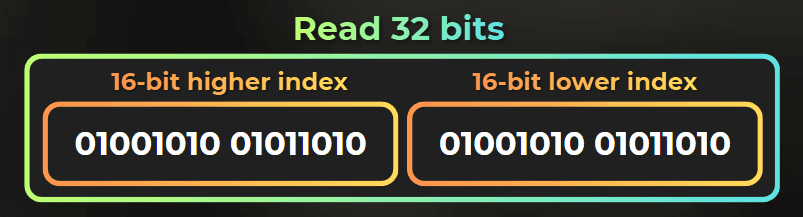
Note: ByteAddressBuffer.Load reads 4 bytes and the address must be 4-byte aligned. That is why 32-bit indices are direct, but 16-bit indices need a small decode step: I load the aligned 32-bit word that contains the index, then pick either the low or high 16 bits.
I load the 4-byte word that contains the index, then mask and shift out the correct 16-bit part:
uint LoadIndex16(uint triangleIndexOffset)
{
uint byteAddr = triangleIndexOffset * 2;
uint alignedAddr = byteAddr & ~3u;
uint word = _IndexBuffer.Load(alignedAddr);
if ((byteAddr & 2u) != 0)
return (word >> 16) & 0xFFFFu;
return word & 0xFFFFu
uint LoadIndex16(uint triangleIndexOffset)
{
uint byteAddr = triangleIndexOffset * 2;
uint alignedAddr = byteAddr & ~3u;
uint word = _IndexBuffer.Load(alignedAddr);
if ((byteAddr & 2u) != 0)
return (word >> 16) & 0xFFFFu;
return word & 0xFFFFu
uint LoadIndex16(uint triangleIndexOffset)
{
uint byteAddr = triangleIndexOffset * 2;
uint alignedAddr = byteAddr & ~3u;
uint word = _IndexBuffer.Load(alignedAddr);
if ((byteAddr & 2u) != 0)
return (word >> 16) & 0xFFFFu;
return word & 0xFFFFu
Finally, index fetching looks like this:
uint GetVertexIndex(uint indexOffset)
{
    if (_IndexBufferStride == 4)
        return _IndexBuffer.Load(indexOffset * 4);
    else
        return LoadIndex16(indexOffset
uint GetVertexIndex(uint indexOffset)
{
    if (_IndexBufferStride == 4)
        return _IndexBuffer.Load(indexOffset * 4);
    else
        return LoadIndex16(indexOffset
uint GetVertexIndex(uint indexOffset)
{
    if (_IndexBufferStride == 4)
        return _IndexBuffer.Load(indexOffset * 4);
    else
        return LoadIndex16(indexOffset
Now I can spawn particles at triangle centers:
if (id.x >= (uint)_IndexCount / 3)
return;
uint triangleIndexOffset = _BaseIndex + id.x * 3;
float3 positionOS_0 = GetVertexPosition(GetVertexIndex(triangleIndexOffset + 0));
float3 positionOS_1 = GetVertexPosition(GetVertexIndex(triangleIndexOffset + 1));
float3 positionOS_2 = GetVertexPosition(GetVertexIndex(triangleIndexOffset + 2));
float3 positionOS = (positionOS_0 + positionOS_1 + positionOS_2) / 3.0f
if (id.x >= (uint)_IndexCount / 3)
return;
uint triangleIndexOffset = _BaseIndex + id.x * 3;
float3 positionOS_0 = GetVertexPosition(GetVertexIndex(triangleIndexOffset + 0));
float3 positionOS_1 = GetVertexPosition(GetVertexIndex(triangleIndexOffset + 1));
float3 positionOS_2 = GetVertexPosition(GetVertexIndex(triangleIndexOffset + 2));
float3 positionOS = (positionOS_0 + positionOS_1 + positionOS_2) / 3.0f
if (id.x >= (uint)_IndexCount / 3)
return;
uint triangleIndexOffset = _BaseIndex + id.x * 3;
float3 positionOS_0 = GetVertexPosition(GetVertexIndex(triangleIndexOffset + 0));
float3 positionOS_1 = GetVertexPosition(GetVertexIndex(triangleIndexOffset + 1));
float3 positionOS_2 = GetVertexPosition(GetVertexIndex(triangleIndexOffset + 2));
float3 positionOS = (positionOS_0 + positionOS_1 + positionOS_2) / 3.0f
Here is the result:
7.8 Compute shader - random position in a triangle
Each particle currently spawns at a triangle center. To spread particles uniformly over the triangle, I generate random barycentric coordinates in the compute shader. This gives a uniform distribution as long as the hash function is good:
float3 GetRandomBarycentric(uint seed)
{
float2 random01 = HashUintToFloat2(seed + 0x3C6EF372u);
float sqrtU = sqrt(random01.x);
float b0 = 1.0 - sqrtU;
float b1 = sqrtU * (1.0 - random01.y);
float b2 = sqrtU * random01.y;
return float3(b0, b1, b2
float3 GetRandomBarycentric(uint seed)
{
float2 random01 = HashUintToFloat2(seed + 0x3C6EF372u);
float sqrtU = sqrt(random01.x);
float b0 = 1.0 - sqrtU;
float b1 = sqrtU * (1.0 - random01.y);
float b2 = sqrtU * random01.y;
return float3(b0, b1, b2
float3 GetRandomBarycentric(uint seed)
{
float2 random01 = HashUintToFloat2(seed + 0x3C6EF372u);
float sqrtU = sqrt(random01.x);
float b0 = 1.0 - sqrtU;
float b1 = sqrtU * (1.0 - random01.y);
float b2 = sqrtU * random01.y;
return float3(b0, b1, b2
Then I use those coordinates to randomize the position:
float3 bar = GetRandomBarycentric(particleSeed);
float3 positionOS = (bar.x * positionOS_0 + bar.y * positionOS_1 + bar.z * positionOS_2
float3 bar = GetRandomBarycentric(particleSeed);
float3 positionOS = (bar.x * positionOS_0 + bar.y * positionOS_1 + bar.z * positionOS_2
float3 bar = GetRandomBarycentric(particleSeed);
float3 positionOS = (bar.x * positionOS_0 + bar.y * positionOS_1 + bar.z * positionOS_2
Now particles spawn randomly over the whole mesh.
However, the distribution is still wrong: every triangle gets one particle, no matter its size. When I stretched the cylinder, you can see the dense spawn at the edges, and fewer particles in the middle.
7.9 Compute shader - spawn depending on triangle area
I want particles to spawn uniformly over the whole mesh surface, whether a triangle is small or large.
The missing piece is area-based spawning.
I use probability-based spawning from triangle area, so larger triangles emit more particles.
C#
First, I rename spawnCount to particlesPerUnitSquare. It defines how many particles spawn each second per unit square of mesh surface.
public class MeshParticleSpawner : MonoBehaviour, ISpawnGPUParticles
{
	[SerializeField] private int particlesPerUnitSquare = 100
public class MeshParticleSpawner : MonoBehaviour, ISpawnGPUParticles
{
	[SerializeField] private int particlesPerUnitSquare = 100
public class MeshParticleSpawner : MonoBehaviour, ISpawnGPUParticles
{
	[SerializeField] private int particlesPerUnitSquare = 100
Then I set this value in the compute shader:
public void SpawnParticles(CommandBuffer cmd, GraphicsBuffer appendParticleBuffer)
{
...
cmd.SetComputeFloatParam(spawnCompute, Uniforms._ParticlesPerUnitSquare, particlesPerUnitSquare);
cmd.SetComputeFloatParam(spawnCompute, Uniforms._DeltaTime, Time.deltaTime
public void SpawnParticles(CommandBuffer cmd, GraphicsBuffer appendParticleBuffer)
{
...
cmd.SetComputeFloatParam(spawnCompute, Uniforms._ParticlesPerUnitSquare, particlesPerUnitSquare);
cmd.SetComputeFloatParam(spawnCompute, Uniforms._DeltaTime, Time.deltaTime
public void SpawnParticles(CommandBuffer cmd, GraphicsBuffer appendParticleBuffer)
{
...
cmd.SetComputeFloatParam(spawnCompute, Uniforms._ParticlesPerUnitSquare, particlesPerUnitSquare);
cmd.SetComputeFloatParam(spawnCompute, Uniforms._DeltaTime, Time.deltaTime
Compute shader
The compute shader now calculates how many particles each triangle should spawn individually - so I can have multiple particle appends per thread.
The particle count will be a fractional number, so I will use the integer part as a fixed spawn count, then use the fractional part as the probability for one extra particle.
First, I need triangle area from its vertices. I used this formula:
float GetTriangleArea(float3 a, float3 b, float3 c)
{
    float3 ab = b - a;
    float3 ac = c - a;
    return 0.5 * sqrt(dot(ab, ab) * dot(ac, ac) - dot(ab, ac) * dot(ab, ac
float GetTriangleArea(float3 a, float3 b, float3 c)
{
    float3 ab = b - a;
    float3 ac = c - a;
    return 0.5 * sqrt(dot(ab, ab) * dot(ac, ac) - dot(ab, ac) * dot(ab, ac
float GetTriangleArea(float3 a, float3 b, float3 c)
{
    float3 ab = b - a;
    float3 ac = c - a;
    return 0.5 * sqrt(dot(ab, ab) * dot(ac, ac) - dot(ab, ac) * dot(ab, ac
The area must be in world space, so I transform the vertices first:
...
float3 positionOS_0 = GetVertexPosition(GetVertexIndex(triangleIndexOffset + 0));
float3 positionOS_1 = GetVertexPosition(GetVertexIndex(triangleIndexOffset + 1));
float3 positionOS_2 = GetVertexPosition(GetVertexIndex(triangleIndexOffset + 2));
float3 positionWS_0 = mul(_LocalToWorld, float4(positionOS_0, 1.0)).xyz;
float3 positionWS_1 = mul(_LocalToWorld, float4(positionOS_1, 1.0)).xyz;
float3 positionWS_2 = mul(_LocalToWorld, float4(positionOS_2, 1.0)).xyz;
float triangleAreaWS = GetTriangleArea(positionWS_0, positionWS_1, positionWS_2
...
float3 positionOS_0 = GetVertexPosition(GetVertexIndex(triangleIndexOffset + 0));
float3 positionOS_1 = GetVertexPosition(GetVertexIndex(triangleIndexOffset + 1));
float3 positionOS_2 = GetVertexPosition(GetVertexIndex(triangleIndexOffset + 2));
float3 positionWS_0 = mul(_LocalToWorld, float4(positionOS_0, 1.0)).xyz;
float3 positionWS_1 = mul(_LocalToWorld, float4(positionOS_1, 1.0)).xyz;
float3 positionWS_2 = mul(_LocalToWorld, float4(positionOS_2, 1.0)).xyz;
float triangleAreaWS = GetTriangleArea(positionWS_0, positionWS_1, positionWS_2
...
float3 positionOS_0 = GetVertexPosition(GetVertexIndex(triangleIndexOffset + 0));
float3 positionOS_1 = GetVertexPosition(GetVertexIndex(triangleIndexOffset + 1));
float3 positionOS_2 = GetVertexPosition(GetVertexIndex(triangleIndexOffset + 2));
float3 positionWS_0 = mul(_LocalToWorld, float4(positionOS_0, 1.0)).xyz;
float3 positionWS_1 = mul(_LocalToWorld, float4(positionOS_1, 1.0)).xyz;
float3 positionWS_2 = mul(_LocalToWorld, float4(positionOS_2, 1.0)).xyz;
float triangleAreaWS = GetTriangleArea(positionWS_0, positionWS_1, positionWS_2
With the area calculated, I can compute the spawn count. The integer part is fixed, and the fractional part drives probability:
float spawnCountF = _ParticlesPerUnitSquare * triangleAreaWS * _DeltaTime;
float spawnCountFloor = floor(spawnCountF);
float spawnCountFrac = spawnCountF - spawnCountFloor;
uint spawnCount = uint(spawnCountFloor);
spawnCount += ((HashUintToFloat01(particleSeed + 0x97AD7039u) < spawnCountFrac) ? 1.0 : 0.0
float spawnCountF = _ParticlesPerUnitSquare * triangleAreaWS * _DeltaTime;
float spawnCountFloor = floor(spawnCountF);
float spawnCountFrac = spawnCountF - spawnCountFloor;
uint spawnCount = uint(spawnCountFloor);
spawnCount += ((HashUintToFloat01(particleSeed + 0x97AD7039u) < spawnCountFrac) ? 1.0 : 0.0
float spawnCountF = _ParticlesPerUnitSquare * triangleAreaWS * _DeltaTime;
float spawnCountFloor = floor(spawnCountF);
float spawnCountFrac = spawnCountF - spawnCountFloor;
uint spawnCount = uint(spawnCountFloor);
spawnCount += ((HashUintToFloat01(particleSeed + 0x97AD7039u) < spawnCountFrac) ? 1.0 : 0.0
The last part is spawning the computed number of particles:
uint seed = particleSeed;
for (uint i = 0; i < spawnCount; i++)
{
seed += 0x3A3B7012u;
float3 bar = GetRandomBarycentric(seed);
float3 positionWS = (bar.x * positionWS_0 + bar.y * positionWS_1 + bar.z * positionWS_2);
ParticleData particle;
particle.positionWS = float4(positionWS, 1.0);
...
_Particles.Append(particle
uint seed = particleSeed;
for (uint i = 0; i < spawnCount; i++)
{
seed += 0x3A3B7012u;
float3 bar = GetRandomBarycentric(seed);
float3 positionWS = (bar.x * positionWS_0 + bar.y * positionWS_1 + bar.z * positionWS_2);
ParticleData particle;
particle.positionWS = float4(positionWS, 1.0);
...
_Particles.Append(particle
uint seed = particleSeed;
for (uint i = 0; i < spawnCount; i++)
{
seed += 0x3A3B7012u;
float3 bar = GetRandomBarycentric(seed);
float3 positionWS = (bar.x * positionWS_0 + bar.y * positionWS_1 + bar.z * positionWS_2);
ParticleData particle;
particle.positionWS = float4(positionWS, 1.0);
...
_Particles.Append(particle
Here is the result:
And with a different mesh:
___
8. Polishing the particle simulation
8.1 Normal-based velocity and lifetime
The particles still have random colors and move straight up. Now I add more visual variety.
First, when spawning each particle, I set its velocity from the mesh normal.
...
float3 bar = GetRandomBarycentric(seed);
float3 positionWS = (bar.x * positionWS_0 + bar.y * positionWS_1 + bar.z * positionWS_2);
float3 normalWS = (bar.x * normalWS_0 + bar.y * normalWS_1 + bar.z * normalWS_2);
ParticleData particle;
particle.positionWS = float4(positionWS, 1.0);
particle.velocityWS = float4(normalWS, 0.0);
...
float3 bar = GetRandomBarycentric(seed);
float3 positionWS = (bar.x * positionWS_0 + bar.y * positionWS_1 + bar.z * positionWS_2);
float3 normalWS = (bar.x * normalWS_0 + bar.y * normalWS_1 + bar.z * normalWS_2);
ParticleData particle;
particle.positionWS = float4(positionWS, 1.0);
particle.velocityWS = float4(normalWS, 0.0);
...
float3 bar = GetRandomBarycentric(seed);
float3 positionWS = (bar.x * positionWS_0 + bar.y * positionWS_1 + bar.z * positionWS_2);
float3 normalWS = (bar.x * normalWS_0 + bar.y * normalWS_1 + bar.z * normalWS_2);
ParticleData particle;
particle.positionWS = float4(positionWS, 1.0);
particle.velocityWS = float4(normalWS, 0.0);
I also make particles live longer, with some random variation, and make them white.
particle.lifetime = lerp(1.1, 5.0, HashUintToFloat01(seed + 0xC2B2AE35u));
particle.color = float4(1.0, 1.0, 1.0, 1.0
particle.lifetime = lerp(1.1, 5.0, HashUintToFloat01(seed + 0xC2B2AE35u));
particle.color = float4(1.0, 1.0, 1.0, 1.0
particle.lifetime = lerp(1.1, 5.0, HashUintToFloat01(seed + 0xC2B2AE35u));
particle.color = float4(1.0, 1.0, 1.0, 1.0
Then the simulation moves each particle by its velocity:
particle.positionWS += particle.velocityWS * _DeltaTime * 0.1
particle.positionWS += particle.velocityWS * _DeltaTime * 0.1
particle.positionWS += particle.velocityWS * _DeltaTime * 0.1
This already looks like a force field.
8.2 Noise, drift and color
Now I add noise and a constant drift, like wind:
float noiseStrength = 4.0;
float noiseScale = 1.5;
float3 constantVelocity = float3(1.2, 0.3, 0.1);
float3 noiseUV = particle.positionWS.xyz * 1.5 + float3(0.0, -_Time * 1.0, 0.0);
float3 noiseOffset = (Noise3_3(noiseUV) - 0.5) * 4.0;
particle.positionWS.xyz += (constantVelocity + noiseOffset) * _DeltaTime * sqrt(normalizedTime
float noiseStrength = 4.0;
float noiseScale = 1.5;
float3 constantVelocity = float3(1.2, 0.3, 0.1);
float3 noiseUV = particle.positionWS.xyz * 1.5 + float3(0.0, -_Time * 1.0, 0.0);
float3 noiseOffset = (Noise3_3(noiseUV) - 0.5) * 4.0;
particle.positionWS.xyz += (constantVelocity + noiseOffset) * _DeltaTime * sqrt(normalizedTime
float noiseStrength = 4.0;
float noiseScale = 1.5;
float3 constantVelocity = float3(1.2, 0.3, 0.1);
float3 noiseUV = particle.positionWS.xyz * 1.5 + float3(0.0, -_Time * 1.0, 0.0);
float3 noiseOffset = (Noise3_3(noiseUV) - 0.5) * 4.0;
particle.positionWS.xyz += (constantVelocity + noiseOffset) * _DeltaTime * sqrt(normalizedTime
Pardon the video quality, compression is really bad on the noisy images. But I need to use compressed videos, otherwise I would need to pay more for the website hosting, and the article would take a long time to load :')
Next, I make the particle shader transparent:

Then I interpolate between two colors over the particle lifetime:
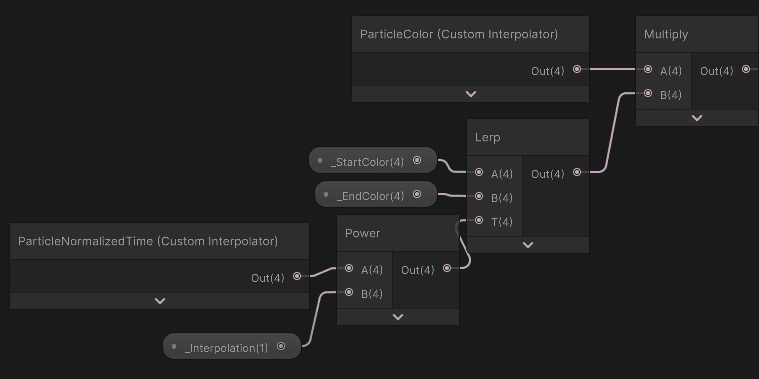
I also increased the spawn rate to 20000 particles per unit square.
___
9. Burning tree
9.1 Shared burning mask
Now it is time to burn the tree. To synchronize the effect, the particle spawner and the tree shader need to use the same noise for the dissolve cutout.
I drafted this HLSL function. I use it as a Shader Graph node and as the particle-spawn mask.
float GetBurningMask(float3 position)
{
position *= 1.4;
float3 noise = 0.0;
position += 4.7386;
noise += Noise3_3(position) * 0.75;
noise += Noise3_3(position * 2.0 + 8.471) * 0.25;
return noise.r - frac(_Time.y * 0.05);
}
void GetBurningMask_float(in float3 IN_PositionOS, out float OUT_Mask)
{
OUT_Mask = GetBurningMask(IN_PositionOS
float GetBurningMask(float3 position)
{
position *= 1.4;
float3 noise = 0.0;
position += 4.7386;
noise += Noise3_3(position) * 0.75;
noise += Noise3_3(position * 2.0 + 8.471) * 0.25;
return noise.r - frac(_Time.y * 0.05);
}
void GetBurningMask_float(in float3 IN_PositionOS, out float OUT_Mask)
{
OUT_Mask = GetBurningMask(IN_PositionOS
float GetBurningMask(float3 position)
{
position *= 1.4;
float3 noise = 0.0;
position += 4.7386;
noise += Noise3_3(position) * 0.75;
noise += Noise3_3(position * 2.0 + 8.471) * 0.25;
return noise.r - frac(_Time.y * 0.05);
}
void GetBurningMask_float(in float3 IN_PositionOS, out float OUT_Mask)
{
OUT_Mask = GetBurningMask(IN_PositionOS
9.2 Surface dissolve
I created a Shader Graph to render the tree and added this function:
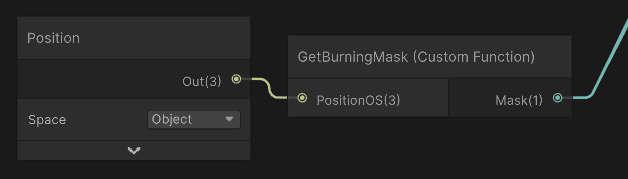
This is what the noise looks like:
Then I used it to control alpha clipping and surface colors:
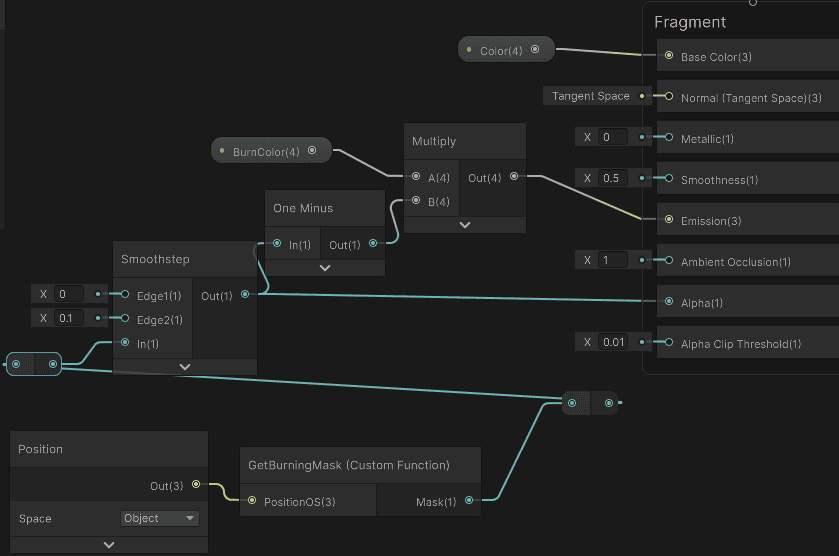
9.3 Masked particle spawn
Now I use the same noise function to control particle spawning. In the spawning compute shader, I read the object-space position, sample the bright mask values, and use them as each particle's spawn probability. Particles outside the moving bright strip do not spawn.
This is what changed in the particle spawning shader:
#include "BurningMask.hlsl"
#include "BurningMask.hlsl"
#include "BurningMask.hlsl"
Then I modified the spawn loop:
uint seed = particleSeed;
for (uint i = 0; i < spawnCount; i++)
{
seed += 0x3A3B7012u;
float3 bar = GetRandomBarycentric(seed);
float3 positionOS = bar.x * positionOS_0 + bar.y * positionOS_1 + bar.z * positionOS_2;
float burningMask = GetBurningMask(positionOS.xyz);
float probability = smoothstep(0.1, 0.0, burningMask) * smoothstep(-0.005, 0.0, burningMask);
bool shouldSpawn = probability > HashUintToFloat01(seed + 0x19A27E32u);
if (!shouldSpawn)
continue;
uint seed = particleSeed;
for (uint i = 0; i < spawnCount; i++)
{
seed += 0x3A3B7012u;
float3 bar = GetRandomBarycentric(seed);
float3 positionOS = bar.x * positionOS_0 + bar.y * positionOS_1 + bar.z * positionOS_2;
float burningMask = GetBurningMask(positionOS.xyz);
float probability = smoothstep(0.1, 0.0, burningMask) * smoothstep(-0.005, 0.0, burningMask);
bool shouldSpawn = probability > HashUintToFloat01(seed + 0x19A27E32u);
if (!shouldSpawn)
continue;
uint seed = particleSeed;
for (uint i = 0; i < spawnCount; i++)
{
seed += 0x3A3B7012u;
float3 bar = GetRandomBarycentric(seed);
float3 positionOS = bar.x * positionOS_0 + bar.y * positionOS_1 + bar.z * positionOS_2;
float burningMask = GetBurningMask(positionOS.xyz);
float probability = smoothstep(0.1, 0.0, burningMask) * smoothstep(-0.005, 0.0, burningMask);
bool shouldSpawn = probability > HashUintToFloat01(seed + 0x19A27E32u);
if (!shouldSpawn)
continue;
I also increased the particle spawn rate to 100000 per unit square. Most particles are culled during spawning, so the source rate needs to be high.
___
10. Performance
Finally, let's check particle performance. This is the profiled frame:
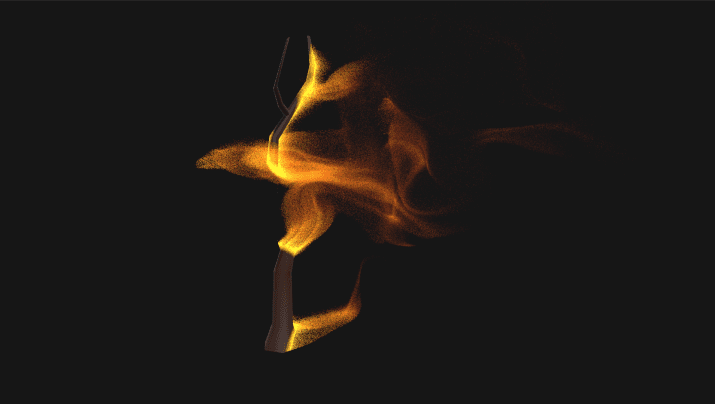
This frame had ~537,175 particles in the simulation, according to Nsight Graphics Debugger:
:center-px:

So:
Mesh spawning: 0.048ms
Preparing indirect arguments: 0.012ms
Simulating particles: 0.212ms
Rendering particles: 3.47ms
Spawning and simulating this many particles took about 0.27ms at the heaviest moment. Quite nice for half a million particles on RTX 3060. Rendering is the biggest issue here.
10.1 Particle spawn bottleneck
For particle spawning, most GPU units show low utilization, so workload distribution is the issue.
:center-px:
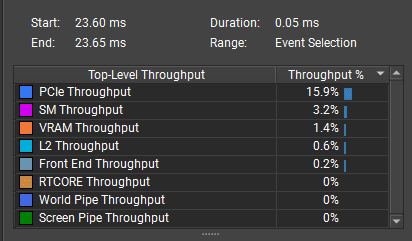
Spawning runs one thread per triangle, and this uses a low-poly mesh. There are not enough threads to occupy the GPU, but spawning is still fast.
Optimization ideas:
I could optimize it by using one thread per particle and using some acceleration structure to sample a random point from a mesh.
I would need to bake triangle areas into an array and use the areas to binary-search for a random triangle based on the areas.
10.2 Particle simulation bottleneck
Particle simulation is bottlenecked by VRAM memory access.
:center-px:
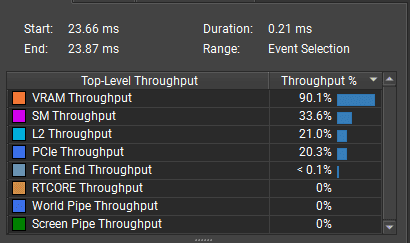
The biggest simulation bottleneck is the load operation, which happens in two places:
_InputParticleCount.Load(0) and _InputParticles.Consume()
:center-px:

To optimize this further, I would store the particle count in a constant buffer instead of Buffer<uint>.
I could also use groupshared memory to load data into L1 first, prepare particles in L1 cache, and submit them in one batch.
10.3 Rendering bottleneck
Rendering is the biggest issue. According to the GPU trace, the bottleneck is triangle and vertex processing. That makes sense: each particle is a small cube, and each particle covers only 1-4 pixels, so I draw about 3x more triangles than pixels:
:center-px:

:center-px:
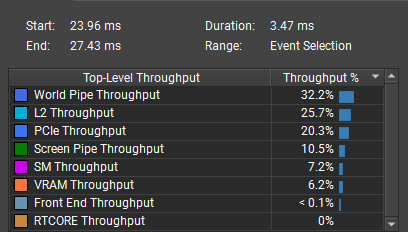
To optimize this, I would:
Render a quad instead of a cube for each particle.
Or use a compute shader to skip vertex/triangle shading entirely and, for small particles, write color directly into the target texture with random-access writes.
___
Optimization
The next article tackles these performance bottlenecks and makes particle rendering as fast as possible.
___
Source code
You can download the source code unitypackage here:
unitypackage
___
Summary
The most valuable part of this effect is the full GPU data flow. Spawning uses append buffers, simulation uses the consume-append pattern with ping-pong buffers, and rendering uses indirect arguments so the CPU does not need to know the particle count at all.
The mesh spawning part is also important. To spawn particles directly on a mesh, I need to read raw vertex and index buffers, understand vertex stride and attribute offsets, handle 16-bit and 32-bit indices, and use barycentric coordinates to place particles on triangles. Area-based spawning is the key step that changes the result from one particle per triangle into an even surface distribution.
For the final burning effect, the main idea is to share the same mask between the surface shader and the particle spawner. This keeps the dissolve and particle emission synchronized, so particles appear only where the burn line is visible.
The performance profile shows that spawning and simulation can be very cheap, while rendering many tiny mesh instances can quickly become the bottleneck. For small particles, the rendering representation matters as much as the simulation architecture.
___
Discuss this article live
If you are interested in building GPU particles, or GPU-driven pipeline in Unity, join the community discussion this Saturday at 15:00 CET.
We will walk through the stuff I implemented in this article, consume-append pipeline, mesh buffer decoding, and why rendering half a million cube instances cost 3.47ms while simulation stayed under 0.3ms.
Bring your questions or your own experiments!
Join the community →