In this article, I show how I built GPU-driven instance rendering in Unity. I paint a ground texture with the mouse, spawn instances from that texture on the GPU, frustum-cull them, and draw them with a single indirect call.
It is a custom rendering path where the CPU only orchestrates buffers and dispatches. The GPU does instance generation, culling, and the final draw count.
The goal of this article is to walk you through that pipeline step by step, from an empty scene to a working interactive demo of GPU-driven rendering in Unity. There is a source code to download at the end.
In this article:
The high-level concept, what "GPU-driven" means.
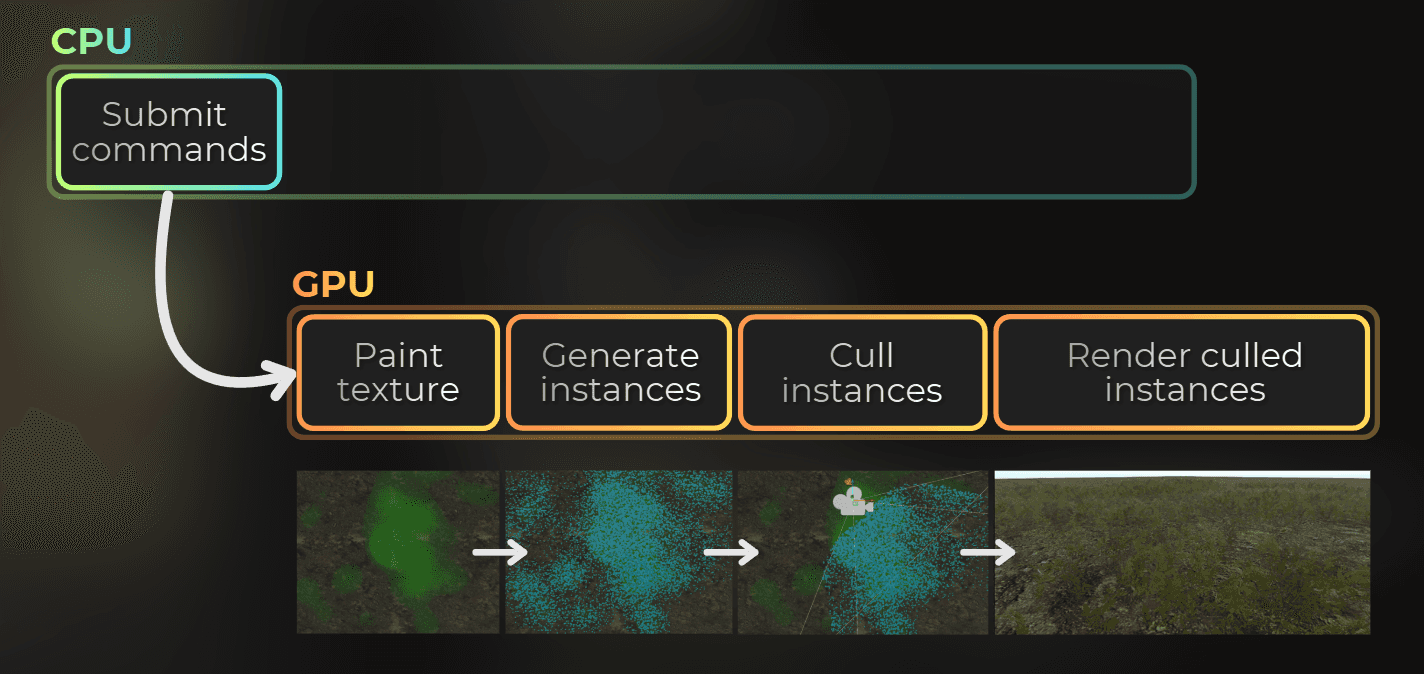
The five pipeline stages at a glance.
Step-by-step implementation with code.
Profiling setup and what I look for in the captures.
My setup:
Unity 6 with URP
Empty project
Prerequisites
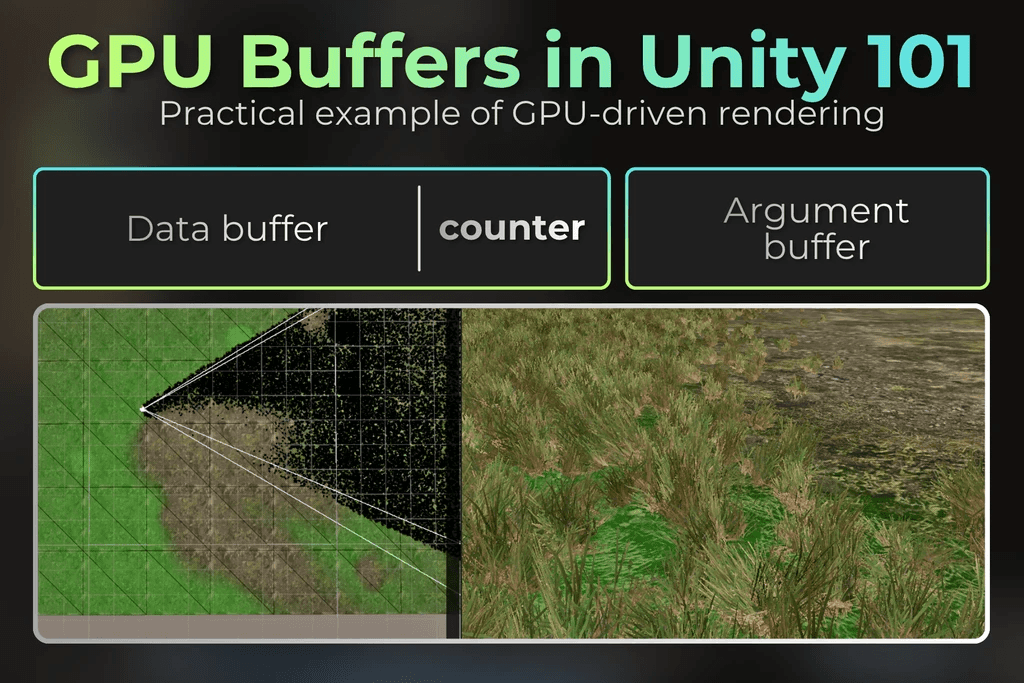
To understand this article fully, you should be familiar with different Buffer types on the GPU.
This short series of images will introduce you to the graphics buffers:
___
What is the goal?
I wanted a small interactive prototype where painting on the ground allows me to spawn instances of a mesh. Painting, spawning, and frustum culling happen entirely on the GPU.
A compute shader reads the hand-painted texture and appends instances into a GPU buffer, depending on the colors in this texture. Another compute pass reads the instances and removes the ones outside the camera frustum. The remaining instances are used in instanced rendering, where one Graphics.RenderMeshIndirect draws them all.

This is the same pattern I use in larger systems: terrain decoration, procedural foliage, GPU particles, decals - just simplified as much as possible.
___
The high-level concept
Traditional instancing in Unity, you build an array of transforms on the CPU, upload it, and call Graphics.RenderMeshInstanced. In this case, the CPU prepares all the instances, performs frustum culling, and sends this data to the GPU each frame.
In a GPU-driven pipeline, the instance list lives on the GPU from start to finish:
The GPU generates instances or uses existing instances stored in a graphics buffer.
The GPU uses the camera frustum to cull the instances.
The GPU renders the list of culled instances as opaque objects.
The CPU never knows how many instances survived culling. It only tells the GPU which buffers to use, what to copy and where, and what to render.
___
Implementation steps - high level
Before diving into code, here is what I will explain:
Ground plane and painting - display the paint texture on a ground mesh, then render brush strokes into it.
Instance generation - one compute thread per texture texel. Sample texture and append instances to a GPU buffer.
Indirect draw - indirect instance rendering based on the generated instances.
Frustum culling - cull instances by using indirect compute shader dispatch.
Indirect draw with culling - render culled instances based on the culling buffer and its instance counter.
Now let's build it. I will use Unity 6000.3.11 with URP.
___
Step 0: Setting up the rendering in Unity.
I start with an empty scene and one component: GPUDrivenInstanceRenderer. It subscribes to RenderPipelineManager.beginContextRendering and owns all buffers and textures.
The render loop splits into three calls per camera. Explanation in the code comments.
private void RenderPipelineManager_beginContextRendering(ScriptableRenderContext context, List<Camera> cameras)
{
foreach (var camera in cameras)
{
if (camera.cameraType == CameraType.Game)
PaintTexture(context, camera);
if (camera.cameraType == CameraType.SceneView || camera.cameraType == CameraType.Game)
{
RenderPlaneIntoCamera(context, camera);
RenderInstancesIntoCamera(context, camera
private void RenderPipelineManager_beginContextRendering(ScriptableRenderContext context, List<Camera> cameras)
{
foreach (var camera in cameras)
{
if (camera.cameraType == CameraType.Game)
PaintTexture(context, camera);
if (camera.cameraType == CameraType.SceneView || camera.cameraType == CameraType.Game)
{
RenderPlaneIntoCamera(context, camera);
RenderInstancesIntoCamera(context, camera
private void RenderPipelineManager_beginContextRendering(ScriptableRenderContext context, List<Camera> cameras)
{
foreach (var camera in cameras)
{
if (camera.cameraType == CameraType.Game)
PaintTexture(context, camera);
if (camera.cameraType == CameraType.SceneView || camera.cameraType == CameraType.Game)
{
RenderPlaneIntoCamera(context, camera);
RenderInstancesIntoCamera(context, camera
___
Step 1: Ground plane and painting
Step 1 has two parts. First I draw a ground plane into the camera so there is something visible in the scene. Then I paint into a RenderTexture that the ground shader samples. The R channel of that texture later drives spawn probability in the generate pass.
I explain the display path first because it is the simpler half: a normal mesh draw. Painting into the RT will be explained later.
Render the ground
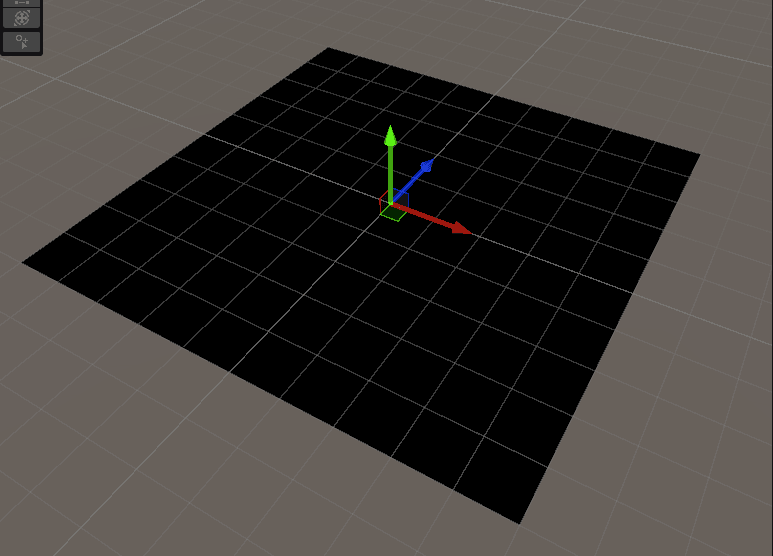
The ground is a built-in Plane mesh. It displays whatever is in paintTexture. At the start the texture is black, so you see a dark floor. Once painting works, strokes show up here automatically.
In OnEnable, when the component gets enabled, I allocate the paintTexture (R16G16B16A16_UNorm) and clear it to black:
paintTexture = new RenderTexture(
paintTextureResolution.x, paintTextureResolution.y,
GraphicsFormat.R16G16B16A16_UNorm, GraphicsFormat.None, 0);
paintTexture.Create();
var clearCmd = new CommandBuffer();
clearCmd.SetRenderTarget(paintTexture.colorBuffer, 0);
clearCmd.ClearRenderTarget(false, true, Color.black);
Graphics.ExecuteCommandBuffer(clearCmd);
clearCmd.Dispose
paintTexture = new RenderTexture(
paintTextureResolution.x, paintTextureResolution.y,
GraphicsFormat.R16G16B16A16_UNorm, GraphicsFormat.None, 0);
paintTexture.Create();
var clearCmd = new CommandBuffer();
clearCmd.SetRenderTarget(paintTexture.colorBuffer, 0);
clearCmd.ClearRenderTarget(false, true, Color.black);
Graphics.ExecuteCommandBuffer(clearCmd);
clearCmd.Dispose
paintTexture = new RenderTexture(
paintTextureResolution.x, paintTextureResolution.y,
GraphicsFormat.R16G16B16A16_UNorm, GraphicsFormat.None, 0);
paintTexture.Create();
var clearCmd = new CommandBuffer();
clearCmd.SetRenderTarget(paintTexture.colorBuffer, 0);
clearCmd.ClearRenderTarget(false, true, Color.black);
Graphics.ExecuteCommandBuffer(clearCmd);
clearCmd.Dispose
Then, each frame, RenderPlaneIntoCamera binds the runtime texture and draws the plane into the active camera:
private void RenderPlaneIntoCamera(ScriptableRenderContext context, Camera camera)
{
if (planeMaterial == null || planeMesh == null)
return;
planePropertyBlock.SetTexture(Uniforms._MainTex, paintTexture, RenderTextureSubElement.Color);
RenderParams renderParams = new RenderParams(planeMaterial);
renderParams.camera = camera;
renderParams.matProps = planePropertyBlock;
Graphics.RenderMesh(renderParams, planeMesh, 0, transform.localToWorldMatrix
private void RenderPlaneIntoCamera(ScriptableRenderContext context, Camera camera)
{
if (planeMaterial == null || planeMesh == null)
return;
planePropertyBlock.SetTexture(Uniforms._MainTex, paintTexture, RenderTextureSubElement.Color);
RenderParams renderParams = new RenderParams(planeMaterial);
renderParams.camera = camera;
renderParams.matProps = planePropertyBlock;
Graphics.RenderMesh(renderParams, planeMesh, 0, transform.localToWorldMatrix
private void RenderPlaneIntoCamera(ScriptableRenderContext context, Camera camera)
{
if (planeMaterial == null || planeMesh == null)
return;
planePropertyBlock.SetTexture(Uniforms._MainTex, paintTexture, RenderTextureSubElement.Color);
RenderParams renderParams = new RenderParams(planeMaterial);
renderParams.camera = camera;
renderParams.matProps = planePropertyBlock;
Graphics.RenderMesh(renderParams, planeMesh, 0, transform.localToWorldMatrix
The display shader is a normal URP unlit pass - sample _MainTex by mesh UV and output the color:
half4 frag(Varyings IN) : SV_Target
{
return pow(SAMPLE_TEXTURE2D(_MainTex, sampler_MainTex, IN.uv), 2.0
half4 frag(Varyings IN) : SV_Target
{
return pow(SAMPLE_TEXTURE2D(_MainTex, sampler_MainTex, IN.uv), 2.0
half4 frag(Varyings IN) : SV_Target
{
return pow(SAMPLE_TEXTURE2D(_MainTex, sampler_MainTex, IN.uv), 2.0
At this point you should see an empty ground plane in the game view. Nothing is painted yet, but the display path is working.
Paint into the texture
Now I add the brush. Each LMB stroke writes into paintTexture. PaintTexture raycasts onto the ground, then draws the plane mesh into the texture with a pooled CommandBuffer:
private void PaintTexture(ScriptableRenderContext context, Camera camera)
{
if (Mouse.current == null || !Mouse.current.leftButton.isPressed)
return;
Ray ray = camera.ScreenPointToRay(Mouse.current.position.ReadValue());
Plane yPlane = new Plane(Vector3.up, 0.0f);
if (!yPlane.Raycast(ray, out float entryDistance))
return;
CommandBuffer cmd = CommandBufferPool.Get(nameof(GPUDrivenInstanceRenderer) + "_Paint");
float3 hitPositionWS = ray.origin + ray.direction * entryDistance;
paintPropertyBlock.SetVector(Uniforms._HitPositionWS, float4(hitPositionWS, 1.0f));
paintPropertyBlock.SetVector(Uniforms._PaintColor, paintColor);
paintPropertyBlock.SetFloat(Uniforms._HitRadiusWS, paintRadiusWS);
paintPropertyBlock.SetFloat(Uniforms._HitAlphaWS,
1f - Mathf.Exp(-pow(paintRate, 2.0f) * Time.deltaTime));
cmd.SetRenderTarget(paintTexture.colorBuffer,
RenderBufferLoadAction.Load, RenderBufferStoreAction.Store);
cmd.DrawMesh(planeMesh, transform.localToWorldMatrix, paintMaterial, 0, 0, paintPropertyBlock);
context.ExecuteCommandBuffer(cmd);
CommandBufferPool.Release(cmd
private void PaintTexture(ScriptableRenderContext context, Camera camera)
{
if (Mouse.current == null || !Mouse.current.leftButton.isPressed)
return;
Ray ray = camera.ScreenPointToRay(Mouse.current.position.ReadValue());
Plane yPlane = new Plane(Vector3.up, 0.0f);
if (!yPlane.Raycast(ray, out float entryDistance))
return;
CommandBuffer cmd = CommandBufferPool.Get(nameof(GPUDrivenInstanceRenderer) + "_Paint");
float3 hitPositionWS = ray.origin + ray.direction * entryDistance;
paintPropertyBlock.SetVector(Uniforms._HitPositionWS, float4(hitPositionWS, 1.0f));
paintPropertyBlock.SetVector(Uniforms._PaintColor, paintColor);
paintPropertyBlock.SetFloat(Uniforms._HitRadiusWS, paintRadiusWS);
paintPropertyBlock.SetFloat(Uniforms._HitAlphaWS,
1f - Mathf.Exp(-pow(paintRate, 2.0f) * Time.deltaTime));
cmd.SetRenderTarget(paintTexture.colorBuffer,
RenderBufferLoadAction.Load, RenderBufferStoreAction.Store);
cmd.DrawMesh(planeMesh, transform.localToWorldMatrix, paintMaterial, 0, 0, paintPropertyBlock);
context.ExecuteCommandBuffer(cmd);
CommandBufferPool.Release(cmd
private void PaintTexture(ScriptableRenderContext context, Camera camera)
{
if (Mouse.current == null || !Mouse.current.leftButton.isPressed)
return;
Ray ray = camera.ScreenPointToRay(Mouse.current.position.ReadValue());
Plane yPlane = new Plane(Vector3.up, 0.0f);
if (!yPlane.Raycast(ray, out float entryDistance))
return;
CommandBuffer cmd = CommandBufferPool.Get(nameof(GPUDrivenInstanceRenderer) + "_Paint");
float3 hitPositionWS = ray.origin + ray.direction * entryDistance;
paintPropertyBlock.SetVector(Uniforms._HitPositionWS, float4(hitPositionWS, 1.0f));
paintPropertyBlock.SetVector(Uniforms._PaintColor, paintColor);
paintPropertyBlock.SetFloat(Uniforms._HitRadiusWS, paintRadiusWS);
paintPropertyBlock.SetFloat(Uniforms._HitAlphaWS,
1f - Mathf.Exp(-pow(paintRate, 2.0f) * Time.deltaTime));
cmd.SetRenderTarget(paintTexture.colorBuffer,
RenderBufferLoadAction.Load, RenderBufferStoreAction.Store);
cmd.DrawMesh(planeMesh, transform.localToWorldMatrix, paintMaterial, 0, 0, paintPropertyBlock);
context.ExecuteCommandBuffer(cmd);
CommandBufferPool.Release(cmd
Note - framerate-independent paint: I use 1 - exp(-rate² × dt) instead of a fixed alpha. At 30 FPS and 120 FPS the stroke builds up at the same speed.
I like to debug raycasts using Debug.DrawLine.
Paint shader
The vertex shader maps mesh UVs directly to clip space so one brush draw covers the whole texture. Then the texture gets painted based on the raycast hit position and the world-space position of the mesh vertex.
Varyings vert(Attributes IN)
{
Varyings OUT;
OUT.positionHCS = float4(IN.uv.xy * 2.0 - 1.0, 0.0, 1.0);
#if UNITY_UV_STARTS_AT_TOP
OUT.positionHCS.y *= -1.0;
#endif
OUT.positionWS = TransformObjectToWorld(IN.positionOS.xyz);
return OUT;
}
half4 frag(Varyings IN) : SV_Target
{
float distanceToHit = distance(_HitPositionWS.xyz, IN.positionWS.xyz);
float paintAlphaMask = smoothstep(_HitRadiusWS, 0.0, distanceToHit);
paintAlphaMask *= _HitAlphaWS;
float4 paintColor = _PaintColor;
paintColor.a *= paintAlphaMask;
return paintColor
Varyings vert(Attributes IN)
{
Varyings OUT;
OUT.positionHCS = float4(IN.uv.xy * 2.0 - 1.0, 0.0, 1.0);
#if UNITY_UV_STARTS_AT_TOP
OUT.positionHCS.y *= -1.0;
#endif
OUT.positionWS = TransformObjectToWorld(IN.positionOS.xyz);
return OUT;
}
half4 frag(Varyings IN) : SV_Target
{
float distanceToHit = distance(_HitPositionWS.xyz, IN.positionWS.xyz);
float paintAlphaMask = smoothstep(_HitRadiusWS, 0.0, distanceToHit);
paintAlphaMask *= _HitAlphaWS;
float4 paintColor = _PaintColor;
paintColor.a *= paintAlphaMask;
return paintColor
Varyings vert(Attributes IN)
{
Varyings OUT;
OUT.positionHCS = float4(IN.uv.xy * 2.0 - 1.0, 0.0, 1.0);
#if UNITY_UV_STARTS_AT_TOP
OUT.positionHCS.y *= -1.0;
#endif
OUT.positionWS = TransformObjectToWorld(IN.positionOS.xyz);
return OUT;
}
half4 frag(Varyings IN) : SV_Target
{
float distanceToHit = distance(_HitPositionWS.xyz, IN.positionWS.xyz);
float paintAlphaMask = smoothstep(_HitRadiusWS, 0.0, distanceToHit);
paintAlphaMask *= _HitAlphaWS;
float4 paintColor = _PaintColor;
paintColor.a *= paintAlphaMask;
return paintColor
Note - UNITY_UV_STARTS_AT_TOP: On D3D the RT origin is top-left. Without the Y-flip in the vertex shader, the result texture content is painted upside-down.
Here is how it works in action.
___
Step 2: Instance generation
What this step does
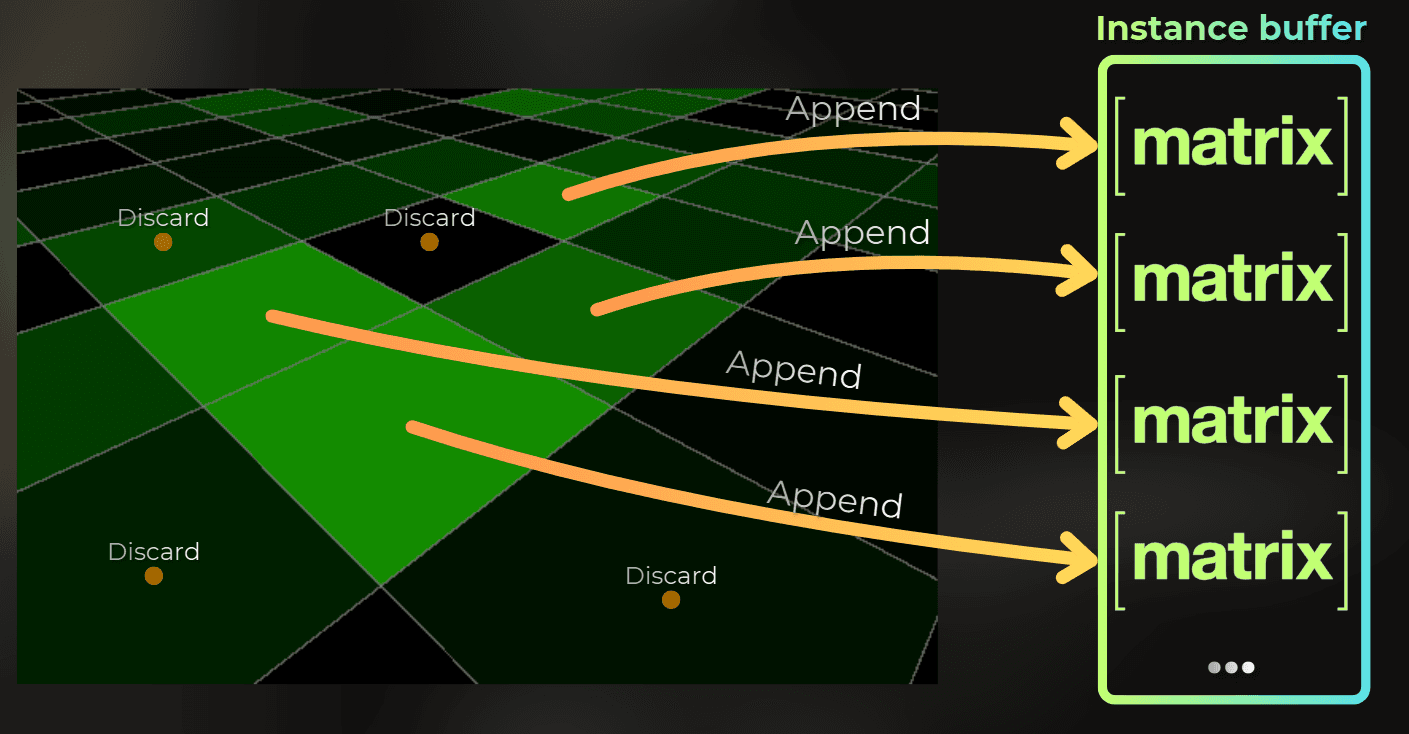
Now it is time to create a compute shader that will generate instances for rendering. A compute shader runs one thread per pixel of the paintTexture. Depending on the R channel value in the texture, it will build a transform matrix and append it into the instance buffer.
Data layout
[StructLayout(LayoutKind.Sequential)]
public struct InstanceData
{
public float4x4 modelMatrix;
public float4 color
[StructLayout(LayoutKind.Sequential)]
public struct InstanceData
{
public float4x4 modelMatrix;
public float4 color
[StructLayout(LayoutKind.Sequential)]
public struct InstanceData
{
public float4x4 modelMatrix;
public float4 color
Resources for the generate dispatch
The dispatch below uses paintTexture (from step 1), generateInstanceCompute (compute shader assigned in the Inspector), and instanceBuffer (created in OnEnable):
instanceBuffer = new GraphicsBuffer(
Target.Append | Target.Structured | Target.CopySource,
maxInstanceCount, UnsafeUtility.SizeOf<InstanceData
instanceBuffer = new GraphicsBuffer(
Target.Append | Target.Structured | Target.CopySource,
maxInstanceCount, UnsafeUtility.SizeOf<InstanceData
instanceBuffer = new GraphicsBuffer(
Target.Append | Target.Structured | Target.CopySource,
maxInstanceCount, UnsafeUtility.SizeOf<InstanceData
Target.Append lets the compute shader call Append(), so this buffer on the GPU behaves like a C# list where I can append elements from each compute shader thread. Target.CopySource lets me copy the append counter into drawArgsBuffer in step 3 and later into the cull dispatch args. maxInstanceCount is the upper bound. I set it high enough for the worst case at my generation resolution.
Each frame I reset the counter, bind the resources, and dispatch:
cmd.SetBufferCounterValue(instanceBuffer, 0u);
cmd.SetComputeTextureParam(generateInstanceCompute, 0, Uniforms._PaintTexture, paintTexture.colorBuffer);
cmd.SetComputeBufferParam(generateInstanceCompute, 0, Uniforms._InstanceBuffer, instanceBuffer);
cmd.SetComputeMatrixParam(generateInstanceCompute, Uniforms._PlaneLocalToWorldMatrix, transform.localToWorldMatrix);
cmd.SetComputeVectorParam(generateInstanceCompute, Uniforms._InstanceGenerationResolution,
new float4(instanceGenerationResolution, 0, 0));
uint3 threadGroupSize;
generateInstanceCompute.GetKernelThreadGroupSizes(0, out threadGroupSize.x, out threadGroupSize.y, out threadGroupSize.z);
int3 groupCount = ((int3(instanceGenerationResolution.xy, 1) - 1) / (int3)threadGroupSize) + 1;
cmd.DispatchCompute(generateInstanceCompute, 0, groupCount.x, groupCount.y, groupCount.z
cmd.SetBufferCounterValue(instanceBuffer, 0u);
cmd.SetComputeTextureParam(generateInstanceCompute, 0, Uniforms._PaintTexture, paintTexture.colorBuffer);
cmd.SetComputeBufferParam(generateInstanceCompute, 0, Uniforms._InstanceBuffer, instanceBuffer);
cmd.SetComputeMatrixParam(generateInstanceCompute, Uniforms._PlaneLocalToWorldMatrix, transform.localToWorldMatrix);
cmd.SetComputeVectorParam(generateInstanceCompute, Uniforms._InstanceGenerationResolution,
new float4(instanceGenerationResolution, 0, 0));
uint3 threadGroupSize;
generateInstanceCompute.GetKernelThreadGroupSizes(0, out threadGroupSize.x, out threadGroupSize.y, out threadGroupSize.z);
int3 groupCount = ((int3(instanceGenerationResolution.xy, 1) - 1) / (int3)threadGroupSize) + 1;
cmd.DispatchCompute(generateInstanceCompute, 0, groupCount.x, groupCount.y, groupCount.z
cmd.SetBufferCounterValue(instanceBuffer, 0u);
cmd.SetComputeTextureParam(generateInstanceCompute, 0, Uniforms._PaintTexture, paintTexture.colorBuffer);
cmd.SetComputeBufferParam(generateInstanceCompute, 0, Uniforms._InstanceBuffer, instanceBuffer);
cmd.SetComputeMatrixParam(generateInstanceCompute, Uniforms._PlaneLocalToWorldMatrix, transform.localToWorldMatrix);
cmd.SetComputeVectorParam(generateInstanceCompute, Uniforms._InstanceGenerationResolution,
new float4(instanceGenerationResolution, 0, 0));
uint3 threadGroupSize;
generateInstanceCompute.GetKernelThreadGroupSizes(0, out threadGroupSize.x, out threadGroupSize.y, out threadGroupSize.z);
int3 groupCount = ((int3(instanceGenerationResolution.xy, 1) - 1) / (int3)threadGroupSize) + 1;
cmd.DispatchCompute(generateInstanceCompute, 0, groupCount.x, groupCount.y, groupCount.z
Generate compute shader
Now it is time to write a compute shader that will generate the instances.
struct InstanceData
{
float4x4 modelMatrix;
float4 color;
};
AppendStructuredBuffer<InstanceData> _InstanceBuffer;
Texture2D _PaintTexture;
SamplerState linearClampSampler;
float4 _InstanceGenerationResolution;
float4x4 _PlaneLocalToWorldMatrix;
float4x4 _PlaneWorldToLocalMatrix;
[numthreads(8,8,1)]
void CSMain (uint3 id : SV_DispatchThreadID)
{
int2 pixelCoord = (int2)id.xy;
int2 generationResolution = (int2)round(_InstanceGenerationResolution.xy);
if (any(pixelCoord < int2(0, 0)) || any(pixelCoord >= generationResolution))
return;
float2 uv = (pixelCoord + 0.5) / (float2)generationResolution;
float2 hashPerInstance = FastHashInt2ToFloat2(id.xy * 7131);
float2 hashPerInstance2 = FastHashInt2ToFloat2(id.xy * 9315);
float4 paintTextureValue = _PaintTexture.SampleLevel(linearClampSampler, 1.0 - uv, 0);
if (hashPerInstance2.x > paintTextureValue.r)
return;
float3 positionOS = float3(uv.x * 2.0 - 1.0, 0.0, uv.y * 2.0 - 1.0);
positionOS *= 5.0f;
float4 positionWS = mul(_PlaneLocalToWorldMatrix, float4(positionOS.xyz, 1.0));
positionWS.xz += (hashPerInstance2.xy - 0.5) * 0.1;
float angle = hashPerInstance.x * 6.28;
float4 topDirectionWS = float4(0, 1, 0, 0);
float4 rightDirectionWS = float4(1, 0, 0, 0);
rightDirectionWS.xz = mul(float2x2(cos(angle), sin(angle), -sin(angle), cos(angle)), rightDirectionWS.xz);
float4 forwardDirection = float4(-rightDirectionWS.z, 0.0, rightDirectionWS.x, 0.0);
float scale = 0.1 * lerp(0.4, 1.0, hashPerInstance2.x);
float4x4 modelMatrix = transpose(float4x4(
rightDirectionWS * scale,
topDirectionWS * scale,
forwardDirection * scale,
float4(positionWS.xyz, 1.0)));
InstanceData instanceData;
instanceData.modelMatrix = modelMatrix;
instanceData.color = lerp(float4(0.4, 0.6, 0.2, 1.0), float4(0.9, 0.7, 0.0, 1.0), hashPerInstance2.y);
_InstanceBuffer.Append(instanceData
struct InstanceData
{
float4x4 modelMatrix;
float4 color;
};
AppendStructuredBuffer<InstanceData> _InstanceBuffer;
Texture2D _PaintTexture;
SamplerState linearClampSampler;
float4 _InstanceGenerationResolution;
float4x4 _PlaneLocalToWorldMatrix;
float4x4 _PlaneWorldToLocalMatrix;
[numthreads(8,8,1)]
void CSMain (uint3 id : SV_DispatchThreadID)
{
int2 pixelCoord = (int2)id.xy;
int2 generationResolution = (int2)round(_InstanceGenerationResolution.xy);
if (any(pixelCoord < int2(0, 0)) || any(pixelCoord >= generationResolution))
return;
float2 uv = (pixelCoord + 0.5) / (float2)generationResolution;
float2 hashPerInstance = FastHashInt2ToFloat2(id.xy * 7131);
float2 hashPerInstance2 = FastHashInt2ToFloat2(id.xy * 9315);
float4 paintTextureValue = _PaintTexture.SampleLevel(linearClampSampler, 1.0 - uv, 0);
if (hashPerInstance2.x > paintTextureValue.r)
return;
float3 positionOS = float3(uv.x * 2.0 - 1.0, 0.0, uv.y * 2.0 - 1.0);
positionOS *= 5.0f;
float4 positionWS = mul(_PlaneLocalToWorldMatrix, float4(positionOS.xyz, 1.0));
positionWS.xz += (hashPerInstance2.xy - 0.5) * 0.1;
float angle = hashPerInstance.x * 6.28;
float4 topDirectionWS = float4(0, 1, 0, 0);
float4 rightDirectionWS = float4(1, 0, 0, 0);
rightDirectionWS.xz = mul(float2x2(cos(angle), sin(angle), -sin(angle), cos(angle)), rightDirectionWS.xz);
float4 forwardDirection = float4(-rightDirectionWS.z, 0.0, rightDirectionWS.x, 0.0);
float scale = 0.1 * lerp(0.4, 1.0, hashPerInstance2.x);
float4x4 modelMatrix = transpose(float4x4(
rightDirectionWS * scale,
topDirectionWS * scale,
forwardDirection * scale,
float4(positionWS.xyz, 1.0)));
InstanceData instanceData;
instanceData.modelMatrix = modelMatrix;
instanceData.color = lerp(float4(0.4, 0.6, 0.2, 1.0), float4(0.9, 0.7, 0.0, 1.0), hashPerInstance2.y);
_InstanceBuffer.Append(instanceData
struct InstanceData
{
float4x4 modelMatrix;
float4 color;
};
AppendStructuredBuffer<InstanceData> _InstanceBuffer;
Texture2D _PaintTexture;
SamplerState linearClampSampler;
float4 _InstanceGenerationResolution;
float4x4 _PlaneLocalToWorldMatrix;
float4x4 _PlaneWorldToLocalMatrix;
[numthreads(8,8,1)]
void CSMain (uint3 id : SV_DispatchThreadID)
{
int2 pixelCoord = (int2)id.xy;
int2 generationResolution = (int2)round(_InstanceGenerationResolution.xy);
if (any(pixelCoord < int2(0, 0)) || any(pixelCoord >= generationResolution))
return;
float2 uv = (pixelCoord + 0.5) / (float2)generationResolution;
float2 hashPerInstance = FastHashInt2ToFloat2(id.xy * 7131);
float2 hashPerInstance2 = FastHashInt2ToFloat2(id.xy * 9315);
float4 paintTextureValue = _PaintTexture.SampleLevel(linearClampSampler, 1.0 - uv, 0);
if (hashPerInstance2.x > paintTextureValue.r)
return;
float3 positionOS = float3(uv.x * 2.0 - 1.0, 0.0, uv.y * 2.0 - 1.0);
positionOS *= 5.0f;
float4 positionWS = mul(_PlaneLocalToWorldMatrix, float4(positionOS.xyz, 1.0));
positionWS.xz += (hashPerInstance2.xy - 0.5) * 0.1;
float angle = hashPerInstance.x * 6.28;
float4 topDirectionWS = float4(0, 1, 0, 0);
float4 rightDirectionWS = float4(1, 0, 0, 0);
rightDirectionWS.xz = mul(float2x2(cos(angle), sin(angle), -sin(angle), cos(angle)), rightDirectionWS.xz);
float4 forwardDirection = float4(-rightDirectionWS.z, 0.0, rightDirectionWS.x, 0.0);
float scale = 0.1 * lerp(0.4, 1.0, hashPerInstance2.x);
float4x4 modelMatrix = transpose(float4x4(
rightDirectionWS * scale,
topDirectionWS * scale,
forwardDirection * scale,
float4(positionWS.xyz, 1.0)));
InstanceData instanceData;
instanceData.modelMatrix = modelMatrix;
instanceData.color = lerp(float4(0.4, 0.6, 0.2, 1.0), float4(0.9, 0.7, 0.0, 1.0), hashPerInstance2.y);
_InstanceBuffer.Append(instanceData
Note - UV flip on read only: I sample at 1.0 - uv but keep the original uv for world position. Flipping both would misalign instances on the plane. I do not fully know why I need to invert the UV in this scenario. I noticed it while debugging the shader because the UV was misaligned.
Note - transpose() on the model matrix: I build the matrix from row vectors (float4x4(row0, row1, row2, row3)). In HLSL, mul(matrix, vector) expects column-major layout, so I transpose the row-major matrix to make it column-major.
Note - stochastic spawn: hash.x > paint.r means a bright R channel spawns more instances per texel without a hard on/off threshold. It is important to use a deterministic hash or a kernel to make the spawn deterministic between devices.
Now I need to run the compute dispatch and check in the frame debugger if that works properly. This is GPU-driven rendering, so I need to use proper tools to inspect GPU memory during frame rendering.
I used Nsight Graphics Frame Debugger and connected the debugger to the game view in Unity. I found the dispatch:
:center-px:
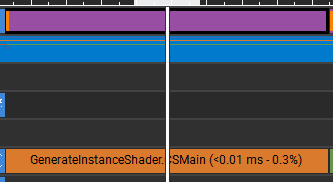
Now I need to check if it generated any instances. I will see that in API Inspector in Unordered Access Views, where my append buffer should be.
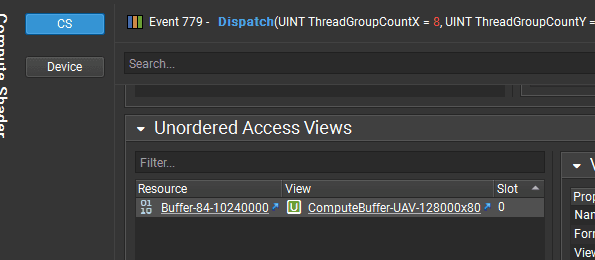
I can inspect the contents of this buffer using the Resource window:
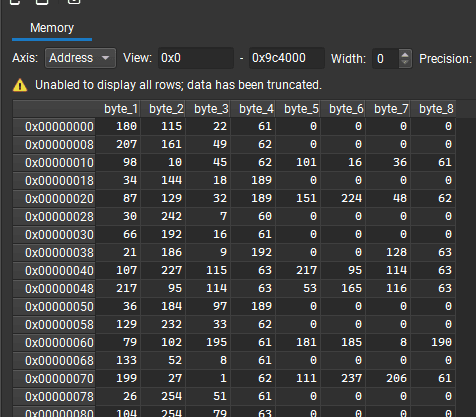
However, it is not very helpful, except that I can see some data. Luckily, I can configure the format of this buffer by using a "configure" button, where I can paste the struct used by this buffer in the compute shader.
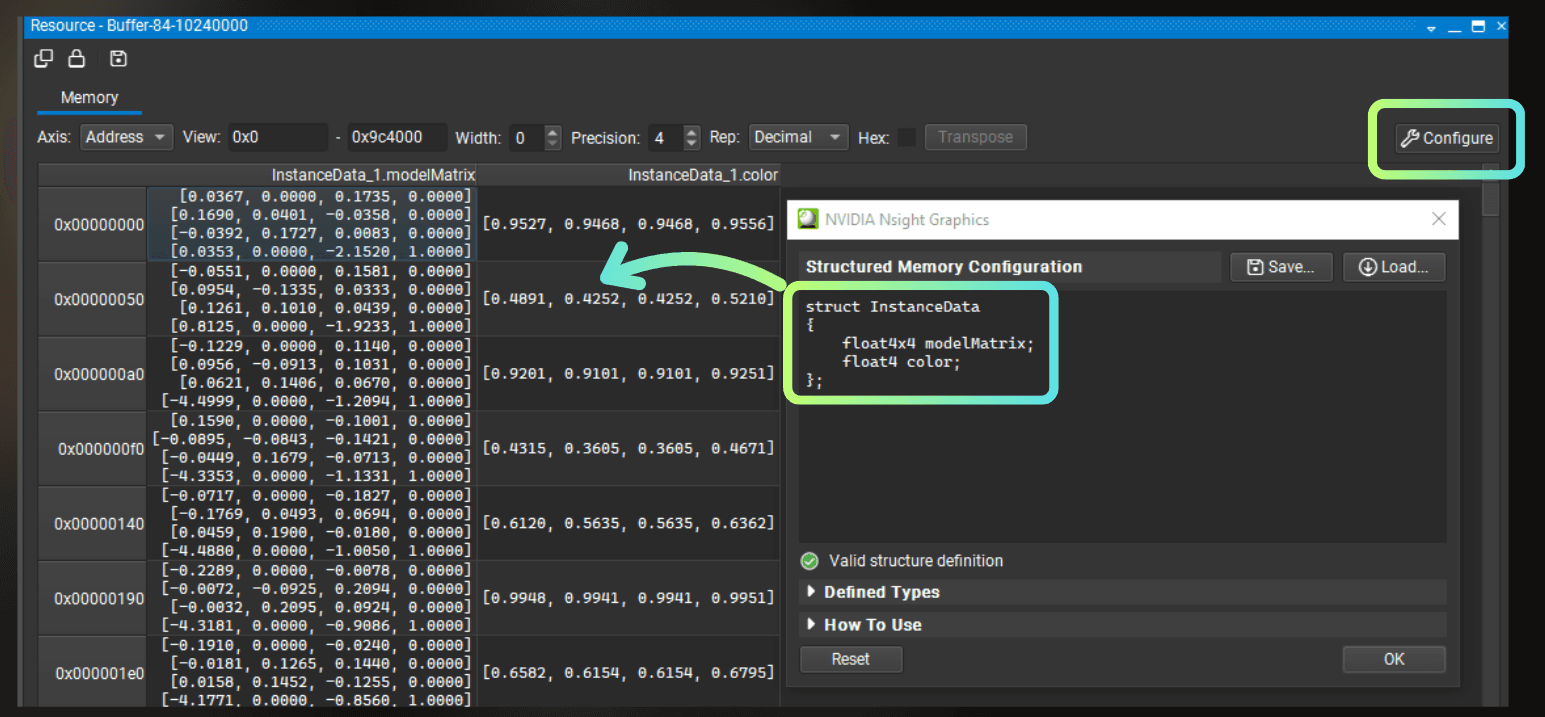
It looks like the instance generation works fine!
___
Step 3: Indirect draw (verify generation)
First I wanted to see instances on screen and confirm that generation, matrix layout, and UV mapping were correct. Only after trees showed up in the right places did I add frustum culling.
What this step does
For each draw call the GPU needs to know three things: which mesh to draw, how many of its triangles to render, and how many instances to draw.
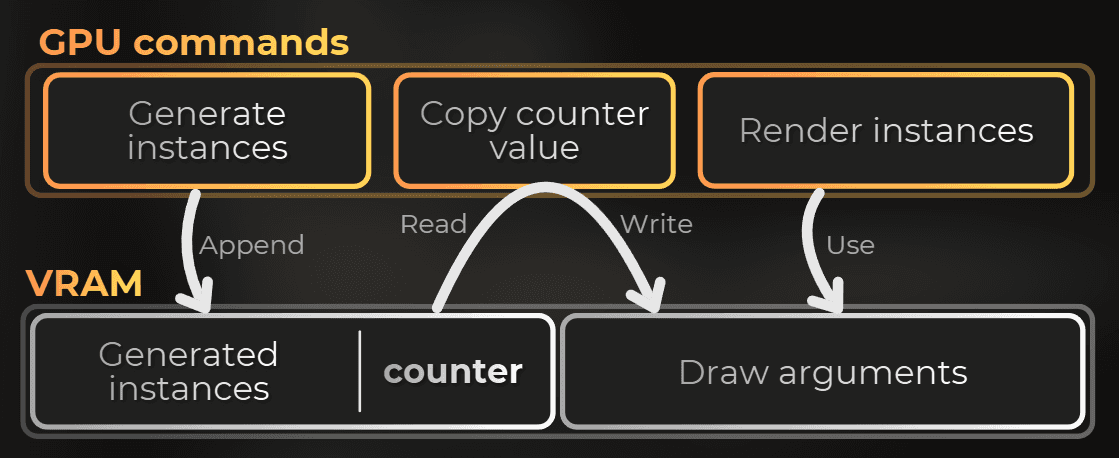
The instance count in my case comes from the generate pass append counter - the CPU never needs to know the final number. This number lives on the GPU and will be used by the GPU to render the next draw call.
This is what people call indirect or GPU-driven rendering. The draw arguments already live in a GPU buffer (drawArgsBuffer). Right before I issue the draw, I only tweak the fields that changed. Here it is instanceCount changed via CopyCounterValue command.
After the generate dispatch, I copy the instance append counter into drawArgsBuffer and call Graphics.RenderMeshIndirect. SV_InstanceID indexes instanceBuffer directly.
At this stage the flow is:
Resources for the draw
Besides instanceBuffer, this step needs drawArgsBuffer (created in OnEnable).
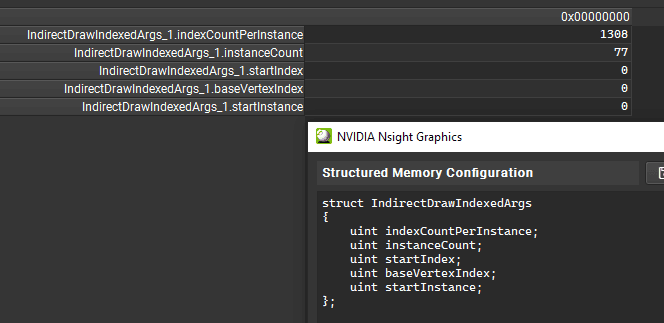
drawArgsBuffer is where the parameters for the indirect draw live.
The data format in the memory is:
public struct IndirectDrawIndexedArgs
{
	public uint indexCountPerInstance { get; set; }
	public uint instanceCount { get; set; }
	public uint startIndex { get; set; }
	public uint baseVertexIndex { get; set; }
	public uint startInstance { get; set
public struct IndirectDrawIndexedArgs
{
	public uint indexCountPerInstance { get; set; }
	public uint instanceCount { get; set; }
	public uint startIndex { get; set; }
	public uint baseVertexIndex { get; set; }
	public uint startInstance { get; set
public struct IndirectDrawIndexedArgs
{
	public uint indexCountPerInstance { get; set; }
	public uint instanceCount { get; set; }
	public uint startIndex { get; set; }
	public uint baseVertexIndex { get; set; }
	public uint startInstance { get; set
So I created a graphics buffer that will store the parameters:
drawArgsBuffer = new GraphicsBuffer(
Target.IndirectArguments | Target.CopyDestination,
1, IndirectDrawIndexedArgs.size
drawArgsBuffer = new GraphicsBuffer(
Target.IndirectArguments | Target.CopyDestination,
1, IndirectDrawIndexedArgs.size
drawArgsBuffer = new GraphicsBuffer(
Target.IndirectArguments | Target.CopyDestination,
1, IndirectDrawIndexedArgs.size

C# - draw args and indirect draw
Right after the generate dispatch, I prepare draw args and draw:
...
cmd.DispatchCompute(generateInstanceCompute, 0, groupCount.x, groupCount.y, groupCount.z);
cmd.SetBufferData(drawArgsBuffer, new IndirectDrawIndexedArgs[] { new IndirectDrawIndexedArgs()
{
indexCountPerInstance = instanceMesh.GetIndexCount(0),
instanceCount = 0,
startIndex = 0,
baseVertexIndex = 0,
startInstance = 0
}});
cmd.CopyCounterValue(instanceBuffer, drawArgsBuffer, sizeof(int));
context.ExecuteCommandBuffer(cmd);
CommandBufferPool.Release(cmd);
instancedRenderPropertyBlock.SetBuffer(Uniforms._InstanceBuffer, instanceBuffer);
RenderParams renderParams = new RenderParams(instanceMaterial);
renderParams.matProps = instancedRenderPropertyBlock;
renderParams.worldBounds = new Bounds(transform.position,
Vector3.Scale(new Vector3(10f, 1f, 10f), transform.lossyScale));
renderParams.camera = camera;
Graphics.RenderMeshIndirect(renderParams, instanceMesh, drawArgsBuffer
...
cmd.DispatchCompute(generateInstanceCompute, 0, groupCount.x, groupCount.y, groupCount.z);
cmd.SetBufferData(drawArgsBuffer, new IndirectDrawIndexedArgs[] { new IndirectDrawIndexedArgs()
{
indexCountPerInstance = instanceMesh.GetIndexCount(0),
instanceCount = 0,
startIndex = 0,
baseVertexIndex = 0,
startInstance = 0
}});
cmd.CopyCounterValue(instanceBuffer, drawArgsBuffer, sizeof(int));
context.ExecuteCommandBuffer(cmd);
CommandBufferPool.Release(cmd);
instancedRenderPropertyBlock.SetBuffer(Uniforms._InstanceBuffer, instanceBuffer);
RenderParams renderParams = new RenderParams(instanceMaterial);
renderParams.matProps = instancedRenderPropertyBlock;
renderParams.worldBounds = new Bounds(transform.position,
Vector3.Scale(new Vector3(10f, 1f, 10f), transform.lossyScale));
renderParams.camera = camera;
Graphics.RenderMeshIndirect(renderParams, instanceMesh, drawArgsBuffer
...
cmd.DispatchCompute(generateInstanceCompute, 0, groupCount.x, groupCount.y, groupCount.z);
cmd.SetBufferData(drawArgsBuffer, new IndirectDrawIndexedArgs[] { new IndirectDrawIndexedArgs()
{
indexCountPerInstance = instanceMesh.GetIndexCount(0),
instanceCount = 0,
startIndex = 0,
baseVertexIndex = 0,
startInstance = 0
}});
cmd.CopyCounterValue(instanceBuffer, drawArgsBuffer, sizeof(int));
context.ExecuteCommandBuffer(cmd);
CommandBufferPool.Release(cmd);
instancedRenderPropertyBlock.SetBuffer(Uniforms._InstanceBuffer, instanceBuffer);
RenderParams renderParams = new RenderParams(instanceMaterial);
renderParams.matProps = instancedRenderPropertyBlock;
renderParams.worldBounds = new Bounds(transform.position,
Vector3.Scale(new Vector3(10f, 1f, 10f), transform.lossyScale));
renderParams.camera = camera;
Graphics.RenderMeshIndirect(renderParams, instanceMesh, drawArgsBuffer
Note - worldBounds: RenderMeshIndirect has no per-instance CPU bounds. Unity uses RenderParams.worldBounds for coarse culling of the entire draw call.
Note - renderParams.camera: Without this, the draw may not show up in the intended camera's view.
Instance render shader
Now, to draw the instances I need to write a custom shader that will use the SV_InstanceID to get the instance data and move the vertices.
struct Attributes
{
float4 positionOS : POSITION;
float4 color : COLOR0;
float4 normalOS : NORMAL;
uint instanceID : SV_InstanceID;
};
struct InstanceData
{
float4x4 modelMatrix;
float4 color;
};
StructuredBuffer<InstanceData> _InstanceBuffer;
Varyings vert(Attributes IN)
{
Varyings OUT;
InstanceData instanceData = _InstanceBuffer[IN.instanceID];
float4 positionWS = mul(instanceData.modelMatrix, float4(IN.positionOS.xyz, 1.0));
float3 normalWS = normalize(mul(instanceData.modelMatrix, float4(IN.normalOS.xyz, 0.0)).xyz);
OUT.positionHCS = TransformWorldToHClip(positionWS.xyz);
OUT.color = IN.color * instanceData.color;
OUT.normalWS = normalWS;
return OUT;
}
half4 frag(Varyings IN) : SV_Target
{
half4 color = IN.color
* saturate(dot(normalize(float3(1.0, 1.0, 1.0)), IN.normalWS) * 0.5 + 0.5);
return color
struct Attributes
{
float4 positionOS : POSITION;
float4 color : COLOR0;
float4 normalOS : NORMAL;
uint instanceID : SV_InstanceID;
};
struct InstanceData
{
float4x4 modelMatrix;
float4 color;
};
StructuredBuffer<InstanceData> _InstanceBuffer;
Varyings vert(Attributes IN)
{
Varyings OUT;
InstanceData instanceData = _InstanceBuffer[IN.instanceID];
float4 positionWS = mul(instanceData.modelMatrix, float4(IN.positionOS.xyz, 1.0));
float3 normalWS = normalize(mul(instanceData.modelMatrix, float4(IN.normalOS.xyz, 0.0)).xyz);
OUT.positionHCS = TransformWorldToHClip(positionWS.xyz);
OUT.color = IN.color * instanceData.color;
OUT.normalWS = normalWS;
return OUT;
}
half4 frag(Varyings IN) : SV_Target
{
half4 color = IN.color
* saturate(dot(normalize(float3(1.0, 1.0, 1.0)), IN.normalWS) * 0.5 + 0.5);
return color
struct Attributes
{
float4 positionOS : POSITION;
float4 color : COLOR0;
float4 normalOS : NORMAL;
uint instanceID : SV_InstanceID;
};
struct InstanceData
{
float4x4 modelMatrix;
float4 color;
};
StructuredBuffer<InstanceData> _InstanceBuffer;
Varyings vert(Attributes IN)
{
Varyings OUT;
InstanceData instanceData = _InstanceBuffer[IN.instanceID];
float4 positionWS = mul(instanceData.modelMatrix, float4(IN.positionOS.xyz, 1.0));
float3 normalWS = normalize(mul(instanceData.modelMatrix, float4(IN.normalOS.xyz, 0.0)).xyz);
OUT.positionHCS = TransformWorldToHClip(positionWS.xyz);
OUT.color = IN.color * instanceData.color;
OUT.normalWS = normalWS;
return OUT;
}
half4 frag(Varyings IN) : SV_Target
{
half4 color = IN.color
* saturate(dot(normalize(float3(1.0, 1.0, 1.0)), IN.normalWS) * 0.5 + 0.5);
return color
If generation is wrong, you see it immediately here - instances at the origin, wrong rows, or nothing at all. I stayed on this step until painting and spawning looked correct.
I can also find the draw call in the Nsight Graphics:
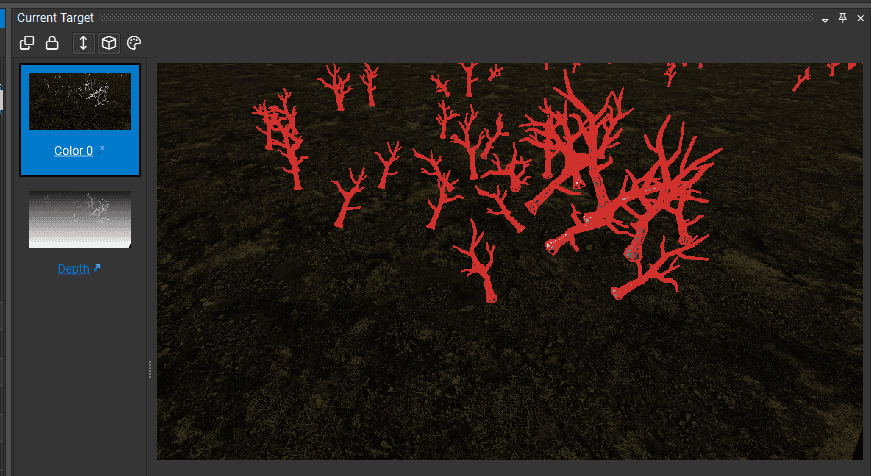
I can also peek the buffer used for the indirect draw arguments and see that the GPU was rendering 77 instances:
___
Step 4: Frustum culling
What this step does
Once generation looked correct, I added culling. Drawing generated instances when the camera looks in a completely different direction is wasteful. A compute pass tests each instance's bounding sphere against the six frustum planes and appends indices of survivors into cullingBuffer.
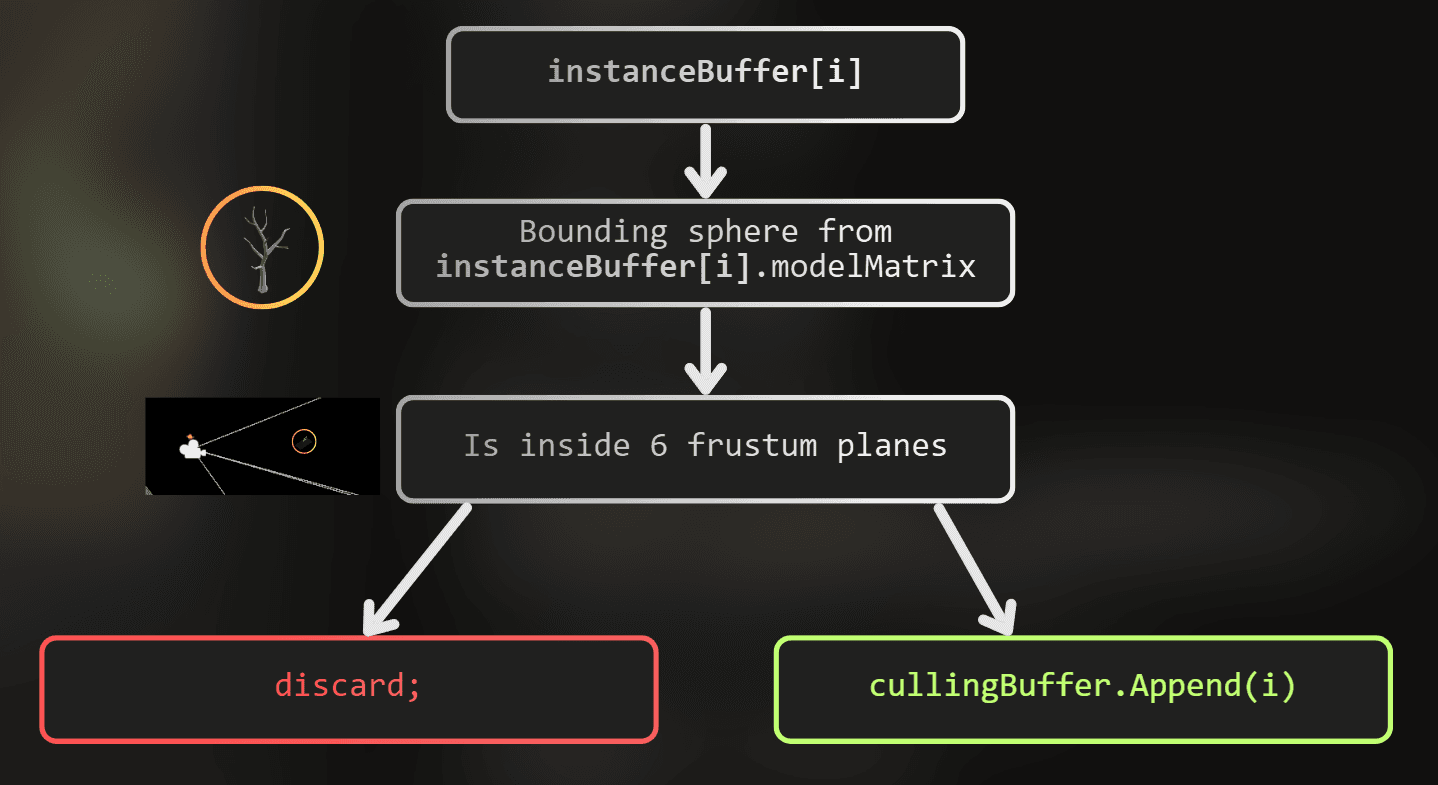
I append indices, not full InstanceData copies. The draw shader uses SV_InstanceID to index into cullingBuffer, then looks up the real instance.
Resources for culling
For culling, I need to allocate another buffer on the GPU:
cullingBuffer = new GraphicsBuffer(
Target.Append | Target.Structured,
maxInstanceCount, sizeof
cullingBuffer = new GraphicsBuffer(
Target.Append | Target.Structured,
maxInstanceCount, sizeof
cullingBuffer = new GraphicsBuffer(
Target.Append | Target.Structured,
maxInstanceCount, sizeof
Cull compute shader
This is the compute shader I will use.
struct InstanceData
{
float4x4 modelMatrix;
float4 color;
};
StructuredBuffer<InstanceData> _InstanceBuffer;
StructuredBuffer<uint4> _InstanceBufferCount;
AppendStructuredBuffer<uint> _CullingBuffer;
cbuffer C_CameraFrustumPlanes
{
float4 _FrustumPlane0;
float4 _FrustumPlane1;
float4 _FrustumPlane2;
float4 _FrustumPlane3;
float4 _FrustumPlane4;
float4 _FrustumPlane5;
}
bool TestPlane(float3 positionWS, float radius, float4 plane)
{
return dot(plane.xyz, positionWS) + plane.w >= -radius;
}
[numthreads(16,1,1)]
void CSMain (uint3 id : SV_DispatchThreadID)
{
int instanceBufferCount = (int)_InstanceBufferCount[0].x;
if ((int)id.x >= instanceBufferCount)
return;
InstanceData instanceData = _InstanceBuffer[id.x];
float4x4 modelMatrix = transpose(instanceData.modelMatrix);
float radius = 0.0f;
radius = max(radius, length(modelMatrix[0].xyz));
radius = max(radius, length(modelMatrix[1].xyz));
radius = max(radius, length(modelMatrix[2].xyz));
radius *= 5.0;
float3 positionWS = modelMatrix[3].xyz;
if (!TestPlane(positionWS, radius, _FrustumPlane0)) return;
if (!TestPlane(positionWS, radius, _FrustumPlane1)) return;
if (!TestPlane(positionWS, radius, _FrustumPlane2)) return;
if (!TestPlane(positionWS, radius, _FrustumPlane3)) return;
if (!TestPlane(positionWS, radius, _FrustumPlane4)) return;
if (!TestPlane(positionWS, radius, _FrustumPlane5)) return;
_CullingBuffer.Append(id.x
struct InstanceData
{
float4x4 modelMatrix;
float4 color;
};
StructuredBuffer<InstanceData> _InstanceBuffer;
StructuredBuffer<uint4> _InstanceBufferCount;
AppendStructuredBuffer<uint> _CullingBuffer;
cbuffer C_CameraFrustumPlanes
{
float4 _FrustumPlane0;
float4 _FrustumPlane1;
float4 _FrustumPlane2;
float4 _FrustumPlane3;
float4 _FrustumPlane4;
float4 _FrustumPlane5;
}
bool TestPlane(float3 positionWS, float radius, float4 plane)
{
return dot(plane.xyz, positionWS) + plane.w >= -radius;
}
[numthreads(16,1,1)]
void CSMain (uint3 id : SV_DispatchThreadID)
{
int instanceBufferCount = (int)_InstanceBufferCount[0].x;
if ((int)id.x >= instanceBufferCount)
return;
InstanceData instanceData = _InstanceBuffer[id.x];
float4x4 modelMatrix = transpose(instanceData.modelMatrix);
float radius = 0.0f;
radius = max(radius, length(modelMatrix[0].xyz));
radius = max(radius, length(modelMatrix[1].xyz));
radius = max(radius, length(modelMatrix[2].xyz));
radius *= 5.0;
float3 positionWS = modelMatrix[3].xyz;
if (!TestPlane(positionWS, radius, _FrustumPlane0)) return;
if (!TestPlane(positionWS, radius, _FrustumPlane1)) return;
if (!TestPlane(positionWS, radius, _FrustumPlane2)) return;
if (!TestPlane(positionWS, radius, _FrustumPlane3)) return;
if (!TestPlane(positionWS, radius, _FrustumPlane4)) return;
if (!TestPlane(positionWS, radius, _FrustumPlane5)) return;
_CullingBuffer.Append(id.x
struct InstanceData
{
float4x4 modelMatrix;
float4 color;
};
StructuredBuffer<InstanceData> _InstanceBuffer;
StructuredBuffer<uint4> _InstanceBufferCount;
AppendStructuredBuffer<uint> _CullingBuffer;
cbuffer C_CameraFrustumPlanes
{
float4 _FrustumPlane0;
float4 _FrustumPlane1;
float4 _FrustumPlane2;
float4 _FrustumPlane3;
float4 _FrustumPlane4;
float4 _FrustumPlane5;
}
bool TestPlane(float3 positionWS, float radius, float4 plane)
{
return dot(plane.xyz, positionWS) + plane.w >= -radius;
}
[numthreads(16,1,1)]
void CSMain (uint3 id : SV_DispatchThreadID)
{
int instanceBufferCount = (int)_InstanceBufferCount[0].x;
if ((int)id.x >= instanceBufferCount)
return;
InstanceData instanceData = _InstanceBuffer[id.x];
float4x4 modelMatrix = transpose(instanceData.modelMatrix);
float radius = 0.0f;
radius = max(radius, length(modelMatrix[0].xyz));
radius = max(radius, length(modelMatrix[1].xyz));
radius = max(radius, length(modelMatrix[2].xyz));
radius *= 5.0;
float3 positionWS = modelMatrix[3].xyz;
if (!TestPlane(positionWS, radius, _FrustumPlane0)) return;
if (!TestPlane(positionWS, radius, _FrustumPlane1)) return;
if (!TestPlane(positionWS, radius, _FrustumPlane2)) return;
if (!TestPlane(positionWS, radius, _FrustumPlane3)) return;
if (!TestPlane(positionWS, radius, _FrustumPlane4)) return;
if (!TestPlane(positionWS, radius, _FrustumPlane5)) return;
_CullingBuffer.Append(id.x
Note - transpose(modelMatrix) for position and radius: Reading original modelMatrix[3]returns a row instead of the column. I transpose before reading row lengths and the translation row.
Note - radius *= 5.0: The code assumes that the size of the model is 1 unit. Here I need to scale the bounding sphere further to encapsulate the whole model. In practice, you want to provide the model size from the mesh used for rendering. For now, to keep things simple, I just hardcoded the model size here.
Indirect compute dispatch
Before I can run the cull shader, there is a dispatch problem to solve.
DispatchCompute does not take an instance count. It takes a thread group count - how many groups of [numthreads(X,Y,Z)] to launch. My cull kernel uses [numthreads(16,1,1)], so 1000 instances need ceil(1000 / 16) = 63 groups in X, not 1000.
The instance count lives on the GPU inside the append counter. I do not want to read it back to the CPU every frame just to compute ceil(count / 16).
That is what compute dispatch is for. I run a tiny prep shader first. It reads the instance count and the culling compute kernel's thread group size, writes group counts into a GPU buffer, and then the cull dispatch reads those args:
cmd.DispatchCompute(instanceCullingCompute, 0, groupCountX, groupCountY, groupCountZ);
cmd.DispatchCompute(instanceCullingCompute, 0, indirectComputeArgsBuffer, 0
cmd.DispatchCompute(instanceCullingCompute, 0, groupCountX, groupCountY, groupCountZ);
cmd.DispatchCompute(instanceCullingCompute, 0, indirectComputeArgsBuffer, 0
cmd.DispatchCompute(instanceCullingCompute, 0, groupCountX, groupCountY, groupCountZ);
cmd.DispatchCompute(instanceCullingCompute, 0, indirectComputeArgsBuffer, 0
Same idea as RenderMeshIndirect, but for compute instead of draw.
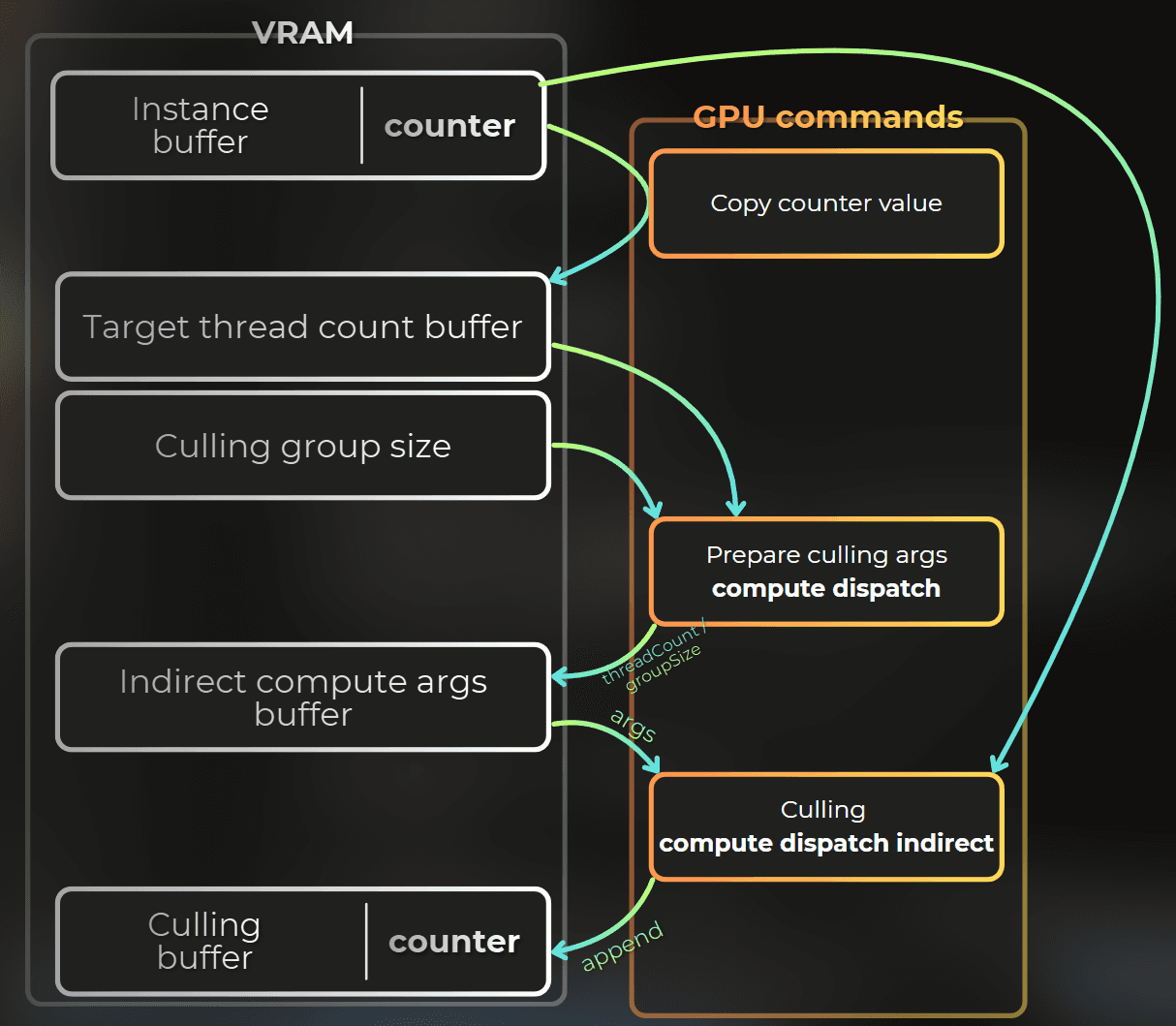
PrepareIndirectComputeArgs.compute
The role of this compute shader is to calculate the indirect compute args for the culling shader.
C_GroupSizes stores the thread group size of the culling shader.
_TargetThreadCount[0] is a target thread count.
_IndirectComputeArgs[0] are indirect dispatch arguments for the culling shader.
cbuffer C_GroupSizes
{
uint _GroupSizeX;
uint _GroupSizeY;
uint _GroupSizeZ;
uint _GroupSizesPadding;
}
StructuredBuffer<uint4> _TargetThreadCount;
RWStructuredBuffer<uint4> _IndirectComputeArgs;
[numthreads(1,1,1)]
void CSMain (uint3 id : SV_DispatchThreadID)
{
uint3 groupSize = uint3(_GroupSizeX, _GroupSizeY, _GroupSizeZ);
uint3 targetThreadCount = _TargetThreadCount[0].xyz;
uint3 groupCount = (targetThreadCount + groupSize - 1u) / groupSize;
_IndirectComputeArgs[0] = uint4(groupCount, 0
cbuffer C_GroupSizes
{
uint _GroupSizeX;
uint _GroupSizeY;
uint _GroupSizeZ;
uint _GroupSizesPadding;
}
StructuredBuffer<uint4> _TargetThreadCount;
RWStructuredBuffer<uint4> _IndirectComputeArgs;
[numthreads(1,1,1)]
void CSMain (uint3 id : SV_DispatchThreadID)
{
uint3 groupSize = uint3(_GroupSizeX, _GroupSizeY, _GroupSizeZ);
uint3 targetThreadCount = _TargetThreadCount[0].xyz;
uint3 groupCount = (targetThreadCount + groupSize - 1u) / groupSize;
_IndirectComputeArgs[0] = uint4(groupCount, 0
cbuffer C_GroupSizes
{
uint _GroupSizeX;
uint _GroupSizeY;
uint _GroupSizeZ;
uint _GroupSizesPadding;
}
StructuredBuffer<uint4> _TargetThreadCount;
RWStructuredBuffer<uint4> _IndirectComputeArgs;
[numthreads(1,1,1)]
void CSMain (uint3 id : SV_DispatchThreadID)
{
uint3 groupSize = uint3(_GroupSizeX, _GroupSizeY, _GroupSizeZ);
uint3 targetThreadCount = _TargetThreadCount[0].xyz;
uint3 groupCount = (targetThreadCount + groupSize - 1u) / groupSize;
_IndirectComputeArgs[0] = uint4(groupCount, 0
C# - prepare args dispatch
Resources for this pass (created in OnEnable):
targetThreadCountBuffer = new GraphicsBuffer(
	Target.Structured | Target.CopyDestination | Target.Raw, 1, UnsafeUtility.SizeOf<uint4>());
groupSizeCBuffer = new GraphicsBuffer(Target.Constant, 1, UnsafeUtility.SizeOf<uint4>());
indirectComputeArgsBuffer = new GraphicsBuffer(
	Target.Structured | Target.IndirectArguments, 1, UnsafeUtility.SizeOf<uint4
targetThreadCountBuffer = new GraphicsBuffer(
	Target.Structured | Target.CopyDestination | Target.Raw, 1, UnsafeUtility.SizeOf<uint4>());
groupSizeCBuffer = new GraphicsBuffer(Target.Constant, 1, UnsafeUtility.SizeOf<uint4>());
indirectComputeArgsBuffer = new GraphicsBuffer(
	Target.Structured | Target.IndirectArguments, 1, UnsafeUtility.SizeOf<uint4
targetThreadCountBuffer = new GraphicsBuffer(
	Target.Structured | Target.CopyDestination | Target.Raw, 1, UnsafeUtility.SizeOf<uint4>());
groupSizeCBuffer = new GraphicsBuffer(Target.Constant, 1, UnsafeUtility.SizeOf<uint4>());
indirectComputeArgsBuffer = new GraphicsBuffer(
	Target.Structured | Target.IndirectArguments, 1, UnsafeUtility.SizeOf<uint4
Each frame, after generating instances:
cmd.SetBufferData(targetThreadCountCBuffer, new uint4[] { uint4(1, 1, 1, 1) });
cmd.CopyCounterValue(instanceBuffer, targetThreadCountCBuffer, 0);
instanceCullingCompute.GetKernelThreadGroupSizes(0, out threadGroupSize.x, out threadGroupSize.y, out threadGroupSize.z);
cmd.SetBufferData(groupSizeCBuffer, new uint4[] { uint4(threadGroupSize.x, threadGroupSize.y, threadGroupSize.z, 0) });
cmd.SetComputeConstantBufferParam(prepareIndirectComputeArgsCompute, Uniforms.C_GroupSizes,
groupSizeCBuffer, 0, groupSizeCBuffer.stride);
cmd.SetComputeBufferParam(prepareIndirectComputeArgsCompute, 0, Uniforms._TargetThreadCount, targetThreadCountCBuffer);
cmd.SetComputeBufferParam(prepareIndirectComputeArgsCompute, 0, Uniforms._IndirectComputeArgs, indirectComputeArgsBuffer);
cmd.DispatchCompute(prepareIndirectComputeArgsCompute, 0, 1, 1, 1
cmd.SetBufferData(targetThreadCountCBuffer, new uint4[] { uint4(1, 1, 1, 1) });
cmd.CopyCounterValue(instanceBuffer, targetThreadCountCBuffer, 0);
instanceCullingCompute.GetKernelThreadGroupSizes(0, out threadGroupSize.x, out threadGroupSize.y, out threadGroupSize.z);
cmd.SetBufferData(groupSizeCBuffer, new uint4[] { uint4(threadGroupSize.x, threadGroupSize.y, threadGroupSize.z, 0) });
cmd.SetComputeConstantBufferParam(prepareIndirectComputeArgsCompute, Uniforms.C_GroupSizes,
groupSizeCBuffer, 0, groupSizeCBuffer.stride);
cmd.SetComputeBufferParam(prepareIndirectComputeArgsCompute, 0, Uniforms._TargetThreadCount, targetThreadCountCBuffer);
cmd.SetComputeBufferParam(prepareIndirectComputeArgsCompute, 0, Uniforms._IndirectComputeArgs, indirectComputeArgsBuffer);
cmd.DispatchCompute(prepareIndirectComputeArgsCompute, 0, 1, 1, 1
cmd.SetBufferData(targetThreadCountCBuffer, new uint4[] { uint4(1, 1, 1, 1) });
cmd.CopyCounterValue(instanceBuffer, targetThreadCountCBuffer, 0);
instanceCullingCompute.GetKernelThreadGroupSizes(0, out threadGroupSize.x, out threadGroupSize.y, out threadGroupSize.z);
cmd.SetBufferData(groupSizeCBuffer, new uint4[] { uint4(threadGroupSize.x, threadGroupSize.y, threadGroupSize.z, 0) });
cmd.SetComputeConstantBufferParam(prepareIndirectComputeArgsCompute, Uniforms.C_GroupSizes,
groupSizeCBuffer, 0, groupSizeCBuffer.stride);
cmd.SetComputeBufferParam(prepareIndirectComputeArgsCompute, 0, Uniforms._TargetThreadCount, targetThreadCountCBuffer);
cmd.SetComputeBufferParam(prepareIndirectComputeArgsCompute, 0, Uniforms._IndirectComputeArgs, indirectComputeArgsBuffer);
cmd.DispatchCompute(prepareIndirectComputeArgsCompute, 0, 1, 1, 1
Now indirectComputeArgsBuffer holds the group count. I can dispatch the cull shader.
C# - cull dispatch chain
Now I can dispatch the culling compute by binding all the resources and dispatching it indirectly:
var frustumPlanes = new CameraFrustumPlanes(GeometryUtility.CalculateFrustumPlanes(camera));
cmd.SetBufferData(cameraFrustumPlanesCBuffer, new CameraFrustumPlanes[] { frustumPlanes });
cmd.SetComputeConstantBufferParam(instanceCullingCompute, Uniforms.C_CameraFrustumPlanes,
cameraFrustumPlanesCBuffer, 0, cameraFrustumPlanesCBuffer.stride);
cmd.CopyCounterValue(instanceBuffer, instanceBufferCountCBuffer, 0);
cmd.SetComputeBufferParam(instanceCullingCompute, 0, Uniforms._InstanceBufferCount, instanceBufferCountCBuffer);
cmd.SetComputeBufferParam(instanceCullingCompute, 0, Uniforms._InstanceBuffer, instanceBuffer);
cmd.SetBufferCounterValue(cullingBuffer, 0);
cmd.SetComputeBufferParam(instanceCullingCompute, 0, Uniforms._CullingBuffer, cullingBuffer);
cmd.DispatchCompute(instanceCullingCompute, 0, indirectComputeArgsBuffer, 0
var frustumPlanes = new CameraFrustumPlanes(GeometryUtility.CalculateFrustumPlanes(camera));
cmd.SetBufferData(cameraFrustumPlanesCBuffer, new CameraFrustumPlanes[] { frustumPlanes });
cmd.SetComputeConstantBufferParam(instanceCullingCompute, Uniforms.C_CameraFrustumPlanes,
cameraFrustumPlanesCBuffer, 0, cameraFrustumPlanesCBuffer.stride);
cmd.CopyCounterValue(instanceBuffer, instanceBufferCountCBuffer, 0);
cmd.SetComputeBufferParam(instanceCullingCompute, 0, Uniforms._InstanceBufferCount, instanceBufferCountCBuffer);
cmd.SetComputeBufferParam(instanceCullingCompute, 0, Uniforms._InstanceBuffer, instanceBuffer);
cmd.SetBufferCounterValue(cullingBuffer, 0);
cmd.SetComputeBufferParam(instanceCullingCompute, 0, Uniforms._CullingBuffer, cullingBuffer);
cmd.DispatchCompute(instanceCullingCompute, 0, indirectComputeArgsBuffer, 0
var frustumPlanes = new CameraFrustumPlanes(GeometryUtility.CalculateFrustumPlanes(camera));
cmd.SetBufferData(cameraFrustumPlanesCBuffer, new CameraFrustumPlanes[] { frustumPlanes });
cmd.SetComputeConstantBufferParam(instanceCullingCompute, Uniforms.C_CameraFrustumPlanes,
cameraFrustumPlanesCBuffer, 0, cameraFrustumPlanesCBuffer.stride);
cmd.CopyCounterValue(instanceBuffer, instanceBufferCountCBuffer, 0);
cmd.SetComputeBufferParam(instanceCullingCompute, 0, Uniforms._InstanceBufferCount, instanceBufferCountCBuffer);
cmd.SetComputeBufferParam(instanceCullingCompute, 0, Uniforms._InstanceBuffer, instanceBuffer);
cmd.SetBufferCounterValue(cullingBuffer, 0);
cmd.SetComputeBufferParam(instanceCullingCompute, 0, Uniforms._CullingBuffer, cullingBuffer);
cmd.DispatchCompute(instanceCullingCompute, 0, indirectComputeArgsBuffer, 0
After culling is done, I copy the element counter from the cullingBuffer into indirect draw arguments.
cmd.SetBufferData(drawArgsBuffer, new IndirectDrawIndexedArgs[] { new IndirectDrawIndexedArgs()
{
indexCountPerInstance = instanceMesh.GetIndexCount(0),
instanceCount = 0,
startIndex = 0,
baseVertexIndex = 0,
startInstance = 0
}});
cmd.CopyCounterValue(cullingBuffer, drawArgsBuffer, sizeof
cmd.SetBufferData(drawArgsBuffer, new IndirectDrawIndexedArgs[] { new IndirectDrawIndexedArgs()
{
indexCountPerInstance = instanceMesh.GetIndexCount(0),
instanceCount = 0,
startIndex = 0,
baseVertexIndex = 0,
startInstance = 0
}});
cmd.CopyCounterValue(cullingBuffer, drawArgsBuffer, sizeof
cmd.SetBufferData(drawArgsBuffer, new IndirectDrawIndexedArgs[] { new IndirectDrawIndexedArgs()
{
indexCountPerInstance = instanceMesh.GetIndexCount(0),
instanceCount = 0,
startIndex = 0,
baseVertexIndex = 0,
startInstance = 0
}});
cmd.CopyCounterValue(cullingBuffer, drawArgsBuffer, sizeof
Draw count now reflects visible instances, not total generated instances.
___
Step 5: Indirect draw with culling
What this step does
The draw path from step 3 stays the same, but the vertex shader and buffer bindings change. instanceCount in drawArgsBuffer now comes from the cull append counter. SV_InstanceID indexes the culled list, not the raw instance buffer.
So to access the instance, I no longer do this:
InstanceData instanceData = _InstanceBuffer[IN.instanceID
InstanceData instanceData = _InstanceBuffer[IN.instanceID
InstanceData instanceData = _InstanceBuffer[IN.instanceID
But I do this instead:
InstanceData instanceData = _InstanceBuffer[_CullingBuffer[IN.instanceID
InstanceData instanceData = _InstanceBuffer[_CullingBuffer[IN.instanceID
InstanceData instanceData = _InstanceBuffer[_CullingBuffer[IN.instanceID
Instance render shader (with culling)
For the shader that renders the instances, I modified how the instances are accessed by fetching the instance ID from _CullingBuffer.
StructuredBuffer<InstanceData> _InstanceBuffer;
StructuredBuffer<uint> _CullingBuffer;
Varyings vert(Attributes IN)
{
Varyings OUT;
InstanceData instanceData = _InstanceBuffer[_CullingBuffer[IN.instanceID]];
StructuredBuffer<InstanceData> _InstanceBuffer;
StructuredBuffer<uint> _CullingBuffer;
Varyings vert(Attributes IN)
{
Varyings OUT;
InstanceData instanceData = _InstanceBuffer[_CullingBuffer[IN.instanceID]];
StructuredBuffer<InstanceData> _InstanceBuffer;
StructuredBuffer<uint> _CullingBuffer;
Varyings vert(Attributes IN)
{
Varyings OUT;
InstanceData instanceData = _InstanceBuffer[_CullingBuffer[IN.instanceID]];
C# draw call (updated bindings)
Now the last thing was to update the bindings for the instance rendering shader:
instancedRenderPropertyBlock.SetBuffer(Uniforms._InstanceBuffer, instanceBuffer);
instancedRenderPropertyBlock.SetBuffer(Uniforms._CullingBuffer, cullingBuffer
instancedRenderPropertyBlock.SetBuffer(Uniforms._InstanceBuffer, instanceBuffer);
instancedRenderPropertyBlock.SetBuffer(Uniforms._CullingBuffer, cullingBuffer
instancedRenderPropertyBlock.SetBuffer(Uniforms._InstanceBuffer, instanceBuffer);
instancedRenderPropertyBlock.SetBuffer(Uniforms._CullingBuffer, cullingBuffer
Sweet. Painting the texture, generating instances, culling them, and rendering are all happening on the GPU.
Profiling
Now it is time to check whether this pipeline is actually cheap enough. I treat this like any other rendering feature: markers first, then a development build, then the GPU profiler.
Adding CPU markers
I split the frame into the three passes I care about:
private static class Markers
{
public static readonly ProfilerMarker GPUDrivenInstancedRendering = new ProfilerMarker(nameof(GPUDrivenInstancedRendering));
public static readonly ProfilerMarker PaintTexture = new ProfilerMarker(nameof(PaintTexture));
public static readonly ProfilerMarker RenderPlane = new ProfilerMarker(nameof(RenderPlane));
public static readonly ProfilerMarker RenderInstances = new ProfilerMarker(nameof(RenderInstances
private static class Markers
{
public static readonly ProfilerMarker GPUDrivenInstancedRendering = new ProfilerMarker(nameof(GPUDrivenInstancedRendering));
public static readonly ProfilerMarker PaintTexture = new ProfilerMarker(nameof(PaintTexture));
public static readonly ProfilerMarker RenderPlane = new ProfilerMarker(nameof(RenderPlane));
public static readonly ProfilerMarker RenderInstances = new ProfilerMarker(nameof(RenderInstances
private static class Markers
{
public static readonly ProfilerMarker GPUDrivenInstancedRendering = new ProfilerMarker(nameof(GPUDrivenInstancedRendering));
public static readonly ProfilerMarker PaintTexture = new ProfilerMarker(nameof(PaintTexture));
public static readonly ProfilerMarker RenderPlane = new ProfilerMarker(nameof(RenderPlane));
public static readonly ProfilerMarker RenderInstances = new ProfilerMarker(nameof(RenderInstances
And I wrapped the respective code section with those profiling markers.
What I look for on the CPU
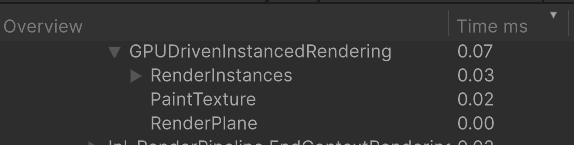
The whole point of this technique is keeping the CPU out of the instance list. I measured a stable 0.06-0.10ms for GPU-driven rendering on the CPU. As expected, the CPU is just scheduling the pipeline, which is quite quick. I also measured that in the editor, so I expect it to be even faster in a build.
Measured on i5-10400F.
:center-px:
GPU profiling setup
For the GPU side I use Nvidia Nsight Graphics. I profile this view while painting with a small brush:
My benchmark scene:
instanceGenerationResolution = 512x512 (max ~256k instances)
paint texture: 256x256
About 1/3 of the plane is covered with instances
Culling should remove about half of the instances
GPU: RTX 3060 12GB
Painting the texture
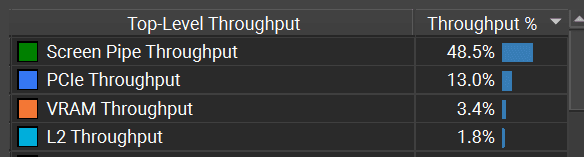
The draw call that paints the texture happens in basically no time, with a bottleneck on writing the pixels. It can get faster only if I reduce the precision of the texture format.
:center-px:
:center-px:

Compute shaders
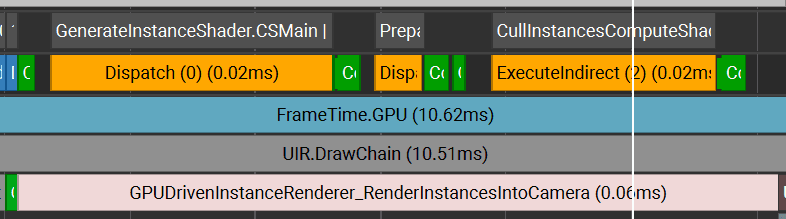
Compute shaders run quite fast. Instance creation for 256k instances takes ~0.02ms. Culling is very similar. Whole instance generation with culling takes ~0.06ms.
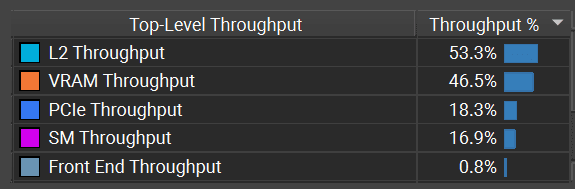
The instance generation bottleneck is on L2 cache and VRAM, so the only way to optimize it is to reduce the amount of data read from the texture or created per instance. For example, reduce the precision of the paint texture, lower the precision of the instance attributes, or encode instance data differently.
:center-px:
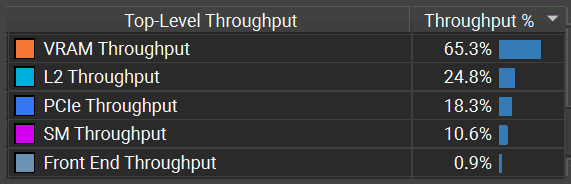
For culling, the problem is only on the VRAM:
:center-px:
Instance render time
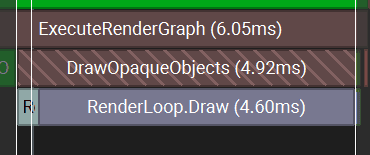
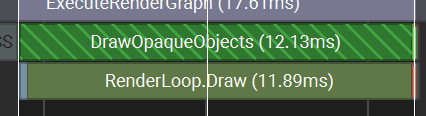
Instance render time depends on the instance count, mesh complexity, the size of each instance on the screen, and shader complexity.
Here I have a very simple shader with no lighting, with a bottleneck on drawing too many pixels.
:center-px:
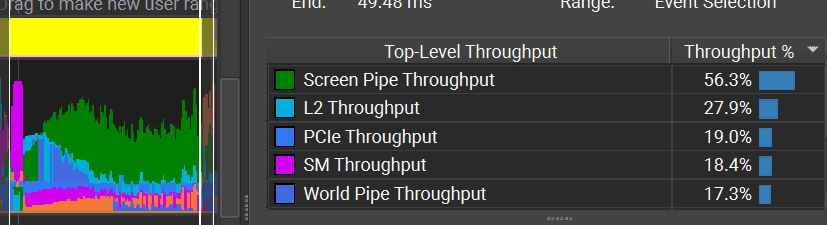
If the shader is more complex and includes lighting, the render time can be higher.
With this type of rendering, you need to be very careful with the instance count. It is useful to implement some LOD or to "shrink" or cull instances away from the camera. Otherwise, it can get quite costly when the instance count explodes.
:center-px:
___
Summary
This prototype shows the core shape of a GPU-driven instance renderer in Unity. It explains how to configure indirect dispatches of compute shaders and instanced draw calls to create fully GPU driven pipeline.
Paint into a runtime texture.
Generate instance data from that texture in a compute shader.
Copy GPU counters into indirect argument buffers.
Cull generated instances on the GPU.
Draw only the visible instances with Graphics.RenderMeshIndirect.
The important idea is that the CPU does not build, filter, or count the instance list. It only schedules the passes and binds the buffers. The GPU owns the heavy part: generation, culling, draw count, and rendering.
This makes the CPU cost small and predictable, but it does not make the feature free. The GPU still pays for texture reads, buffer writes, culling, vertex processing, and overdraw. If the instance count grows too much, you still need practical controls like density limits, LOD, distance fading, better culling, or more compact instance data.
For me, this is the main value of the technique. It gives me a flexible rendering pattern that works well for procedural foliage, decals, particles, terrain details, and other systems where the visible instance list changes every frame.
___
Source code
You can find the source code, as Unitypackage, here:
Download unitypackage for Unity 6000.3.11f1 URP