Intro
In my free time, I like to experiment with my own physics engines. Lately, during a game jam, I used my own verlet solver that uses static SDF's as a colliders. This lets me model the world with boolean operators.
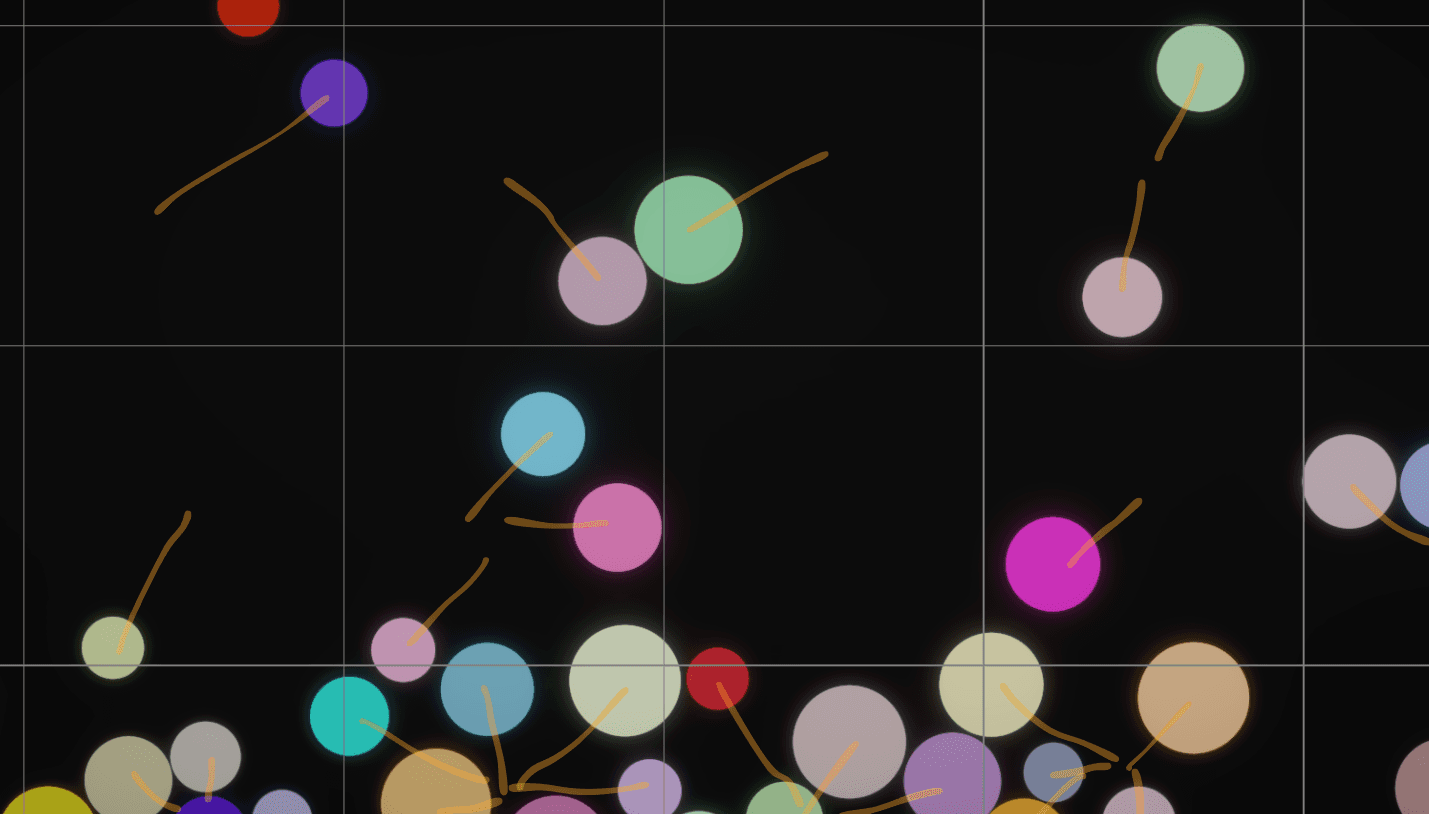
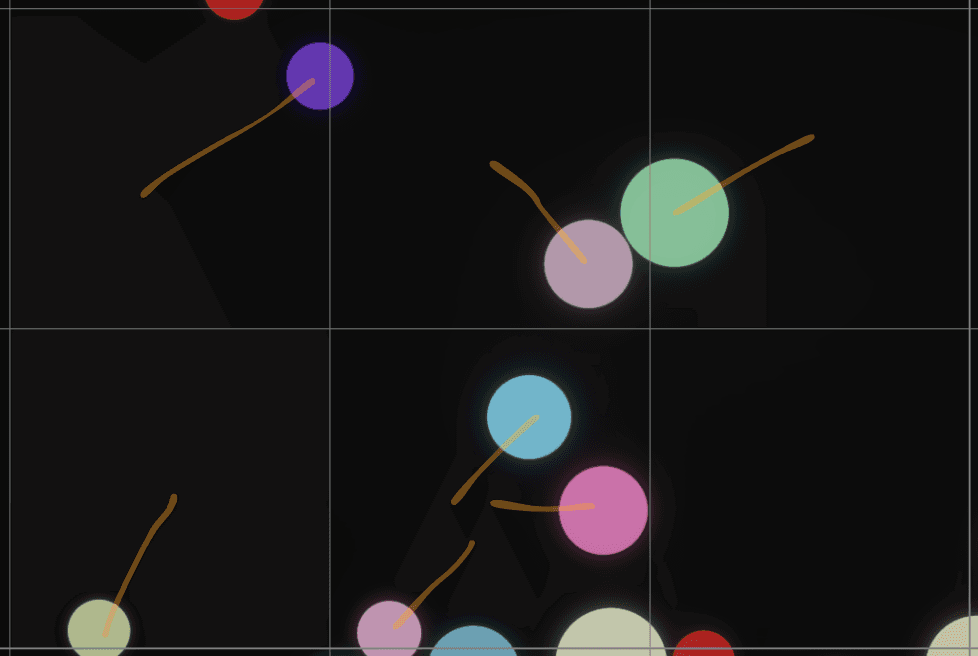
Below you can see a simulation with 1000 objects.
Here I will show you how I optimized dynamic collisions in this solver. The optimization I implemented here is simple and can be used in many game development scenarios.
___
How my physics solver works
This physics engine evaluates a few steps:
Velocity integration - each object is moved according to its velocity
Static collisions - each object is tested against static colliders. This is where friction and bounciness are calculated.
Dynamic collisions - each object is tested against each other object
Constraints - specific features are evaluated here, like distance joints, springs, additional forces, etc.
Solve invalid positions - moving objects out of static colliders (no friction or bounciness is evaluated here)
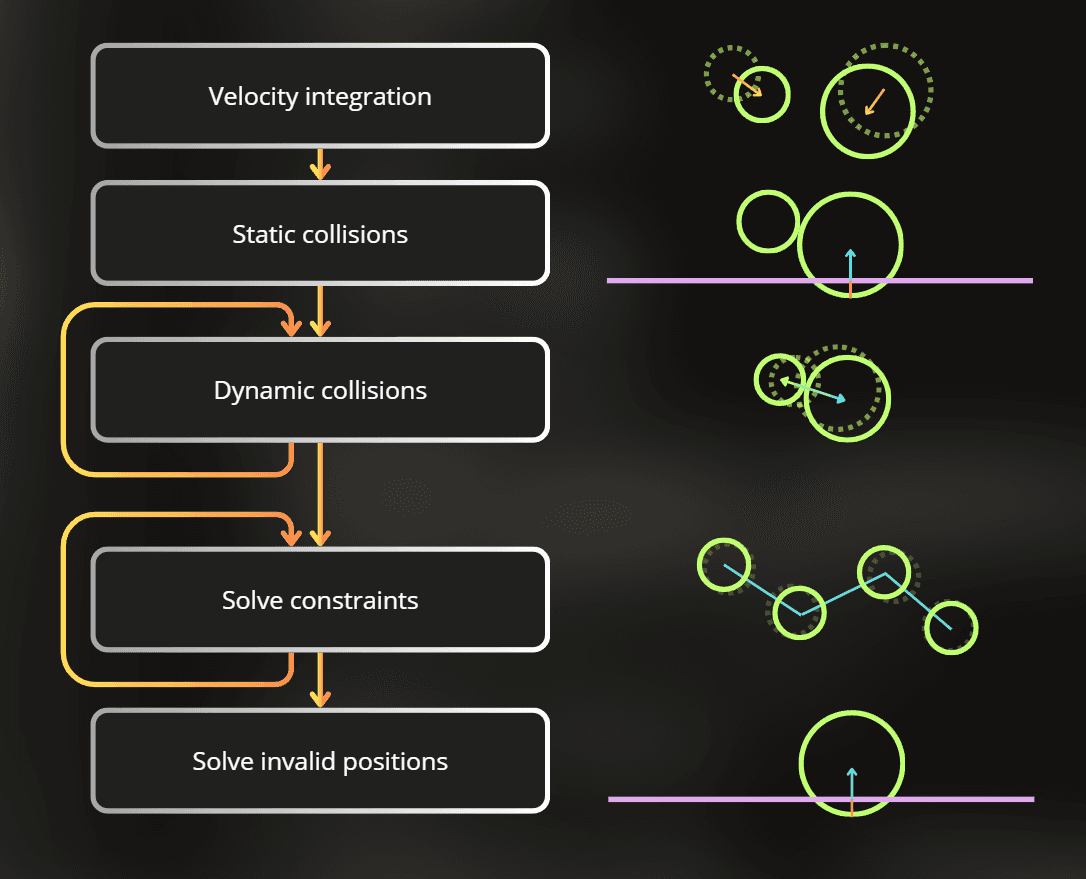
Each step is multithreaded and uses the Unity Job System with the Burst compiler.
Implementation of those steps looks like this:
public JobHandle ScheduleRun()
{
fixed (VerletSolver* solver = &this)
{
var solveVelocityHandle = new SolveVelocityJob(solver).Schedule(objects->Length, 64);
var solveStaticCollisionsHandle = new SolveStaticCollisionJob(solver).Schedule(objects->Length, 64, solveVelocityHandle);
var dynamicCollisionHandle = solveStaticCollisionsHandle;
for (int i = 0; i < GetDynamicCollisionIterations(parameters); i++)
{
var solveDynamicCollisionsHandle = new DynamicCollisionsWithoutCullingJob(solver).Schedule(objects->Length, 64, dynamicCollisionHandle);
dynamicCollisionHandle = new IntegrateConstraintsJob(solver).Schedule(objects->Length, 64, solveDynamicCollisionsHandle);
}
var integrateConstraintsHandle = dynamicCollisionHandle;
JobHandle solveConstraintsHandle;
for (int i = 0; i < GetConstraintsIterations(parameters); i++)
{
solveConstraintsHandle = new SolveConstraintsJob(solver).Schedule(constraints->Length, 64, integrateConstraintsHandle);
integrateConstraintsHandle = new IntegrateConstraintsJob(solver).Schedule(objects->Length, 64, solveConstraintsHandle);
}
var solveInvalidPositionsHandle = new SolveInvalidPositionsJob(solver).Schedule(objects->Length, 64, integrateConstraintsHandle);
return solveInvalidPositionsHandle
public JobHandle ScheduleRun()
{
fixed (VerletSolver* solver = &this)
{
var solveVelocityHandle = new SolveVelocityJob(solver).Schedule(objects->Length, 64);
var solveStaticCollisionsHandle = new SolveStaticCollisionJob(solver).Schedule(objects->Length, 64, solveVelocityHandle);
var dynamicCollisionHandle = solveStaticCollisionsHandle;
for (int i = 0; i < GetDynamicCollisionIterations(parameters); i++)
{
var solveDynamicCollisionsHandle = new DynamicCollisionsWithoutCullingJob(solver).Schedule(objects->Length, 64, dynamicCollisionHandle);
dynamicCollisionHandle = new IntegrateConstraintsJob(solver).Schedule(objects->Length, 64, solveDynamicCollisionsHandle);
}
var integrateConstraintsHandle = dynamicCollisionHandle;
JobHandle solveConstraintsHandle;
for (int i = 0; i < GetConstraintsIterations(parameters); i++)
{
solveConstraintsHandle = new SolveConstraintsJob(solver).Schedule(constraints->Length, 64, integrateConstraintsHandle);
integrateConstraintsHandle = new IntegrateConstraintsJob(solver).Schedule(objects->Length, 64, solveConstraintsHandle);
}
var solveInvalidPositionsHandle = new SolveInvalidPositionsJob(solver).Schedule(objects->Length, 64, integrateConstraintsHandle);
return solveInvalidPositionsHandle
public JobHandle ScheduleRun()
{
fixed (VerletSolver* solver = &this)
{
var solveVelocityHandle = new SolveVelocityJob(solver).Schedule(objects->Length, 64);
var solveStaticCollisionsHandle = new SolveStaticCollisionJob(solver).Schedule(objects->Length, 64, solveVelocityHandle);
var dynamicCollisionHandle = solveStaticCollisionsHandle;
for (int i = 0; i < GetDynamicCollisionIterations(parameters); i++)
{
var solveDynamicCollisionsHandle = new DynamicCollisionsWithoutCullingJob(solver).Schedule(objects->Length, 64, dynamicCollisionHandle);
dynamicCollisionHandle = new IntegrateConstraintsJob(solver).Schedule(objects->Length, 64, solveDynamicCollisionsHandle);
}
var integrateConstraintsHandle = dynamicCollisionHandle;
JobHandle solveConstraintsHandle;
for (int i = 0; i < GetConstraintsIterations(parameters); i++)
{
solveConstraintsHandle = new SolveConstraintsJob(solver).Schedule(constraints->Length, 64, integrateConstraintsHandle);
integrateConstraintsHandle = new IntegrateConstraintsJob(solver).Schedule(objects->Length, 64, solveConstraintsHandle);
}
var solveInvalidPositionsHandle = new SolveInvalidPositionsJob(solver).Schedule(objects->Length, 64, integrateConstraintsHandle);
return solveInvalidPositionsHandle
___
Dynamic collisions - performance
I measured 1000 simulated objects, where dynamic collisions are solved 3 times in each simulation step.
Sample simulation step in the profiler took 1.41ms, while most of the time was spent solving dynamic collisions.
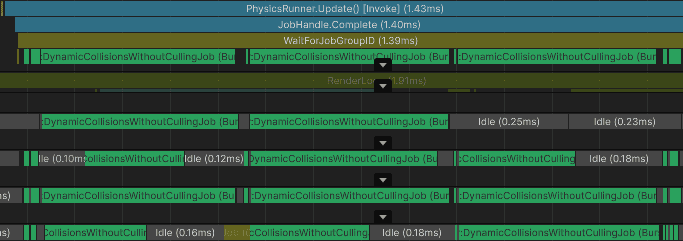
Dynamic collisions are slow because this is a naive implementation where every object is tested against every other object. So for 1000 objects, there are about 1 million tests - quite bad.
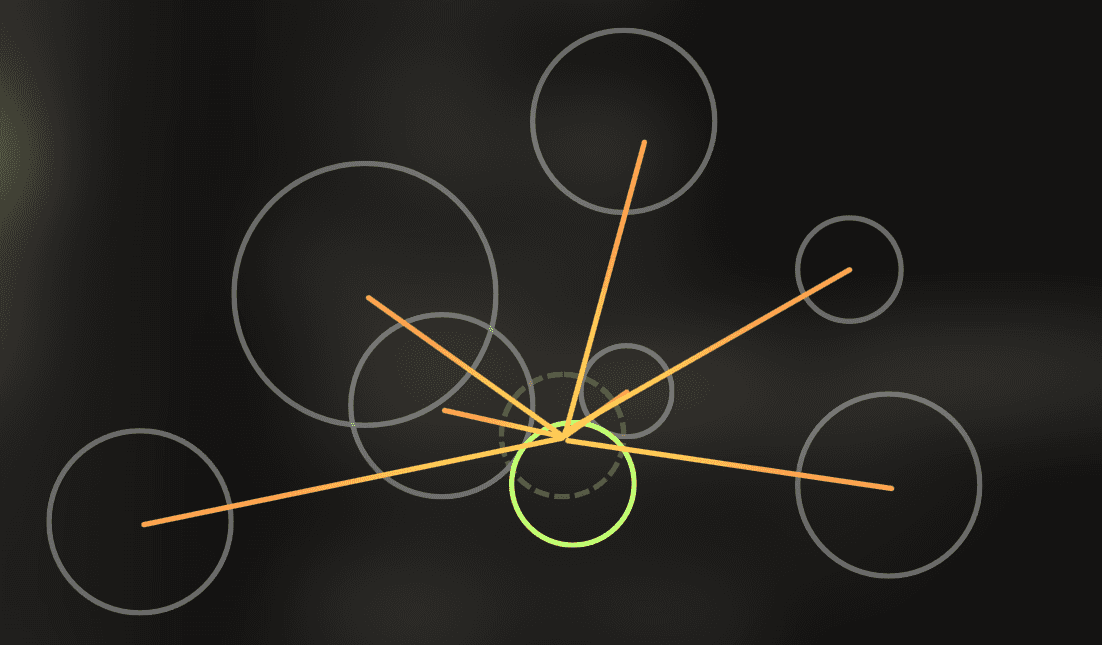
And this is the implementation of dynamic collisions:
[BurstCompile]
private struct DynamicCollisionsWithoutCullingJob : IJobParallelFor
{
[NativeDisableUnsafePtrRestriction]
VerletSolver* solver;
public DynamicCollisionsWithoutCullingJob(VerletSolver* solver)
{
this.solver = solver;
}
public void Execute(int i)
{
var objects = solver->objects;
var firstObject = objects->ElementAt(i);
for (int j = 0; j < objects->Length; j++)
{
var secondObject = objects->ElementAt(j);
if (firstObject == secondObject)
continue;
AddDynamicCollisionConstraint(firstObject, secondObject
[BurstCompile]
private struct DynamicCollisionsWithoutCullingJob : IJobParallelFor
{
[NativeDisableUnsafePtrRestriction]
VerletSolver* solver;
public DynamicCollisionsWithoutCullingJob(VerletSolver* solver)
{
this.solver = solver;
}
public void Execute(int i)
{
var objects = solver->objects;
var firstObject = objects->ElementAt(i);
for (int j = 0; j < objects->Length; j++)
{
var secondObject = objects->ElementAt(j);
if (firstObject == secondObject)
continue;
AddDynamicCollisionConstraint(firstObject, secondObject
[BurstCompile]
private struct DynamicCollisionsWithoutCullingJob : IJobParallelFor
{
[NativeDisableUnsafePtrRestriction]
VerletSolver* solver;
public DynamicCollisionsWithoutCullingJob(VerletSolver* solver)
{
this.solver = solver;
}
public void Execute(int i)
{
var objects = solver->objects;
var firstObject = objects->ElementAt(i);
for (int j = 0; j < objects->Length; j++)
{
var secondObject = objects->ElementAt(j);
if (firstObject == secondObject)
continue;
AddDynamicCollisionConstraint(firstObject, secondObject
___
Optimization idea
It is a huge waste of resources to calculate the collisions between every object in the simulation. It would be nice to be able to quickly filter nearby objects and iterate only the neighborhood.

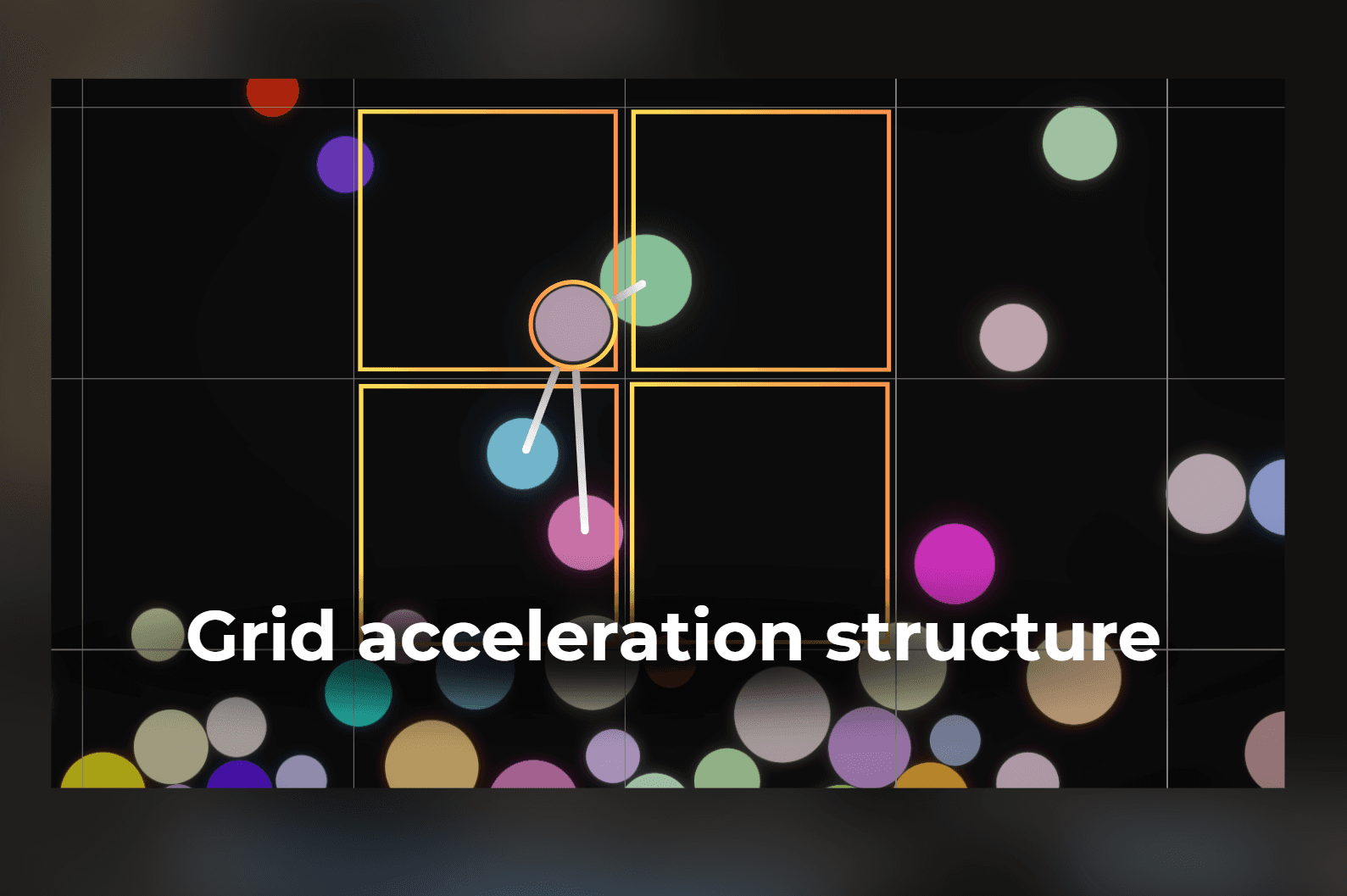
This is a great example where an acceleration structure, like a grid, can speed up collisions a lot.
The idea is like this:
I have a bunch of objects to test against.

I create a grid where each object is smaller than a single cell.

Iterate through each object and add it to the grid. Now each cell has a list of objects I can iterate.
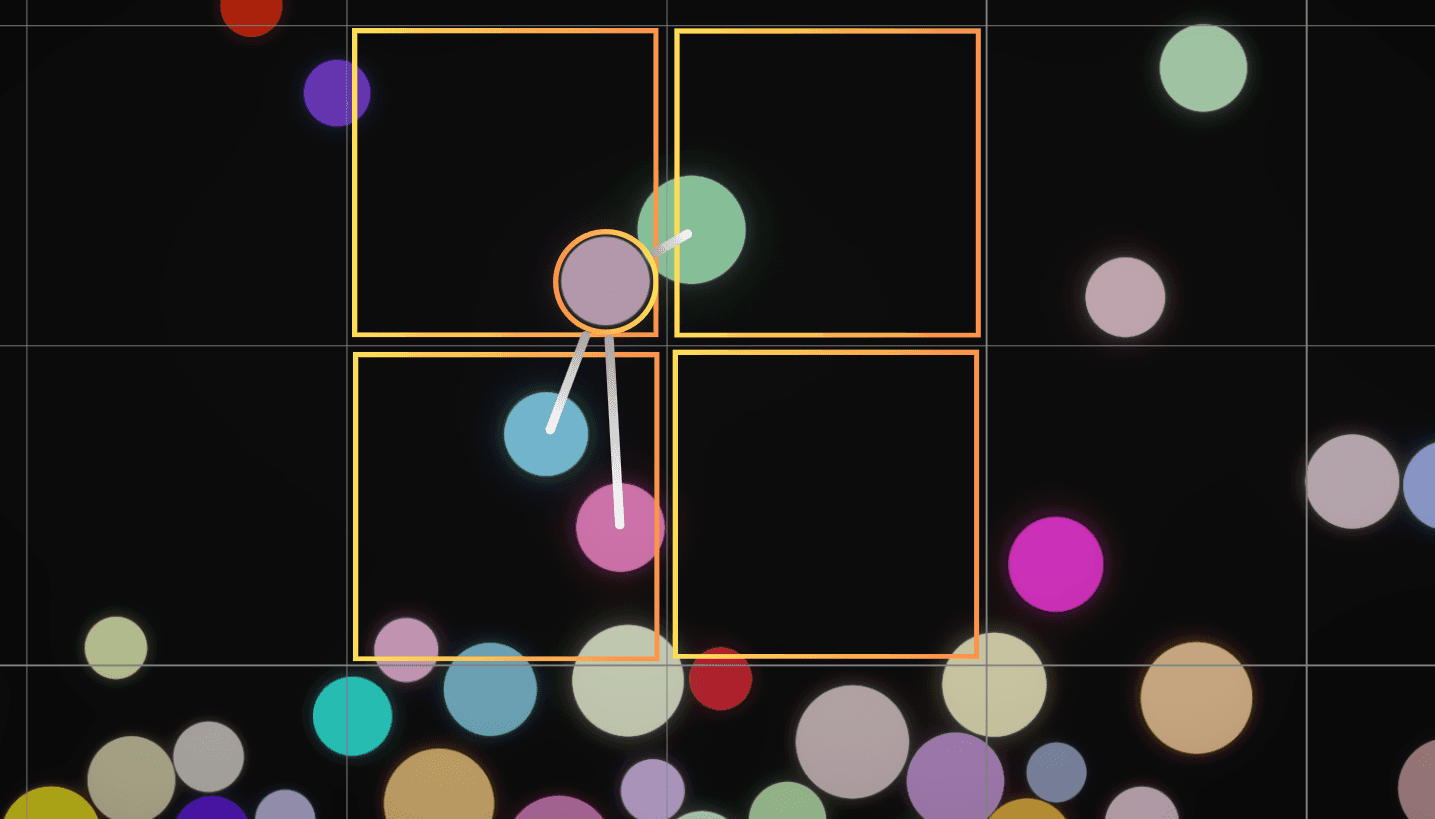
Now, when I want to test one object against the others, I can fetch only the objects from nearby cells. In 2D, I need to check four cells around the object position to cover the current cell and the closest neighboring cells.
The important assumption is that the grid cell is larger than the diameter of the objects I want to collide. If the object radius is too large compared to the cell size, four cells are not enough because a collision candidate could be farther away. In that case, the cell size must be increased, or the query must check more cells.
___
Implementation
Now it's time to implement this. I write performance-focused systems using unmanaged code, so Unity can compile them with the Burst compiler. This means I avoid managed objects and garbage-collected allocations in the hot path. Instead, I use native containers and manual allocations that Burst can turn into efficient native code.
If you are not familiar with this style of Unity C#, you can think of it as writing low-level C# that behaves closer to C or C++. Unity has more details in the official Burst documentation and Collections documentation.
My optimization idea is to write a grid acceleration structure, and to build it from scratch, before the dynamic collisions are evaluated.
Then during collision checks, objects can fetch nearby cells and test collisions only against nearby objects.
___
1. Grid implementation
Let's implement the grid.
The one thing I don't like about many grid-like implementations is that many of them use limited bounds for the world, like a 2D array of some elements that can aggregate the objects. But this array limits the boundaries of the world, adding one more parameter you need to constantly care about when developing your game.
What I like to use instead is a dictionary/map. In a dictionary, I can use cell coordinates as a key and store the list of elements as a value. This makes it a sparse grid.
The practical benefit is that empty cells do not need memory. If the world is huge but objects exist only in a few places, the grid stores only the occupied cells.
In Unity LowLevel collections, there is UnsafeParallelMultiHashMap. It is a dictionary that can store multiple values for every key and lets me iterate all values under a key, which is a perfect fit here. It also has a parallel writer, so multiple jobs can add objects to the grid safely. You can find the official API reference in the UnsafeParallelMultiHashMap documentation.

To make it a grid, I just use this struct:
public struct VerletCullingGrid
{
private float cellSize;
private UnsafeParallelMultiHashMap<int2, VerletObject.Ptr> data;
public static VerletCullingGrid* Create(float cellSize)
{
VerletCullingGrid* grid = PersistentAlloc.Allocate<VerletCullingGrid>();
grid->cellSize = cellSize;
grid->data = new UnsafeParallelMultiHashMap<int2, VerletObject.Ptr>(1000, Allocator.Persistent);
return grid;
}
public static void Destroy(VerletCullingGrid* grid)
{
grid->data.Dispose();
PersistentAlloc.Free(grid
public struct VerletCullingGrid
{
private float cellSize;
private UnsafeParallelMultiHashMap<int2, VerletObject.Ptr> data;
public static VerletCullingGrid* Create(float cellSize)
{
VerletCullingGrid* grid = PersistentAlloc.Allocate<VerletCullingGrid>();
grid->cellSize = cellSize;
grid->data = new UnsafeParallelMultiHashMap<int2, VerletObject.Ptr>(1000, Allocator.Persistent);
return grid;
}
public static void Destroy(VerletCullingGrid* grid)
{
grid->data.Dispose();
PersistentAlloc.Free(grid
public struct VerletCullingGrid
{
private float cellSize;
private UnsafeParallelMultiHashMap<int2, VerletObject.Ptr> data;
public static VerletCullingGrid* Create(float cellSize)
{
VerletCullingGrid* grid = PersistentAlloc.Allocate<VerletCullingGrid>();
grid->cellSize = cellSize;
grid->data = new UnsafeParallelMultiHashMap<int2, VerletObject.Ptr>(1000, Allocator.Persistent);
return grid;
}
public static void Destroy(VerletCullingGrid* grid)
{
grid->data.Dispose();
PersistentAlloc.Free(grid
Notice that I don't need anything except cellSize and the dictionary that stores the values.
Now I'm missing a few crucial functions:
Resetting the grid and ensuring that it has the capacity to store the required objects. I will add the objects using multiple threads, so I want to make the necessary allocations before the adding happens.
public void Reset(int requiredCapacity)
{
	if (data.Capacity < requiredCapacity)
		data.Capacity = requiredCapacity;

	data.Clear
public void Reset(int requiredCapacity)
{
	if (data.Capacity < requiredCapacity)
		data.Capacity = requiredCapacity;

	data.Clear
public void Reset(int requiredCapacity)
{
	if (data.Capacity < requiredCapacity)
		data.Capacity = requiredCapacity;

	data.Clear
Adding a new object to the grid
public void Add(VerletObject* ptr)
{
	data.Add(GetCellID(ptr->currentPosition), ptr);
}

public int2 GetCellID(float2 position)
{
	float2 cellCoord = position / cellSize;
	return (int2)floor(cellCoord
public void Add(VerletObject* ptr)
{
	data.Add(GetCellID(ptr->currentPosition), ptr);
}

public int2 GetCellID(float2 position)
{
	float2 cellCoord = position / cellSize;
	return (int2)floor(cellCoord
public void Add(VerletObject* ptr)
{
	data.Add(GetCellID(ptr->currentPosition), ptr);
}

public int2 GetCellID(float2 position)
{
	float2 cellCoord = position / cellSize;
	return (int2)floor(cellCoord
Getting a parallel writer - object that allows me to use many threads to add new objects to the grid.
public UnsafeParallelMultiHashMap<int2, VerletObject.Ptr>.ParallelWriter AsParallelWriter()
{
	return data.AsParallelWriter
public UnsafeParallelMultiHashMap<int2, VerletObject.Ptr>.ParallelWriter AsParallelWriter()
{
	return data.AsParallelWriter
public UnsafeParallelMultiHashMap<int2, VerletObject.Ptr>.ParallelWriter AsParallelWriter()
{
	return data.AsParallelWriter
Fetching nearby cells
public void GetNearbyCellIDs(float2 position, ref Span<int2> outCells)
{
if (outCells.Length != 4)
throw new InvalidOperationException("Output cells must have a length of 4.");
float2 cellCoord = position / cellSize;
int2 rootCellID = (int2)floor(cellCoord);
float2 frac = cellCoord - floor(cellCoord);
int2 offset = (int2)floor(clamp(frac, 0.25f, 0.75f) * 2.0f) * 2 - 1;
outCells[0] = rootCellID + offset * int2(0, 0);
outCells[1] = rootCellID + offset * int2(0, 1);
outCells[2] = rootCellID + offset * int2(1, 0);
outCells[3] = rootCellID + offset * int2(1, 1
public void GetNearbyCellIDs(float2 position, ref Span<int2> outCells)
{
if (outCells.Length != 4)
throw new InvalidOperationException("Output cells must have a length of 4.");
float2 cellCoord = position / cellSize;
int2 rootCellID = (int2)floor(cellCoord);
float2 frac = cellCoord - floor(cellCoord);
int2 offset = (int2)floor(clamp(frac, 0.25f, 0.75f) * 2.0f) * 2 - 1;
outCells[0] = rootCellID + offset * int2(0, 0);
outCells[1] = rootCellID + offset * int2(0, 1);
outCells[2] = rootCellID + offset * int2(1, 0);
outCells[3] = rootCellID + offset * int2(1, 1
public void GetNearbyCellIDs(float2 position, ref Span<int2> outCells)
{
if (outCells.Length != 4)
throw new InvalidOperationException("Output cells must have a length of 4.");
float2 cellCoord = position / cellSize;
int2 rootCellID = (int2)floor(cellCoord);
float2 frac = cellCoord - floor(cellCoord);
int2 offset = (int2)floor(clamp(frac, 0.25f, 0.75f) * 2.0f) * 2 - 1;
outCells[0] = rootCellID + offset * int2(0, 0);
outCells[1] = rootCellID + offset * int2(0, 1);
outCells[2] = rootCellID + offset * int2(1, 0);
outCells[3] = rootCellID + offset * int2(1, 1
The offset picks the closest direction to the edge of the current cell. This way, the query checks the current cell and the three neighboring cells that are most likely to contain touching objects. This works because the cell size is chosen to be larger than the object diameter.
Iterator - below functions can be used to iterate the objects under a specific cellID
public bool TryGetFirstObject(int2 cellID, out VerletObject.Ptr objectPtr, out NativeParallelMultiHashMapIterator<int2> iterator)
{
	return data.TryGetFirstValue(cellID, out objectPtr, out iterator);
}

public bool TryGetNextObject(out VerletObject.Ptr objectPtr, ref NativeParallelMultiHashMapIterator<int2> iterator)
{
	return data.TryGetNextValue(out objectPtr, ref iterator
public bool TryGetFirstObject(int2 cellID, out VerletObject.Ptr objectPtr, out NativeParallelMultiHashMapIterator<int2> iterator)
{
	return data.TryGetFirstValue(cellID, out objectPtr, out iterator);
}

public bool TryGetNextObject(out VerletObject.Ptr objectPtr, ref NativeParallelMultiHashMapIterator<int2> iterator)
{
	return data.TryGetNextValue(out objectPtr, ref iterator
public bool TryGetFirstObject(int2 cellID, out VerletObject.Ptr objectPtr, out NativeParallelMultiHashMapIterator<int2> iterator)
{
	return data.TryGetFirstValue(cellID, out objectPtr, out iterator);
}

public bool TryGetNextObject(out VerletObject.Ptr objectPtr, ref NativeParallelMultiHashMapIterator<int2> iterator)
{
	return data.TryGetNextValue(out objectPtr, ref iterator
___
2. Using the grid
Now I need to use the grid in my algorithm. I need to build this grid acceleration structure before the dynamic collisions.
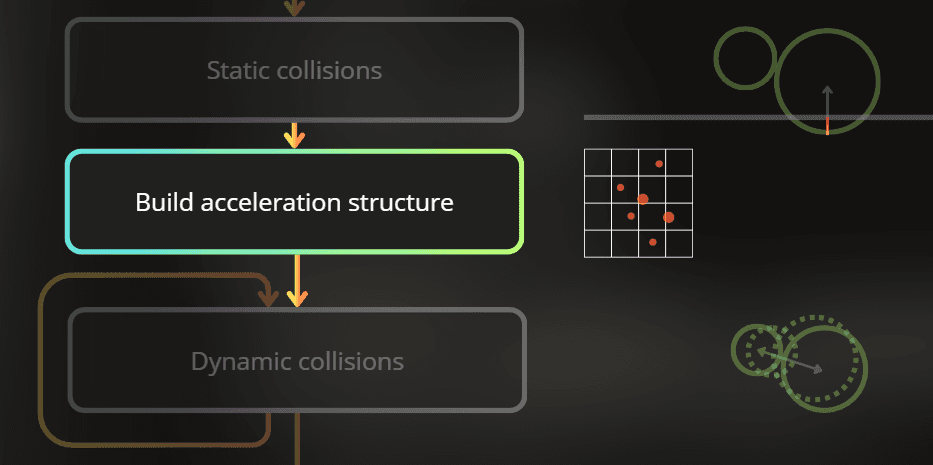
1. First step - create this grid object in the solver
It basically means that I allocate the grid when creating a solver, and deallocate it when destroying the solver:
[BurstCompile]
public unsafe struct VerletSolver : IDisposable
{
...
private VerletCullingGrid* objectsCullingGrid;
private VerletSolver(Allocator allocator, SolverParameters parameters)
{
...
objectsCullingGrid = VerletCullingGrid.Create(GetCullingGridCellSize(parameters));
}
public void Dispose()
{
...
if (objectsCullingGrid != null)
VerletCullingGrid.Destroy(objectsCullingGrid);
objectsCullingGrid = null
[BurstCompile]
public unsafe struct VerletSolver : IDisposable
{
...
private VerletCullingGrid* objectsCullingGrid;
private VerletSolver(Allocator allocator, SolverParameters parameters)
{
...
objectsCullingGrid = VerletCullingGrid.Create(GetCullingGridCellSize(parameters));
}
public void Dispose()
{
...
if (objectsCullingGrid != null)
VerletCullingGrid.Destroy(objectsCullingGrid);
objectsCullingGrid = null
[BurstCompile]
public unsafe struct VerletSolver : IDisposable
{
...
private VerletCullingGrid* objectsCullingGrid;
private VerletSolver(Allocator allocator, SolverParameters parameters)
{
...
objectsCullingGrid = VerletCullingGrid.Create(GetCullingGridCellSize(parameters));
}
public void Dispose()
{
...
if (objectsCullingGrid != null)
VerletCullingGrid.Destroy(objectsCullingGrid);
objectsCullingGrid = null
___
2. Second step - build the grid acceleration structure.
So I modified the solver to build the grid before the dynamic collisions:
fixed (VerletSolver* solver = &this)
{
JobHandle handle;
handle = new SolveVelocityJob(solver).Schedule(objects->Length, 64);
handle = new SolveStaticCollisionJob(solver).Schedule(objects->Length, 64, handle);
handle = new PrepareCullingGridJob(solver).Schedule(handle);
handle = new BuildCullingGridJob(solver).Schedule(solver->objects->Length, 64, handle);
for (int i = 0; i < GetDynamicCollisionIterations(parameters); i++)
{
handle = new DynamicCollisionsJob(solver).Schedule(objects->Length, 64, handle);
handle = new IntegrateConstraintsJob(solver).Schedule(objects->Length, 64, handle);
}
for (int i = 0; i < GetConstraintSolverIterations(parameters); i++)
{
handle = new SolveConstraintsJob(solver).Schedule(constraints->Length, 64, handle);
handle = new IntegrateConstraintsJob(solver).Schedule(objects->Length, 64, handle);
}
handle = new SolveInvalidPositionsJob(solver).Schedule(objects->Length, 64, handle);
return handle
fixed (VerletSolver* solver = &this)
{
JobHandle handle;
handle = new SolveVelocityJob(solver).Schedule(objects->Length, 64);
handle = new SolveStaticCollisionJob(solver).Schedule(objects->Length, 64, handle);
handle = new PrepareCullingGridJob(solver).Schedule(handle);
handle = new BuildCullingGridJob(solver).Schedule(solver->objects->Length, 64, handle);
for (int i = 0; i < GetDynamicCollisionIterations(parameters); i++)
{
handle = new DynamicCollisionsJob(solver).Schedule(objects->Length, 64, handle);
handle = new IntegrateConstraintsJob(solver).Schedule(objects->Length, 64, handle);
}
for (int i = 0; i < GetConstraintSolverIterations(parameters); i++)
{
handle = new SolveConstraintsJob(solver).Schedule(constraints->Length, 64, handle);
handle = new IntegrateConstraintsJob(solver).Schedule(objects->Length, 64, handle);
}
handle = new SolveInvalidPositionsJob(solver).Schedule(objects->Length, 64, handle);
return handle
fixed (VerletSolver* solver = &this)
{
JobHandle handle;
handle = new SolveVelocityJob(solver).Schedule(objects->Length, 64);
handle = new SolveStaticCollisionJob(solver).Schedule(objects->Length, 64, handle);
handle = new PrepareCullingGridJob(solver).Schedule(handle);
handle = new BuildCullingGridJob(solver).Schedule(solver->objects->Length, 64, handle);
for (int i = 0; i < GetDynamicCollisionIterations(parameters); i++)
{
handle = new DynamicCollisionsJob(solver).Schedule(objects->Length, 64, handle);
handle = new IntegrateConstraintsJob(solver).Schedule(objects->Length, 64, handle);
}
for (int i = 0; i < GetConstraintSolverIterations(parameters); i++)
{
handle = new SolveConstraintsJob(solver).Schedule(constraints->Length, 64, handle);
handle = new IntegrateConstraintsJob(solver).Schedule(objects->Length, 64, handle);
}
handle = new SolveInvalidPositionsJob(solver).Schedule(objects->Length, 64, handle);
return handle
The job that prepares the grid is simple, as it just ensures the grid has the correct capacity.
[BurstCompile]
private struct PrepareCullingGridJob : IJob
{
	[NativeDisableUnsafePtrRestriction]
	VerletSolver* solver;

	public PrepareCullingGridJob(VerletSolver* solver)
		=> this.solver = solver;

	public void Execute()
		=> solver->objectsCullingGrid->Reset(solver->objects->Length
[BurstCompile]
private struct PrepareCullingGridJob : IJob
{
	[NativeDisableUnsafePtrRestriction]
	VerletSolver* solver;

	public PrepareCullingGridJob(VerletSolver* solver)
		=> this.solver = solver;

	public void Execute()
		=> solver->objectsCullingGrid->Reset(solver->objects->Length
[BurstCompile]
private struct PrepareCullingGridJob : IJob
{
	[NativeDisableUnsafePtrRestriction]
	VerletSolver* solver;

	public PrepareCullingGridJob(VerletSolver* solver)
		=> this.solver = solver;

	public void Execute()
		=> solver->objectsCullingGrid->Reset(solver->objects->Length
The job that builds the grid executes for each object in the simulation and adds it to the grid using a parallel writer, so it is thread safe.
[BurstCompile]
private struct BuildCullingGridJob : IJobParallelFor
{
[NativeDisableUnsafePtrRestriction]
VerletSolver* solver;
UnsafeParallelMultiHashMap<int2, VerletObject.Ptr>.ParallelWriter gridWriter;
public BuildCullingGridJob(VerletSolver* solver)
{
this.solver = solver;
gridWriter = solver->objectsCullingGrid->AsParallelWriter();
}
public void Execute(int i)
{
var obj = solver->objects->ElementAt(i);
gridWriter.Add(solver->objectsCullingGrid->GetCellID(obj->currentPosition), obj
[BurstCompile]
private struct BuildCullingGridJob : IJobParallelFor
{
[NativeDisableUnsafePtrRestriction]
VerletSolver* solver;
UnsafeParallelMultiHashMap<int2, VerletObject.Ptr>.ParallelWriter gridWriter;
public BuildCullingGridJob(VerletSolver* solver)
{
this.solver = solver;
gridWriter = solver->objectsCullingGrid->AsParallelWriter();
}
public void Execute(int i)
{
var obj = solver->objects->ElementAt(i);
gridWriter.Add(solver->objectsCullingGrid->GetCellID(obj->currentPosition), obj
[BurstCompile]
private struct BuildCullingGridJob : IJobParallelFor
{
[NativeDisableUnsafePtrRestriction]
VerletSolver* solver;
UnsafeParallelMultiHashMap<int2, VerletObject.Ptr>.ParallelWriter gridWriter;
public BuildCullingGridJob(VerletSolver* solver)
{
this.solver = solver;
gridWriter = solver->objectsCullingGrid->AsParallelWriter();
}
public void Execute(int i)
{
var obj = solver->objects->ElementAt(i);
gridWriter.Add(solver->objectsCullingGrid->GetCellID(obj->currentPosition), obj
___
3. Third step - use the grid in dynamic collisions
Here, instead of iterating through every object, I fetch four nearby cells and iterate only the objects inside them.
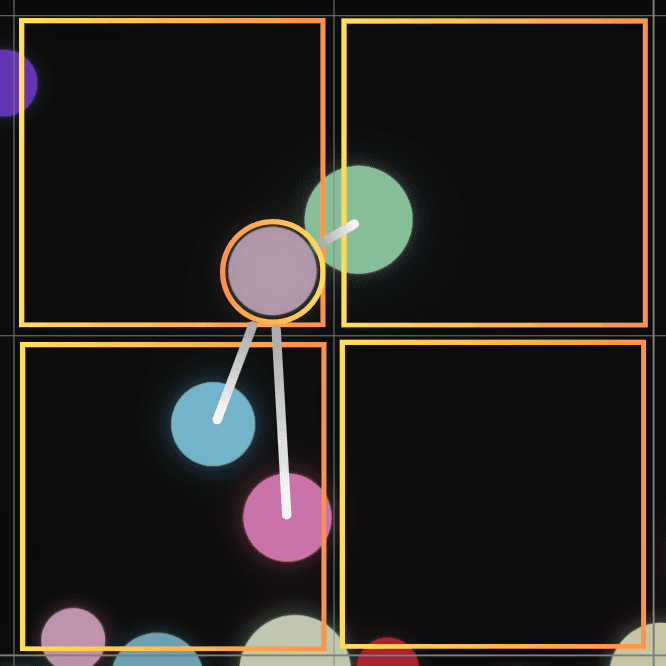
The code, with explanations in the comments:
[BurstCompile]
private struct DynamicCollisionsJob : IJobParallelFor
{
[NativeDisableUnsafePtrRestriction]
VerletSolver* solver;
public DynamicCollisionsJob(VerletSolver* solver)
{
this.solver = solver;
}
public void Execute(int i)
{
var objects = solver->objects;
var firstObject = objects->ElementAt(i);
Span<int2> nearbyCellIDs = stackalloc int2[4];
solver->objectsCullingGrid->GetNearbyCellIDs(firstObject->currentPosition, ref nearbyCellIDs);
for (int cellIndex = 0; cellIndex < 4; cellIndex++)
{
if (!solver->objectsCullingGrid->TryGetFirstObject(nearbyCellIDs[cellIndex], out var secondObjectPtr, out var iterator))
continue;
do
AddDynamicCollisionConstraint(firstObject, secondObjectPtr.ptr);
while (solver->objectsCullingGrid->TryGetNextObject(out secondObjectPtr, ref iterator
[BurstCompile]
private struct DynamicCollisionsJob : IJobParallelFor
{
[NativeDisableUnsafePtrRestriction]
VerletSolver* solver;
public DynamicCollisionsJob(VerletSolver* solver)
{
this.solver = solver;
}
public void Execute(int i)
{
var objects = solver->objects;
var firstObject = objects->ElementAt(i);
Span<int2> nearbyCellIDs = stackalloc int2[4];
solver->objectsCullingGrid->GetNearbyCellIDs(firstObject->currentPosition, ref nearbyCellIDs);
for (int cellIndex = 0; cellIndex < 4; cellIndex++)
{
if (!solver->objectsCullingGrid->TryGetFirstObject(nearbyCellIDs[cellIndex], out var secondObjectPtr, out var iterator))
continue;
do
AddDynamicCollisionConstraint(firstObject, secondObjectPtr.ptr);
while (solver->objectsCullingGrid->TryGetNextObject(out secondObjectPtr, ref iterator
[BurstCompile]
private struct DynamicCollisionsJob : IJobParallelFor
{
[NativeDisableUnsafePtrRestriction]
VerletSolver* solver;
public DynamicCollisionsJob(VerletSolver* solver)
{
this.solver = solver;
}
public void Execute(int i)
{
var objects = solver->objects;
var firstObject = objects->ElementAt(i);
Span<int2> nearbyCellIDs = stackalloc int2[4];
solver->objectsCullingGrid->GetNearbyCellIDs(firstObject->currentPosition, ref nearbyCellIDs);
for (int cellIndex = 0; cellIndex < 4; cellIndex++)
{
if (!solver->objectsCullingGrid->TryGetFirstObject(nearbyCellIDs[cellIndex], out var secondObjectPtr, out var iterator))
continue;
do
AddDynamicCollisionConstraint(firstObject, secondObjectPtr.ptr);
while (solver->objectsCullingGrid->TryGetNextObject(out secondObjectPtr, ref iterator
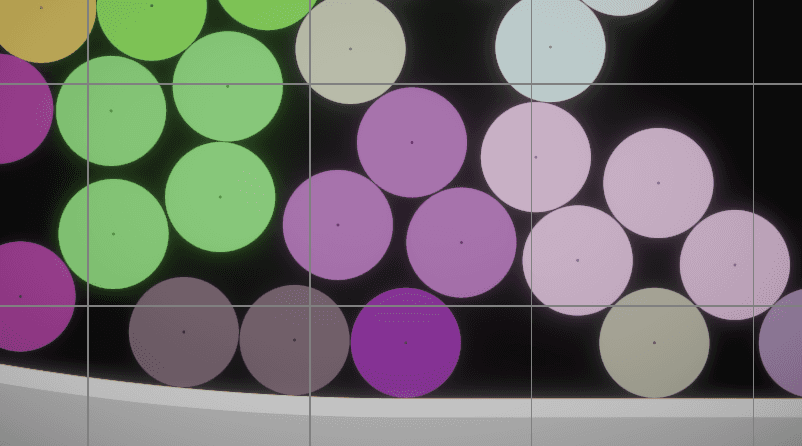
Now the optimization is implemented! Here I visualized how the objects are assigned to different cells. For visualization puproses I lowered the cell size. In this case the cell size is a bit too small.
However, I noticed that if the cell size is at least 2x larger than the diameter of the largest object - the simulation works correctly.
This is the minimum cell size that makes the simulation stable:
___
Performance comparison
To test the performance I implemented a small change that allows me to switch the optimization on and off, so I will measure the performance in the same scenario.
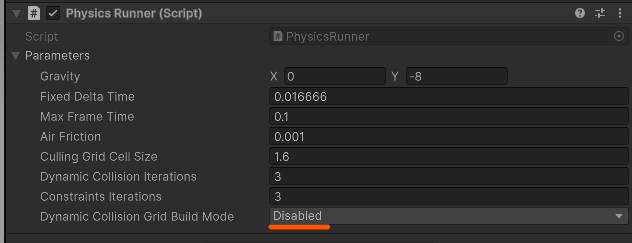
I will test this simulation with 1000 active objects, 3000 active objects and 10000 active objects.
So...
For 1000 objects
Before: 1.41ms / physics step
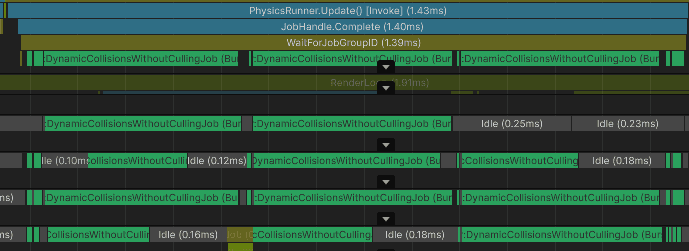
After: 0.38ms / physics step
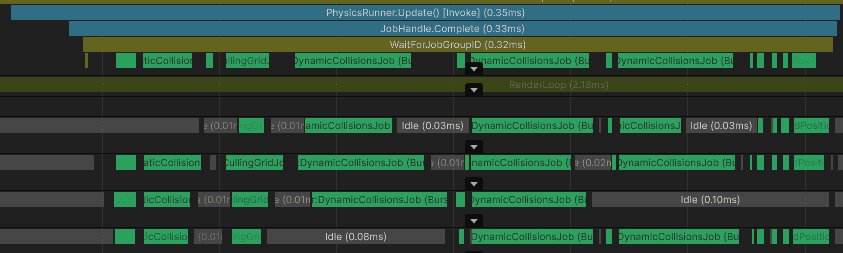
This is about 3.7x faster.
For 3000 objects
No grid: 8.34ms / physics step
With grid: 0.63ms / physics step
This is about 13.2x faster.
For 10000 objects
No grid: 185.7ms / physics step
With grid: 2.68ms / physics step
This is about 69.3x faster.
Summary:
Grid acceleration works best when many objects are spread across space and each object only needs to interact with nearby objects. In this case, it turns "test everything against everything" approach into a much smaller set of local checks.
The result depends on the number of objects, their distribution, their size, and the grid cell size. If the cells are too small, objects may need to query more cells. If the cells are too large, each cell contains too many objects and the grid becomes less useful. A good cell size usually matches the scale of the objects you want to collide.
A grid like this can also be used in gameplay systems, not only physics. For example, it can accelerate collision checks between common objects, proximity queries, or distance culling for small objects that are hard for the engine to cull efficiently, like thin fences or poles. If the game is mostly on flat terrain, many objects can be assigned to a 2D grid, which keeps the data structure simple and fast.